MEP Consultancy Workflow & Task Management Dashboard Template
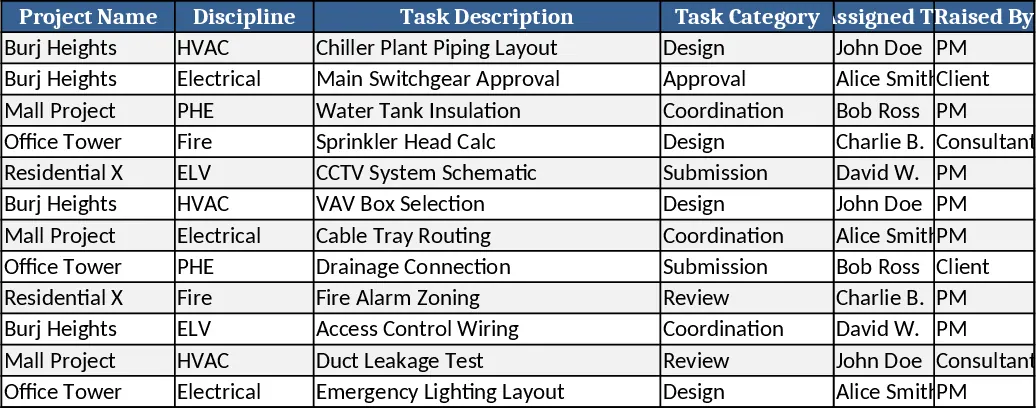
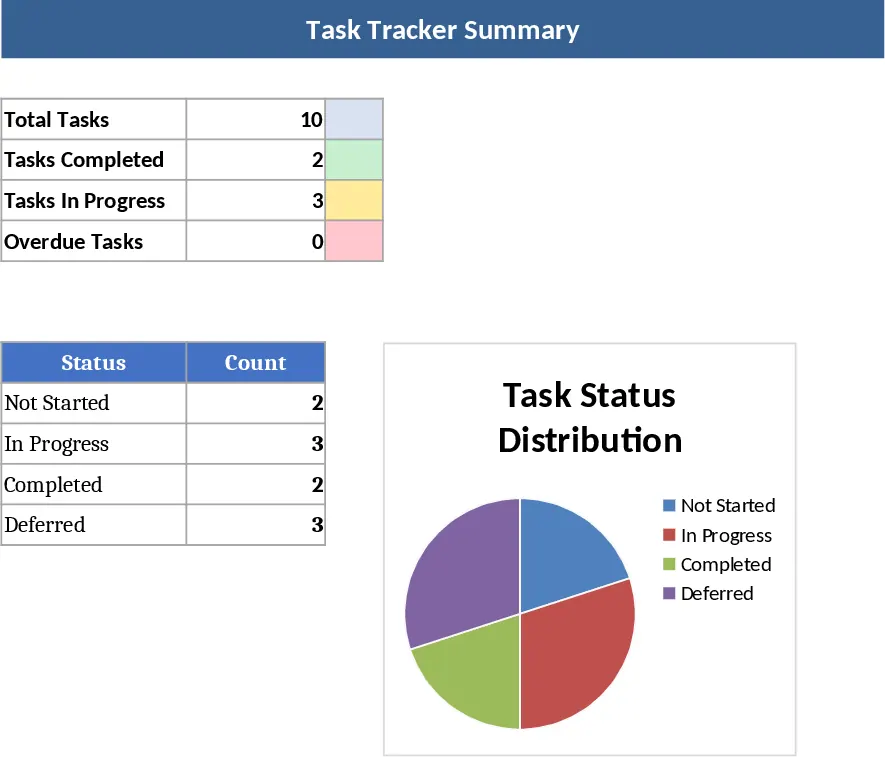
This Excel‑based Workflow & Task Management System is built especially for MEP consultancy firms. The workbook is organized into a Master Dashboard, a detailed Task Tracker, a Follow‑up & Reminder sheet, and separate service‑wise tabs for HVAC, Electrical, PHE, Fire Fighting, and ELV. Each sheet uses data‑validation dropdowns, conditional formatting, and linked formulas so that information entered once propagates throughout the file. The Master Dashboard gives a high‑level view of every active project, showing overall status, service‑specific progress, priority flags, and delay alerts in clear charts and pivot tables. The Task Tracker captures every work item with fields such as Project Name, Discipline, Task Description, Category (Design, Review, Coordination, etc.), Assigned To, dates, status, priority, dependencies, and remarks. Status and priority are controlled by dropdown lists, while the Reminder Flag automatically highlights overdue tasks in red. Service‑wise sheets provide filtered views for each discipline, letting engineers focus on their own workload while staying synced with the master data.
The template solves the common chaos of scattered emails, manual status updates, and duplicated effort in MEP projects. By centralizing task data, it reduces the time spent compiling weekly DRM or coordination meeting reports, ensures that dependencies and client inputs are visible at a glance, and triggers automatic reminders when deadlines slip. Project managers gain instant insight into bottlenecks, resource allocation, and risk areas, while discipline leads can monitor their team’s workload and prioritize high‑impact items. The built‑in escalation matrix flags tasks that exceed defined timelines, prompting timely follow‑up without hunting through inboxes.
Who benefits? Project managers, senior engineers, and coordination leads in MEP consultancies who need a reliable, offline‑ready tool for weekly status meetings, client reporting, and internal task hand‑overs. It works for single‑project or multi‑project environments, scaling easily as new projects are added.
How to use
- Open the workbook and enter your projects on the "Projects" list in the Master Dashboard. The system will automatically create rows in the Task Tracker.
- Populate each task row with the required details – select the discipline, category, assign a team member, and set start, target, and expected completion dates. The dropdowns ensure consistency.
- Review the auto‑generated alerts: overdue tasks turn red, high‑priority items are highlighted, and the Follow‑up Tracker lists pending actions with suggested reminder dates.
- Use the pivot‑chart section on the Dashboard to view progress percentages, delay days, and workload distribution. Export or copy the charts for meeting decks.
Expected benefits: streamlined data entry, faster weekly reporting, fewer missed deadlines, and clearer visibility into project health, all without needing separate software.