How to Add Numbers in Excel Faster with AI (2025 Guide)

Let’s be real—manually adding numbers in Excel feels like using a flip phone in 2024. Sure, SUM formulas get the job done, but what if AI could handle the heavy lifting while you focus on insights? As a growth manager at RowSpeak, I’ve seen how AI transforms spreadsheets from static tables into smart data partners.

The Old-School Way (And Why It’s Time to Upgrade)

We all know the basics:

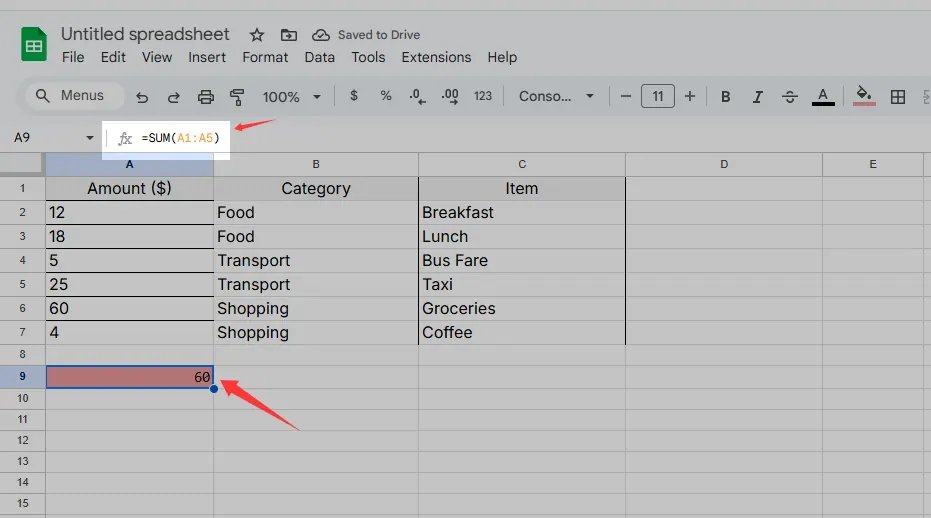
  • =SUM(A1:A5) for simple totals
  • AutoSum for quick calculations

sum

But here’s the catch: these methods require constant manual updates. Miss a cell? Your data’s wrong. Change your dataset? Time to rewrite formulas. That’s where AI steps in—imagine Excel that anticipates your needs.

Enter RowSpeak: AI-Powered Number Crunching

shouye

RowSpeak redefines Excel workflows with AI that:
Auto-generates formulas based on your data patterns
Flags inconsistencies in real-time (no more “why doesn’t this add up?!” moments)
Predicts trends before you even create charts

Pro Tip: Try dragging a range of numbers into RowSpeak—it’ll instantly suggest SUM formulas and highlight outliers.

Beyond SUM: AI’s Hidden Excel Superpowers

  1. Smart Insights
    RowSpeak’s AI scans your data and surfaces trends like:

    • “Sales spike every Friday—boost promotions then.”
    • “Expense category X is 30% higher than average.”
  2. One-Click Automation
    Instead of manually filling formulas across 500 rows, RowSpeak’s pattern recognition:

    • Detects your calculation logic
    • Applies it consistently even if your data changes
  3. Collaboration Made Easy
    Share live dashboards where teammates can:

    • Input numbers that auto-update totals
    • Get AI-powered suggestions (“Team A’s Q3 numbers seem low—check the raw data?”)

How to Get Started Today

  1. Install RowSpeak (it integrates directly with Excel)
  2. Highlight your data range—AI will suggest calculation methods
  3. Review insights—approve or tweak the AI’s recommendations

Case Study: A retail client reduced reporting time by 70% by letting RowSpeak auto-sum daily sales while their team focused on analyzing regional trends.

The Future? AI That Thinks Like You

Soon, tools like RowSpeak will:
🔮 Answer natural language queries (“What’s the total of all Q4 invoices over $1K?”)
📊 Build custom formulas just by describing your goal
🤖 Self-correct when data sources change

Why waste time on manual math when AI can do it faster—and spot opportunities you’d miss?

Ready to upgrade? Try RowSpeak free—your first AI-powered SUM is just a click away.


About the Author:
As RowSpeak’s Growth Lead, I test every AI spreadsheet hack so you don’t have to. When I’m not geeking out over data automation, you’ll find me brewing pour-over coffee or explaining pivot tables to my cat.

Ditch Complex Formulas – Get Insights Instantly

No VBA or function memorization needed. Tell RowSpeak what you need in plain English, and let AI handle data processing, analysis, and chart creation

Try RowSpeak Free Now

Recommended Posts

How to Add Tables in Google Sheets Faster with AI (RowSpeak Guide)
Excel Operation

How to Add Tables in Google Sheets Faster with AI (RowSpeak Guide)

Tired of manual data entry? Discover how AI-powered tools like RowSpeak can transform your Google Sheets workflow by generating and formatting tables in seconds.

Gianna
How to Add a Column in Excel: The Ultimate Shortcut Guide for Faster Workflows
Excel Operation

How to Add a Column in Excel: The Ultimate Shortcut Guide for Faster Workflows

Tired of manual column insertion in Excel? Learn time-saving shortcuts and how AI tools like RowSpeak can transform your spreadsheet workflow from tedious to effortless.

Gianna
How to Add Dates in Excel Faster with AI (No More Manual Headaches!)
Excel Operation

How to Add Dates in Excel Faster with AI (No More Manual Headaches!)

Tired of wrestling with Excel date formulas? Discover how AI-powered solutions like RowSpeak can handle date calculations, series generation, and formatting in seconds—so you can focus on what really matters.

Gianna
How to Add Lists in Excel Faster with AI (No More Manual Typing!)
Excel Operation

How to Add Lists in Excel Faster with AI (No More Manual Typing!)

Tired of typing lists manually in Excel? AI can do it for you. Here's how to leverage AI-powered tools like RowSpeak to create lists instantly.

Gianna
How to Add a Trendline in Excel Using AI
Excel Operation

How to Add a Trendline in Excel Using AI

Tired of manual trendline guesswork? Learn how AI-powered tools like RowSpeak can analyze your data and add the perfect trendline in seconds.

Gianna
How to Add Totals in Excel Instantly with AI (Step-by-Step Guide)
Excel Operation

How to Add Totals in Excel Instantly with AI (Step-by-Step Guide)

Tired of manually adding numbers in Excel? AI-powered tools like RowSpeak can automate totals in seconds. Here's how to work smarter, not harder.

Gianna
How to Add Columns in Google Sheets Instantly with AI (2025 Guide)
Excel Operation

How to Add Columns in Google Sheets Instantly with AI (2025 Guide)

Tired of manually adding columns in Google Sheets? AI-powered tools like RowSpeak can do it in seconds. Here's your complete guide to smarter spreadsheet workflows.

Gianna
How to Sum Numbers in Excel Instantly Using AI (RowSpeak Guide)
Excel Operation

How to Sum Numbers in Excel Instantly Using AI (RowSpeak Guide)

Tired of manually adding numbers in Excel? Learn how AI tools like RowSpeak can automate this task, saving you time and reducing errors.

Gianna