We've all been there - staring at a spreadsheet full of numbers, wondering where the real insights are hiding. As someone who's spent years wrestling with data, I can tell you: AI changes everything. It's like having a data scientist sitting right there in your Excel workbook.
Why AI in Excel is a Game-Changer
Excel isn't just about grids and formulas anymore. Modern AI tools turn your spreadsheet into a smart assistant that can spot patterns, clean data, and even predict future trends. The best part? You don't need to be a tech wizard to use them.
At RowSpeak, we've seen how AI can transform spreadsheet work from tedious to terrific. Our users go from spending hours on manual analysis to getting instant insights with just a few clicks. Let me show you how it works.
Getting Started with AI-Powered Excel
First things first - you'll need the right tools. While Excel 365 has some built-in AI features, tools like RowSpeak take things to the next level. Here's what you should know:
- Data Cleaning Made Easy
Messy data ruins analysis. AI tools can automatically:- Remove duplicates
- Fill missing values
- Fix formatting issues
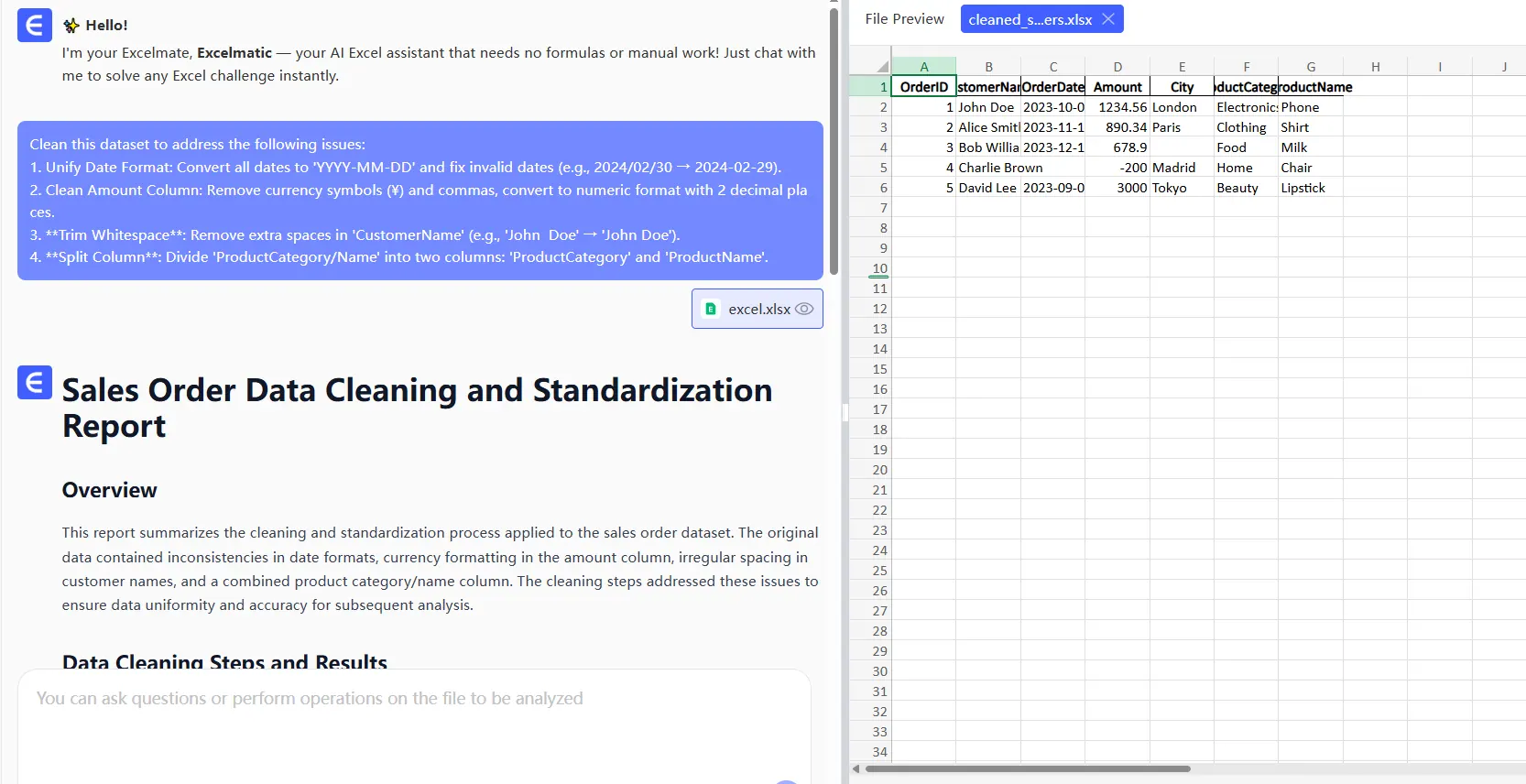
With RowSpeak, you can clean an entire dataset with one click - no manual hunting for errors required.
- Smart Visualizations
Ever struggle to choose the right chart? AI analyzes your data and suggests the most effective visualizations. RowSpeak's smart chart feature creates professional visuals automatically, saving you hours of trial and error.
Predictive Power at Your Fingertips
One of AI's coolest tricks? Predicting the future (well, sort of). Modern tools can:
- Forecast sales trends
- Predict inventory needs
- Identify growth opportunities
RowSpeak's forecasting engine uses advanced algorithms to give you accurate predictions without complex setup. Just point it at your historical data and watch the magic happen.
Beyond Basic Analysis
The real power comes when AI helps you ask better questions. Tools like RowSpeak can:
- Spot hidden correlations
- Flag unusual data points
- Suggest areas for deeper analysis
It's like having a data detective working alongside you, uncovering insights you might have missed.
Collaboration Supercharged
Working with a team? AI-enhanced collaboration features let you:
- Share live dashboards
- Get real-time suggestions
- Track changes automatically
RowSpeak makes team analysis seamless, with everyone seeing the same up-to-date information.
Why RowSpeak Stands Out
While Excel's built-in AI is helpful, dedicated tools like RowSpeak offer more power and flexibility. Here's what makes us different:
- One-click analysis - Get insights without complex setup
- Smart suggestions - AI that actually understands your data
- Beautiful visuals - Professional charts without the design work
- Team-friendly - Collaborate without version control headaches
Ready to Try AI-Powered Analysis?
The future of Excel isn't about doing more manual work - it's about working smarter. With AI tools like RowSpeak, you can:
✅ Reduce analysis time by 80%
✅ Make better data-driven decisions
✅ Create stunning reports in minutes
The best part? You can try RowSpeak for free and see the difference yourself. No more staring blankly at spreadsheets - just clear, actionable insights when you need them.
Remember: AI isn't replacing human analysis - it's making us better at it. By handling the grunt work, it frees us to focus on what really matters: turning data into decisions that move our businesses forward.