As a User Growth Manager at RowSpeak, I've seen firsthand how businesses waste countless hours on manual spreadsheet tasks—time that could be better spent analyzing insights rather than building reports. The game-changer? AI-powered spreadsheet generation.
Why AI is the Future of Excel Automation
Traditional spreadsheet creation is riddled with pain points:
- Hours wasted on manual data entry
- Formula errors that compromise entire reports
- Steep learning curve for advanced Excel functions
- Inconsistent formatting across teams
AI solutions like RowSpeak solve these challenges by transforming natural language requests into perfectly structured spreadsheets—complete with automated formulas, optimized layouts, and professional visualizations.
How AI-Powered Spreadsheet Generation Works
1. Natural Language Processing (NLP)
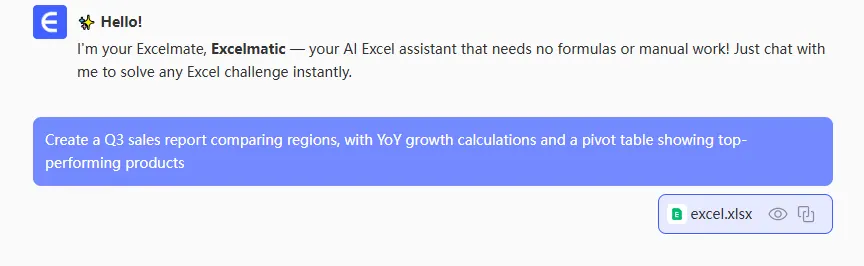
RowSpeak's AI engine understands requests like: "Create a Q3 sales report comparing regions, with YoY growth calculations and a pivot table showing top-performing products."
Unlike basic Excel templates, our AI:
- Interprets nuanced business requirements
- Handles industry-specific terminology
- Adapts to your company's data structure
2. Intelligent Data Analysis
The system automatically:
✔️ Identifies patterns in your raw data
✔️ Flags inconsistencies or missing values
✔️ Suggests optimal visualization types
(Pro Tip: RowSpeak's outlier detection has helped clients spot data errors that would've taken days to find manually)
3. Formula Automation
Where most teams struggle with VLOOKUPs and INDEX/MATCH, RowSpeak:
- Builds error-proof formulas
- Optimizes calculation efficiency
- Even explains each formula in plain English
4. Professional Formatting
No more inconsistent reports. Our AI applies:
- Brand-compliant color schemes
- Responsive column widths
- Conditional formatting rules
- Accessibility-optimized designs
Real-World Applications
Marketing Teams use RowSpeak to:
- Generate campaign performance dashboards in minutes
- Automate ROI calculations across channels
- Create client-ready reports with one click
Financial Analysts leverage our AI to:
- Build error-free budget models
- Automate monthly variance reporting
- Create dynamic forecasting sheets
Getting Started with RowSpeak
- Describe Your Needs: Type or speak your request (e.g., "Monthly expense tracker with category breakdowns")
- Upload Data: Connect to your database or upload CSV files
- Review & Refine: Edit the AI-generated spreadsheet with natural language
- Export & Share: Download as .xlsx or share via cloud platforms
Case Study: A retail client reduced monthly reporting time from 8 hours to 20 minutes using RowSpeak's AI templates.
Why Choose RowSpeak Over Other Tools?
While basic AI spreadsheet assistants exist, RowSpeak stands apart with:
🔹 Enterprise-grade data security
🔹 Custom AI training for your industry
🔹 Two-way integration with existing BI tools
🔹 Dedicated support for complex use cases
Ready to transform your spreadsheet workflow? Try RowSpeak free for 14 days and experience AI-powered efficiency firsthand.
Pro Tip: Start with our pre-built templates for common use cases, then customize them with AI—you'll save 80% of the setup time while maintaining full flexibility.