

Employee Payroll Statement Template
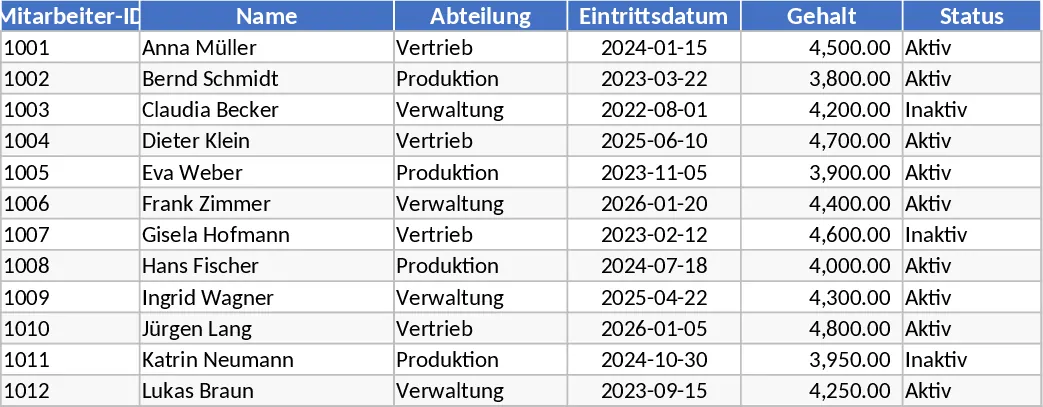
This comprehensive payroll management template is designed to simplify the complex process of calculating employee compensation and maintaining accurate financial records. At its core, the template provides a centralized system to manage everything from basic salary structures to intricate tax deductions and social security contributions. It is organized into several intuitive sheets, including an Employee Master Data section, a Monthly Input log for variable pay, and a Summary Dashboard that provides a high-level overview of total labor costs. Key fields allow you to track hourly rates, fixed salaries, overtime multipliers, and various benefit types, ensuring that no detail is overlooked during the monthly pay cycle. The template includes dropdown menus for tax categories and insurance types, making data entry both fast and consistent across your entire workforce.
Managing payroll manually can often lead to costly errors and administrative bottlenecks. This template solves those problems by providing a standardized workflow that automates the transition from gross pay to net pay. It is particularly useful for small to medium-sized enterprises (SMEs), HR coordinators, and startup founders who need a reliable, professional-grade tool without the high cost of specialized payroll software. By using this template, you can ensure that your business remains compliant with internal accounting standards and provides employees with clear, transparent breakdowns of their earnings. It effectively bridges the gap between time-tracking and financial reporting, allowing for a seamless flow of information.
The template is built to handle various scenarios, such as calculating performance-based bonuses, managing unpaid leave deductions, and tracking employer-side contributions for health and pension funds. It serves as a single source of truth for your HR department, making it easier to answer employee queries regarding their pay stubs or to provide data for annual financial audits. The structured layout ensures that even those with limited accounting experience can navigate the payroll process with confidence, reducing the stress typically associated with month-end closing. Furthermore, the summary outputs provide valuable insights into your company's spending patterns, helping you manage budgets and forecast future hiring costs more effectively.
How to use:
- Start by filling out the Employee Master Data sheet with essential information such as names, positions, tax IDs, and agreed-upon base salaries or hourly rates.
- For each pay period, navigate to the Monthly Input section to record specific variables like overtime hours worked, performance bonuses, or any specific reimbursements and deductions.
- Review the automated calculation columns where the template processes taxes and insurance deductions based on your pre-set percentages to arrive at the final net salary.
- Use the generated summary reports and dashboard views to facilitate bank transfers, generate pay slips, and update your company's general ledger.
By implementing this structured approach, you can expect a significant reduction in the time required to process monthly wages and a marked improvement in the accuracy of your financial documentation. This template helps you maintain a professional, organized, and transparent HR operation with minimal manual effort, ensuring your team is paid correctly every time.
Similar Templates Recommendation
Secondary School Results and Ranking Template
Track up to 200 secondary students' marks, auto‑calculate grades, averages, divisions and rankings in a clear, formatted sheet.

Couple Budget and Cash Flow Tracker Template
Track monthly income, expenses, and cash flow for a working couple, visualize budgets and savings goals in one spreadsheet.

Date Range and Internal Log Template
Create an Excel file with two columns for dates and internal notes, with colored rows for different date ranges.
