

Bidirectional Person-to-Person Distance Lookup Template
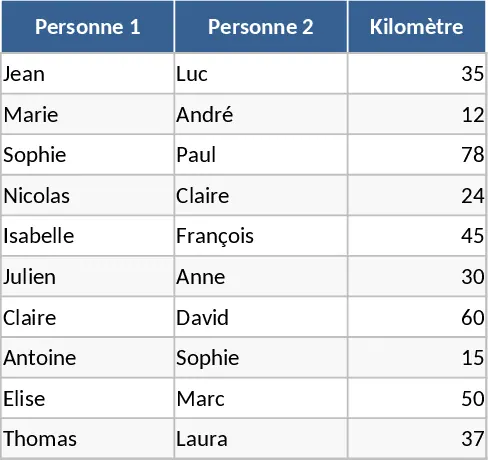
Managing travel distances between team members or project sites can often become a tedious manual task, especially when dealing with a large network of people. This automated distance calculation template provides a robust solution by centralizing your mileage data into a smart, searchable database. Instead of manually checking maps or old spreadsheets every time a trip occurs, you can rely on a pre-defined list of distances that updates your reports instantly. The template is built with a flexible lookup logic that understands the relationship between two points is constant; whether you input Person A to Person B or vice versa, the result remains accurate and consistent.
The workbook is organized into two primary sections: a comprehensive Distance Database and an interactive Calculation Sheet. In the database, you will find columns for the first person, the second person, and the distance in kilometers. This serves as your master reference. The calculation sheet is where the daily work happens; it features dropdown menus and automated formulas that fetch data from your master list. This setup is perfect for administrative staff handling travel reimbursements, project managers planning site visits, or logistics teams coordinating personnel movements across different regions. By using this template, you solve the common problem of data fragmentation and human error. It ensures that every mileage claim or logistics plan uses the exact same figures, which is crucial for financial auditing and operational transparency.
The template also helps in maintaining historical records. As your organization grows, you can continuously append new pairs to the database, making the tool more powerful the more you use it. It eliminates the need for complex formulas for the end-user, as the backend logic is already configured to handle the bidirectional searching. This means even users with basic Excel skills can operate the tool effectively, making it a versatile asset for diverse teams. For those managing budgets, this template serves as a foundational tool for cost estimation. By knowing the exact distances between personnel, you can forecast travel expenses more accurately during the planning phase of a project. It also provides a clear audit trail for finance departments, as every distance used in a report can be traced back to the master database, ensuring compliance with company travel policies.
How to use this template:
- Open the Distance Database sheet and enter the names of the individuals or locations along with the distance between them in the designated columns.
- Switch to the Calculation or Tracking sheet where you need to record specific trips or perform lookups.
- Select the names for Person 1 and Person 2 from the dropdown lists in the input columns.
- The Kilometer column will automatically populate with the correct value retrieved from your database, regardless of the order of the names.
This tool is designed to be a set-it-and-forget-it system. Once your initial data is entered, the daily workflow becomes a simple matter of selecting names and watching the data fill itself in. It is an essential utility for anyone looking to professionalize their travel tracking and reduce the administrative burden of manual distance verification. Expected benefits include a significant reduction in manual data entry effort and the elimination of calculation discrepancies across your travel logs.
Similar Templates Recommendation
Secondary School Results and Ranking Template
Track up to 200 secondary students' marks, auto‑calculate grades, averages, divisions and rankings in a clear, formatted sheet.

Couple Budget and Cash Flow Tracker Template
Track monthly income, expenses, and cash flow for a working couple, visualize budgets and savings goals in one spreadsheet.

Date Range and Internal Log Template
Create an Excel file with two columns for dates and internal notes, with colored rows for different date ranges.
