

Comprehensive Income, Tax, Savings & Travel Planner Template
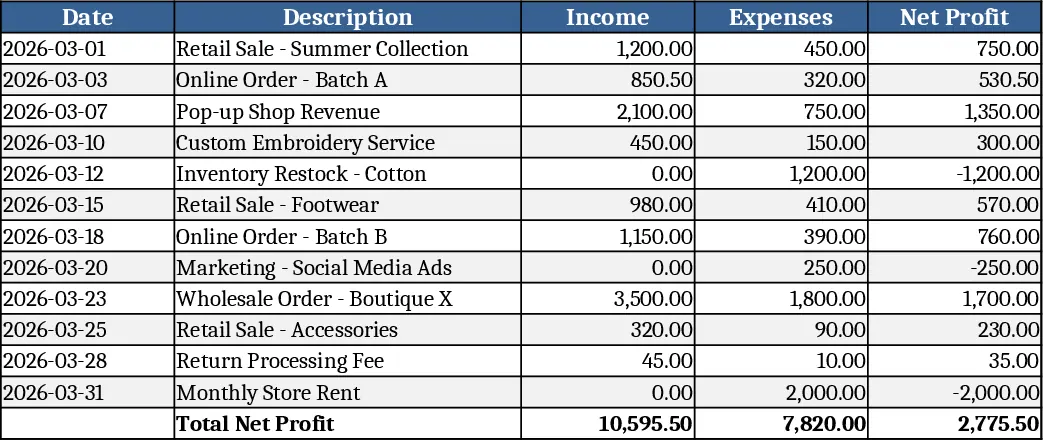
This all‑in‑one Excel workbook lets you monitor several income sources, automatically compute taxes, tuition fees, and savings contributions, and keep a detailed log of everyday expenses and travel budgets.
The file is organized into separate sheets for each income line (Clothing, Trading, Dome, Gang‑Nail) with columns for Date, Description, Income, Expenses, and a Net Profit column that subtracts expenses from income. Linked Tax, Tuition, and Savings sheets pull the total net profit from the corresponding income sheet and apply a 30% rate, so you instantly see what you owe, what you allocate to tuition, and what you set aside as savings. A dedicated Expenses sheet uses a dropdown for categories (Marketing, Design, Samples, Bulk) and sums totals per category as well as an overall expense total. The Summary sheet aggregates totals for taxes, tuition, savings, income, expenses, net profit, and calculates the remaining money after all deductions. Finally, a Travel Planner sheet captures destination, dates, participant count, and line‑item costs (food, transport, car rental, Airbnb, shopping, buffer) and computes the total trip cost automatically.
By centralizing these calculations, the workbook eliminates repetitive manual entry, reduces the chance of formula errors, and gives you a clear snapshot of your financial health at a glance. It’s especially handy for freelancers, small‑business owners, or anyone juggling several revenue streams and personal budgeting goals. You can instantly see which income source is most profitable, how much you need to set aside for taxes or tuition, and where your everyday spending is concentrated. The travel planner adds a practical layer for vacation or business trip budgeting, ensuring you never overlook hidden costs.
The template is built for anyone who needs a structured yet flexible way to manage money: entrepreneurs tracking product‑line performance, educators monitoring tuition allocations, or families planning trips while staying within budget. Each sheet uses simple tables that can be expanded as your data grows, and dropdowns keep category entries consistent. The Summary sheet pulls data dynamically, so updating a single transaction anywhere updates all related totals instantly.
How to use
- Open each Income sheet and fill in Date, Description, Income, and Expenses; the Net Profit column calculates automatically.
- Go to the Tax, Tuition, and Savings sheets – the totals pull from the corresponding Income sheet and apply the 30% rate; adjust the rate if needed.
- Record daily expenses in the Expenses sheet, selecting a category from the dropdown; category totals and overall expense sum update in real time.
- For travel plans, enter destination, start/end dates, number of people, and each cost item; the sheet computes days and total trip cost, then the Summary sheet reflects the impact on your remaining money.
Expected benefits: streamlined data entry, instant financial insights, and less time spent reconciling numbers, letting you focus on growing your business or enjoying your trips.
Similar Templates Recommendation
Secondary School Results and Ranking Template
Track up to 200 secondary students' marks, auto‑calculate grades, averages, divisions and rankings in a clear, formatted sheet.

Couple Budget and Cash Flow Tracker Template
Track monthly income, expenses, and cash flow for a working couple, visualize budgets and savings goals in one spreadsheet.

Date Range and Internal Log Template
Create an Excel file with two columns for dates and internal notes, with colored rows for different date ranges.
