

Movie Merchandise Sales & Incentive Competition Planning Template
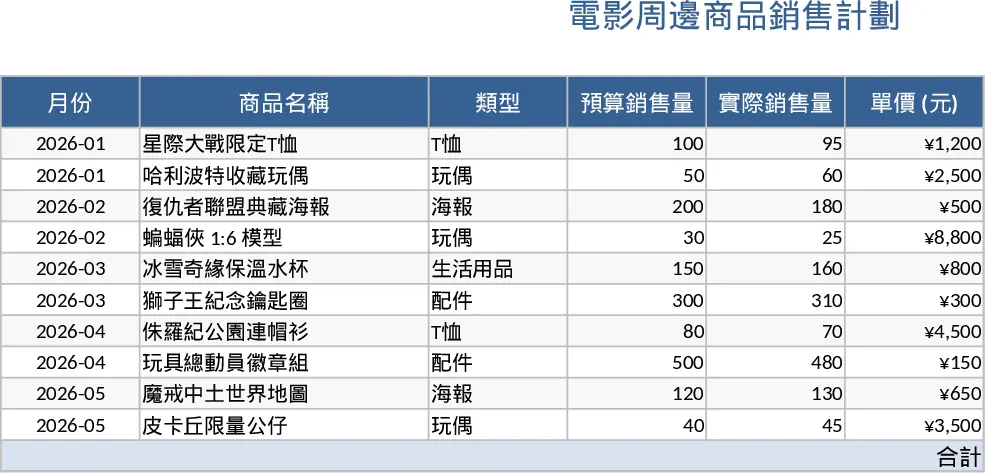
This template is built for anyone running a movie‑related merchandise campaign that also wants to run a sales‑driven incentive competition. It opens with a Campaign Overview sheet where you enter the movie title, launch dates, product categories (e.g., apparel, collectibles, posters) and the overall revenue goal. Below that, a Product List table lets you list each SKU, set unit prices, forecasted units, and assign a sales target. A drop‑down menu for product status (planned, in‑stock, discontinued) keeps the list tidy.
The next tab, Incentive Rules, is where you define the competition structure: points per unit sold, bonus thresholds, and prize tiers. You can choose between flat‑rate points, tiered multipliers, or a mix, and the sheet automatically calculates each salesperson’s potential earnings based on the targets you set. The Sales Tracker sheet is a daily log where reps enter their actual sales per SKU; the template pulls these numbers into a live Dashboard that shows total revenue, progress toward the campaign goal, individual performance rankings, and a visual leaderboard for the contest. Conditional formatting highlights top performers and flags any product that is lagging behind its forecast.
This tool solves the common headache of juggling product inventory, sales targets, and motivational contests in separate files. By consolidating everything into one workbook, you eliminate duplicate data entry, reduce the risk of mismatched numbers, and get instant visibility into how the campaign is performing. It’s especially useful for marketing managers, sales supervisors, and retail coordinators who need to keep both the product side and the people‑motivation side aligned. The template helps you monitor revenue flow, track which merchandise items are selling best, and see at a glance who is leading the incentive race, making it easier to adjust tactics, re‑allocate stock, or tweak prize structures on the fly.
How to use
- Fill in the Campaign Overview with the movie name, dates, and overall sales goal. Add each merchandise item to the Product List, setting prices and targets.
- Define your contest rules in the Incentive Rules sheet – choose point values, bonus levels, and prize options.
- Each day, have your sales team log their actual sales in the Sales Tracker; the dashboard updates automatically.
- Review the Dashboard to see revenue progress, product performance, and the leaderboard, then adjust inventory or incentives as needed.
Expected benefits include faster campaign setup, clearer visibility into sales performance, and a more engaging sales environment that can boost motivation without adding extra administrative work.
Similar Templates Recommendation
Secondary School Results and Ranking Template
Track up to 200 secondary students' marks, auto‑calculate grades, averages, divisions and rankings in a clear, formatted sheet.

Couple Budget and Cash Flow Tracker Template
Track monthly income, expenses, and cash flow for a working couple, visualize budgets and savings goals in one spreadsheet.

Date Range and Internal Log Template
Create an Excel file with two columns for dates and internal notes, with colored rows for different date ranges.
