

Reservist Duty Days and Earnings Tracker Template
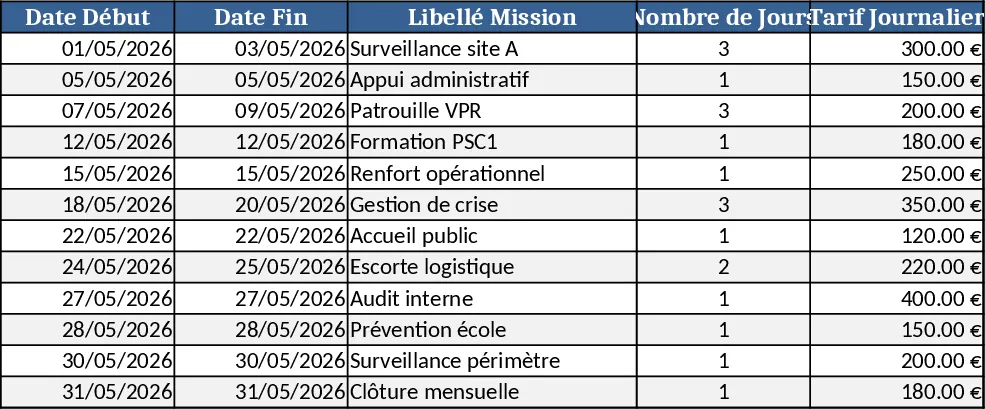
This template is built for reservists of the 2e RPIMa who need a clear, simple way to record every day they serve, determine whether each day is paid, and keep an eye on the mandatory 37‑day annual quota. The workbook contains three sheets:
- Day Log – a table where you enter the date, type of duty (training, deployment, admin), and a dropdown to mark the day as "Paid" or "Unpaid". The sheet automatically flags any entry that exceeds the yearly target.
- Summary – a dashboard that aggregates the logged data, showing total days worked, paid days, unpaid days, and a progress bar toward the 37‑day goal. It also breaks down earnings by month, applying the rate you set in the Settings sheet.
- Settings – a small area where you input your daily pay rate and any special allowances; the formulas use these values to compute the monthly and yearly earnings.
The template solves the common hassle of manually counting service days and calculating pay. Instead of juggling spreadsheets or paper logs, you get instant visibility on whether you’re on track for the annual requirement and how much you’ll earn each month. This helps you plan personal finances, request leave, or discuss compensation with your unit commander.
It is ideal for any reservist who must meet a minimum service quota, unit administrators who need to verify compliance, and finance officers who want a quick snapshot of reservist payroll. By consolidating daily entries and automatic calculations, the workbook eliminates errors and saves the time spent on repetitive bookkeeping.
How to use
- Open the Settings sheet and enter your daily pay rate (and any extra allowances).
- Go to the Day Log sheet and add a new row for each day you serve: select the date, choose the duty type, and mark the day as Paid or Unpaid. The dropdown ensures consistent data.
- Switch to the Summary sheet to see updated totals, a progress bar toward the 37‑day goal, and a month‑by‑month earnings table.
- If you need to adjust the target or rate, edit the values in Settings and all calculations refresh instantly.
Expected benefits: you’ll spend far less time reconciling service days, reduce the risk of missed payments, and gain a quick, reliable view of your annual progress and monthly income.
Similar Templates Recommendation
Secondary School Results and Ranking Template
Track up to 200 secondary students' marks, auto‑calculate grades, averages, divisions and rankings in a clear, formatted sheet.

Couple Budget and Cash Flow Tracker Template
Track monthly income, expenses, and cash flow for a working couple, visualize budgets and savings goals in one spreadsheet.

Date Range and Internal Log Template
Create an Excel file with two columns for dates and internal notes, with colored rows for different date ranges.
