

Marketing Campaign Budget and ROI Tracker Template
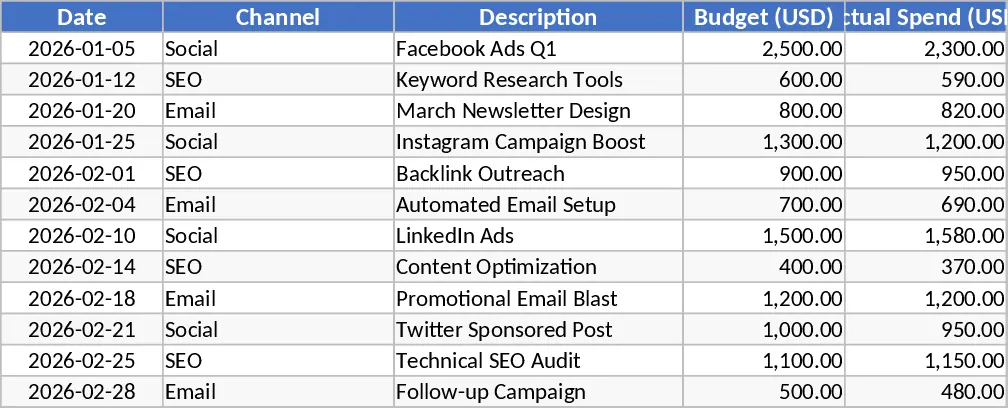
Managing multiple marketing channels often leads to fragmented data and budget overruns. This Marketing Campaign Budget and ROI Tracker is designed to bridge the gap between financial planning and performance analysis, providing a centralized hub for all your promotional activities. The template features a structured expense log where you can categorize spending by channel—such as Social Media, SEO, Email, and PPC—ensuring every dollar is accounted for. With built-in status indicators, you can instantly see if a specific channel is remaining on track or exceeding its allocated budget, allowing for real-time adjustments to your strategy before costs spiral out of control.
Beyond simple expense tracking, the template includes a dedicated Results sheet that transforms raw data into actionable insights. By inputting conversion and revenue figures, the system automatically calculates critical metrics like Cost Per Acquisition (CPA) and Return on Ad Spend (ROAS). This eliminates the need for manual formulas and reduces the risk of calculation errors, providing a clear picture of which channels are driving the most value for your business. The structure is intuitive, featuring dropdown menus for channel selection and automated color-coding for budget health, making it accessible even for those without advanced financial training.
Marketing managers, small business owners, and digital agencies will find this tool indispensable for monthly planning and quarterly reviews. It centralizes data from various platforms like Google Ads, Facebook, and Mailchimp into a single source of truth, making it easier to justify marketing spend to stakeholders or clients. The integrated summary dashboard features dynamic bar charts that visualize spend versus budget for each month, helping you identify seasonal trends and optimize your resource allocation for future campaigns. Whether you are running a small local promotion or a multi-channel national campaign, this tracker ensures you stay focused on profitability.
How to use:
- Start by navigating to the budget setup area to define your monthly limits and target goals for each marketing channel.
- Regularly update the Expense Log with your actual spending, selecting the appropriate channel and date for each entry to trigger the status indicators.
- Enter your performance data—such as total conversions and generated revenue—into the Results sheet to see your CPA and ROAS update automatically.
- Review the Summary Dashboard to visualize your progress and use the charts to present campaign health to your team or management.
Expected benefits: This template significantly reduces the time spent on manual data consolidation and provides immediate clarity on campaign profitability, helping you reduce wasted spend and improve overall marketing efficiency.
Similar Templates Recommendation
Secondary School Results and Ranking Template
Track up to 200 secondary students' marks, auto‑calculate grades, averages, divisions and rankings in a clear, formatted sheet.

Couple Budget and Cash Flow Tracker Template
Track monthly income, expenses, and cash flow for a working couple, visualize budgets and savings goals in one spreadsheet.

Date Range and Internal Log Template
Create an Excel file with two columns for dates and internal notes, with colored rows for different date ranges.
