

Hiring Dashboard & Stakeholder Insights Template
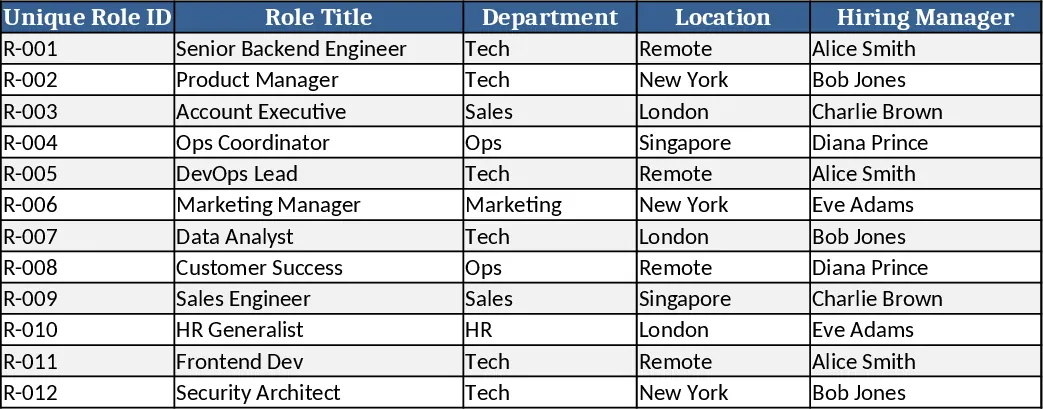
The Comprehensive Hiring Dashboard is built as a single Excel workbook with three main tabs – Master Data, Stakeholder View, and Internal Team View. The Master Data sheet is a structured table where you paste all role‑level information from your existing source file: unique role ID, title, location, required skills, salary band, recruiter, and dates for each recruitment stage. Drop‑down lists standardise status values (e.g., "Submitted", "Interviewed", "Offered", "Joined") and priority flags, while calculated columns generate stage‑wise counts and dates. Both the Stakeholder and Internal Team tabs pull from this table using dynamic formulas, so any change in the master sheet instantly refreshes the visual summaries.
The dashboard solves the common pain of fragmented hiring reports. Instead of manually compiling pipeline health, conversion trends, and risk signals for each weekly sync, the template delivers a live snapshot that updates automatically. Stakeholders get a concise view of funnel metrics (S/I/O ratios), aging positions, and time‑to‑hire, enabling quick decisions on compensation adjustments or JD refinements. Recruiters see their individual submission volumes, conversion rates, and bottleneck stages, helping them balance workload and focus on high‑risk roles. The result is a data‑driven hiring process that reduces guesswork and accelerates decision‑making.
This template is ideal for Talent Advisors, recruitment managers, and sourcing pod leads who need to present consistent, real‑time hiring insights to business leaders while also monitoring team performance. Whether you manage a handful of roles or a large hiring programme, the dashboard scales – simply add new rows to the Master Data sheet and the formulas accommodate them without any extra setup.
How to use
- Import your data – copy the columns from your existing master sheet into the "Master Data" tab, ensuring each role has a unique ID.
- Validate dropdowns – select the appropriate status, priority, and recruiter from the provided lists; the sheet will flag any missing or inconsistent entries.
- Review the views – switch to the "Stakeholder View" for high‑level funnel and risk charts, or to the "Internal Team View" for recruiter‑level performance tables.
- Share the snapshot – export the relevant tab as PDF or share the workbook; all numbers reflect the latest data automatically.
Expected benefits: faster weekly reporting, clearer visibility into hiring bottlenecks, and more informed stakeholder decisions with minimal manual effort.
Similar Templates Recommendation
Secondary School Results and Ranking Template
Track up to 200 secondary students' marks, auto‑calculate grades, averages, divisions and rankings in a clear, formatted sheet.

Couple Budget and Cash Flow Tracker Template
Track monthly income, expenses, and cash flow for a working couple, visualize budgets and savings goals in one spreadsheet.

Date Range and Internal Log Template
Create an Excel file with two columns for dates and internal notes, with colored rows for different date ranges.
