

Employee Absence & Birthday Certificate Bonus Tracker Template
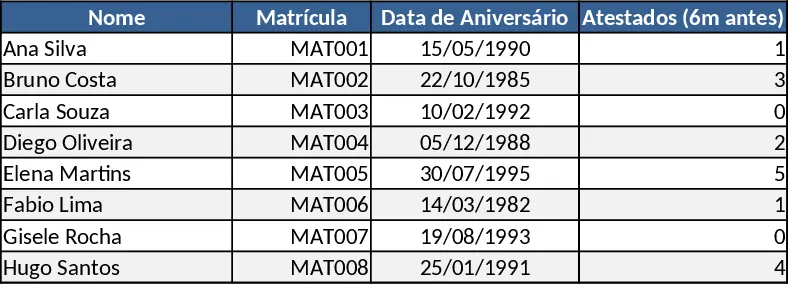
The Absenteeism Control Sheet is built with three main tabs: Data Entry, Rules & Settings, and Summary Dashboard. In the Data Entry sheet you log each employee’s daily record – Employee ID, name, birth‑date, date of the incident, and a dropdown to select the type (Absent, Late, Medical Certificate). The Rules sheet holds the policy parameters – the 6‑month windows before and after each birthday, the thresholds for certificates, and the formulas that decide whether a leave day or a bonus is earned or lost. The Summary Dashboard pulls everything together, showing per‑employee totals of absences, earned leaves, lost leaves, bonus eligibility, and a quick view of upcoming eligibility windows.
This template solves the tedious, error‑prone process of manually counting absences and applying complex birthday‑based rules. By automating the 6‑month filter and the win/lose logic, HR teams can enforce fair policies, avoid disputes, and keep payroll calculations accurate. It also gives managers instant visibility into team attendance trends, helping them address chronic lateness or excessive absences before they affect performance.
Ideal for HR managers, payroll specialists, and team leaders who need a reliable way to monitor attendance and reward punctuality. It tracks every recorded absence, late arrival, and medical certificate, then instantly calculates whether the employee gains a compensatory day off or a monetary bonus, or loses them, based on the defined thresholds.
How to use
- Fill in the Data Entry sheet each day with the employee’s details and select the appropriate incident type.
- Keep the employee list up‑to‑date in the Rules sheet, especially birth‑dates, so the 6‑month windows calculate correctly.
- Click the Refresh Calculations button (macro) to apply the filters and update the Summary Dashboard.
- Review the dashboard to see who has earned or lost leave/bonus and plan any necessary follow‑up actions.
Expected benefits: reduces hours spent on manual attendance audits, minimizes calculation errors, and provides clear, real‑time insight into absenteeism‑related rewards.
Similar Templates Recommendation
Secondary School Results and Ranking Template
Track up to 200 secondary students' marks, auto‑calculate grades, averages, divisions and rankings in a clear, formatted sheet.

Couple Budget and Cash Flow Tracker Template
Track monthly income, expenses, and cash flow for a working couple, visualize budgets and savings goals in one spreadsheet.

Date Range and Internal Log Template
Create an Excel file with two columns for dates and internal notes, with colored rows for different date ranges.
