

Affiliate Commitment & Incubation Compliance Tracker Template
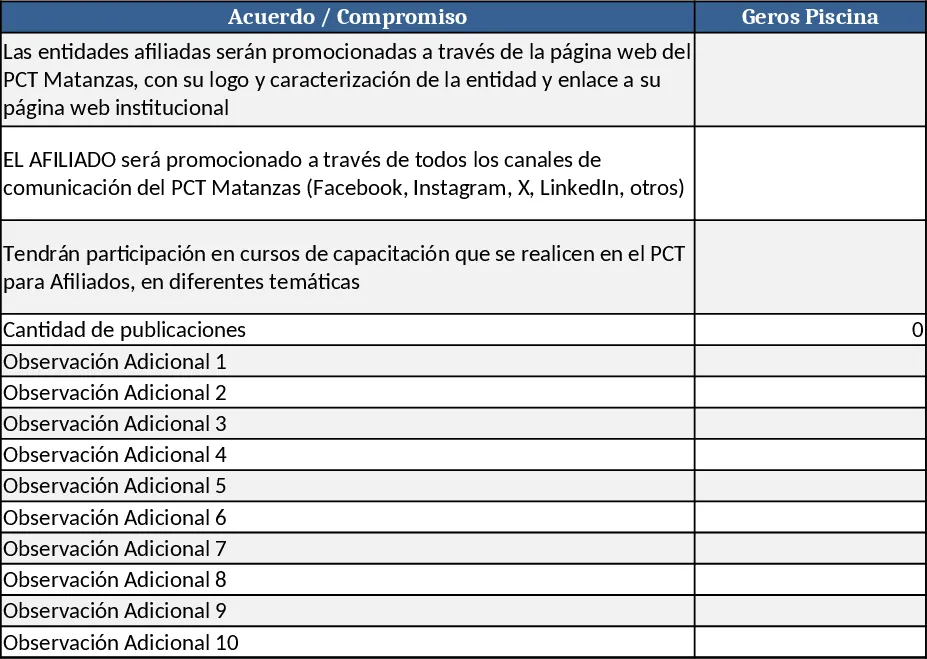
This Excel template is built to help you monitor and manage the performance of your affiliate partners. The workbook contains three main sheets: Partner List, Promotion Tracker, and Summary Dashboard. In the Partner List you enter each affiliate (e.g., Geros Piscina, SSTER, Micro SSTER, Ima Plásticos, Enigma) along with basic details such as contact name, logo file path, and website URL. The Promotion Tracker records every agreement, the number of publications, and the channels used (PCT Matanzas website, Facebook, Instagram, X, LinkedIn, etc.). The Summary Dashboard pulls data from the other sheets to show total publications per partner, compliance status, and upcoming training sessions.
The template solves the common headache of scattered affiliate data and manual reporting. By centralising agreements, promotional outputs, and training attendance, you can quickly see which partners are meeting their commitments, which need a reminder, and how well your promotion strategy is performing across channels. The visual summary saves you from building separate reports each month and ensures that every stakeholder has a clear view of affiliate impact.
It is ideal for marketing coordinators, partnership managers, or operations teams at organizations that run affiliate programs, especially those that promote partners on multiple digital platforms and offer joint training. Whether you are a small business coordinating a handful of local partners or a larger institution handling dozens of affiliates, this template scales to your needs.
With this workbook you can track:
- Each affiliate’s agreement details and compliance deadlines
- Number of publications or posts generated per partner
- Placement of logos and links on the PCT Matanzas website
- Use of social media channels for promotion
- Participation in PCT‑run training courses and topics covered These data points give you a complete picture of partner engagement and help you allocate resources more effectively.
How to use
- Open the Partner List sheet and fill in the company name, contact email, logo path, and website URL for every affiliate.
- Switch to the Promotion Tracker sheet and record each agreement: date, type of content, number of publications, and the specific channels (check the dropdown for Facebook, Instagram, X, LinkedIn, etc.).
- Mark training attendance by selecting the course name and date from the predefined list; the sheet will automatically calculate total hours per partner.
- Go to the Summary Dashboard to see compliance percentages, total publications, and upcoming training reminders. Use the built‑in filters to focus on a single partner or a specific time period.
Expected benefits include faster monthly reporting, clearer visibility into affiliate performance, and reduced manual effort when updating compliance records. The template’s structured layout also helps you stay organized and ensures that no partner commitment falls through the cracks.
Similar Templates Recommendation
Secondary School Results and Ranking Template
Track up to 200 secondary students' marks, auto‑calculate grades, averages, divisions and rankings in a clear, formatted sheet.

Couple Budget and Cash Flow Tracker Template
Track monthly income, expenses, and cash flow for a working couple, visualize budgets and savings goals in one spreadsheet.

Date Range and Internal Log Template
Create an Excel file with two columns for dates and internal notes, with colored rows for different date ranges.
