

Subscription and Renewal Tracking Dashboard Template
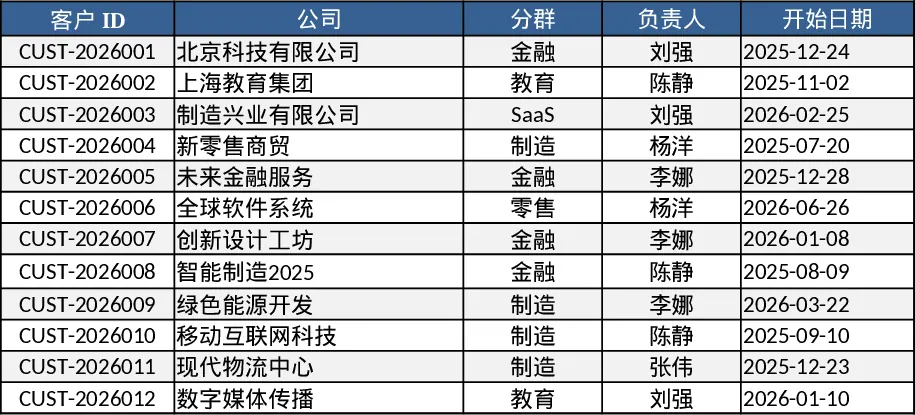
The Subscription & Renewal Tracker is a three‑sheet Excel workbook designed to give you a complete view of every customer contract, its billing schedule, and the key performance indicators that matter to subscription‑based businesses.
- Customers – stores core client data: a unique ID, company name, segmentation, account owner, start date, contract length (months), billing frequency (monthly or annual) and currency.
- Subscriptions – links to the Customers sheet via a drop‑down list, and captures plan name, seat count, price per period, start and renewal dates, auto‑renew flag, current status (Active, Past Due, Cancelled), cancellation date and free‑form notes.
- Metrics Dashboard – aggregates the raw data into monthly KPIs: total active subscriptions, Monthly Recurring Revenue (MRR) with annual plans converted to monthly equivalents, upcoming renewals in the next 30/60/90 days, and churn count plus churn rate (cancelled subscriptions divided by active subscriptions at month start). Sample data for 12 customers and 18 subscriptions, including a mix of renewals and cancellations, is pre‑filled to illustrate the calculations.
This template solves the common headache of manually reconciling subscription data across CRM, invoicing, and finance systems. By centralising customer and contract details and automatically calculating MRR and churn, you eliminate duplicate entry, reduce errors, and gain instant insight into revenue health. It is especially valuable for SaaS founders, finance analysts, and account managers who need to forecast cash flow, prioritize renewal outreach, and monitor the impact of churn on growth.
Anyone who manages recurring revenue—whether a small startup, a mid‑size SaaS firm, or a subscription‑based service—can use this workbook. It shines in quarterly business reviews, board decks, and day‑to‑day operations where quick answers about upcoming renewals or revenue trends are required.
How to use
- Open the Customers sheet and fill in or edit your client list; the Customer ID column will be referenced by the Subscriptions sheet.
- Switch to Subscriptions and add each contract, selecting the appropriate Customer ID from the drop‑down, then specify plan, seats, price, billing cycle, start and renewal dates, and set the auto‑renew flag.
- The Metrics Dashboard updates automatically; review the monthly KPI table to see active subscription count, MRR, upcoming renewals and churn figures.
- Use the built‑in filters or conditional formatting to spot at‑risk accounts and plan outreach.
Expected benefits: streamlined data entry, faster renewal planning, and clearer visibility into revenue trends, saving hours of manual reporting each month.
Similar Templates Recommendation
Secondary School Results and Ranking Template
Track up to 200 secondary students' marks, auto‑calculate grades, averages, divisions and rankings in a clear, formatted sheet.

Couple Budget and Cash Flow Tracker Template
Track monthly income, expenses, and cash flow for a working couple, visualize budgets and savings goals in one spreadsheet.

Date Range and Internal Log Template
Create an Excel file with two columns for dates and internal notes, with colored rows for different date ranges.
