

Washing Machine Rental Management Template
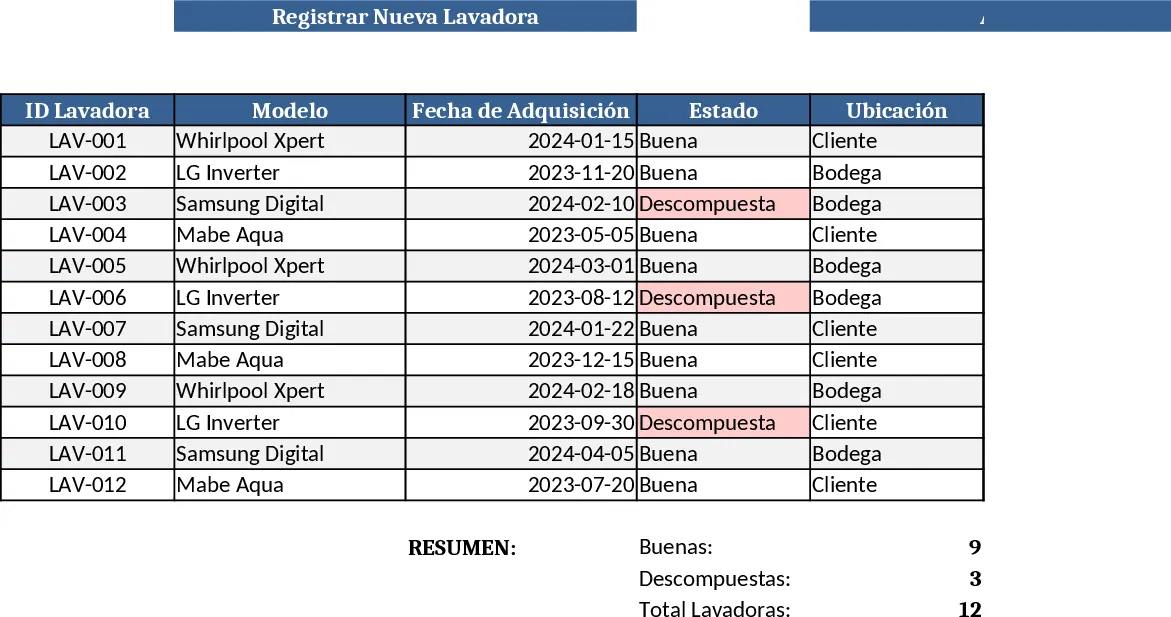
The Washing‑Machine Rental Management workbook is organized into five clear sheets: Rentals, Customers, Machines, Payments, and a visual Dashboard. In the Rentals sheet you’ll find fields such as Rental ID, Machine ID, Customer Name, Start Date, End Date, Rental Rate, and Status, with dropdowns for status (Active, Returned, Overdue). The Customers sheet stores contact information, billing address, and preferred payment method, while the Machines sheet tracks each washer’s model, serial number, purchase date, and maintenance history. Payments records capture amounts received, dates, and payment method, automatically linking back to the corresponding rental. The Dashboard pulls key metrics – total active rentals, upcoming due dates, monthly revenue, and overdue alerts – into easy‑to‑read charts and summary tables.
This template solves the headache of juggling spreadsheets, paper logs, and missed return dates. By centralizing all rental data, you gain instant visibility into cash flow, inventory utilization, and maintenance cycles, reducing the risk of late fees and equipment downtime. The automated calculations and conditional formatting highlight rentals that are nearing their return date or are overdue, helping you prioritize follow‑ups and keep customers satisfied. The built‑in revenue summary lets you see how each machine contributes to your bottom line, making pricing decisions and fleet expansion easier.
Designed for small appliance rental businesses, laundromats that offer machine leasing, or property managers who provide washers as amenities, this workbook fits any scenario where you need to track who has which machine, when it’s due back, and whether payments are up to date. Whether you rent a handful of units or manage a larger fleet, the template scales by simply adding rows, and the formulas adjust automatically.
How to use
- Open the workbook and fill in the Customers sheet with names, contact details, and payment preferences.
- Add each washer to the Machines sheet, including model, serial number, and any maintenance notes.
- Record every new rental in the Rentals sheet, selecting the customer and machine from dropdown lists, and set the start/end dates and rate.
- As payments arrive, log them in the Payments sheet; the Dashboard will instantly update revenue totals and highlight overdue rentals.
Expected benefits: streamlined data entry, faster invoice generation, fewer missed returns, and clearer insight into rental performance, saving you hours each week.
Similar Templates Recommendation
Secondary School Results and Ranking Template
Track up to 200 secondary students' marks, auto‑calculate grades, averages, divisions and rankings in a clear, formatted sheet.

Couple Budget and Cash Flow Tracker Template
Track monthly income, expenses, and cash flow for a working couple, visualize budgets and savings goals in one spreadsheet.

Date Range and Internal Log Template
Create an Excel file with two columns for dates and internal notes, with colored rows for different date ranges.
