

2 m and 70 cm Band Frequency Table Template
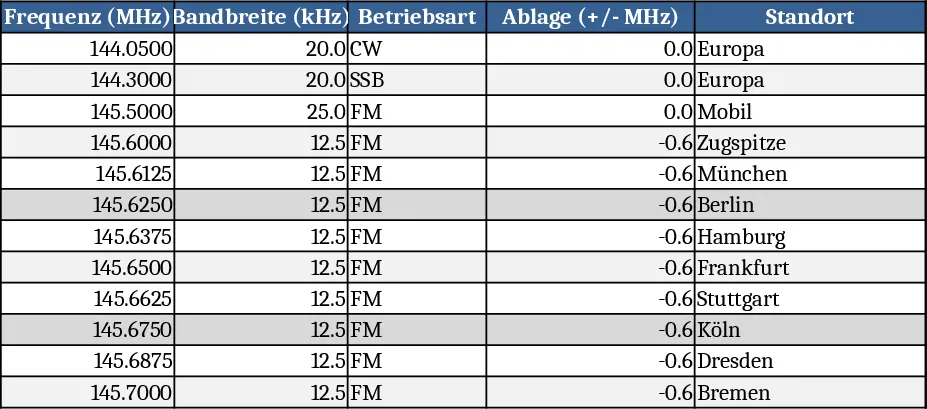
This template provides a clean, printable Excel sheet that gathers every authorized 2 m (144‑148 MHz) and 70 cm (430‑440 MHz) amateur radio frequency into one easy‑to‑navigate table. The workbook contains two main sheets – Frequency List and Summary. The Frequency List sheet is laid out in columns for Band, Channel/Mode, Frequency (MHz), Primary Use (e.g., local simplex, repeater input, digital), and optional Notes. Drop‑down menus let you filter by mode (FM, SSB, Digital) or by usage type, while conditional formatting highlights repeater inputs in green and emergency channels in red. The Summary sheet automatically aggregates the total number of channels per band, counts how many are allocated to digital modes, and creates a small chart that visualises the distribution of voice versus data channels.
The template solves the common hassle of flipping through PDFs or web pages to find the right frequency when planning a field day, setting up a new repeater, or simply checking band‑plan compliance. By having all frequencies in a single, searchable table, you reduce the risk of tuning to a wrong channel, speed up coordination with other operators, and keep a consistent reference for club meetings or licensing preparation. It is especially handy for club technicians, event organizers, and any amateur radio operator who regularly works the VHF/UHF bands.
Who benefits most? Club repeaters managers, field‑day coordinators, and individual hams who need a quick, printable reference during on‑air activities. The template works in any scenario where you need to plan frequency usage – from setting up portable stations to documenting band‑plan changes after a regulatory update.
How to use
- Open the workbook and go to the Frequency List sheet. Enter any new local repeater frequencies or custom channels in the blank rows at the bottom; the drop‑downs will automatically include your entry.
- Use the filter row at the top to narrow the view by mode, usage, or band. The conditional colours will instantly highlight the rows that match your criteria.
- Switch to the Summary sheet to see updated counts and the chart reflecting the current composition of your frequency list.
- Print the Frequency List (or export to PDF) for a handy pocket reference during events.
Expected benefits include a noticeable cut in time spent searching online band‑plan documents, fewer tuning errors, and a consistent, shareable reference that can be updated by any team member without recreating the table from scratch.
Similar Templates Recommendation
Secondary School Results and Ranking Template
Track up to 200 secondary students' marks, auto‑calculate grades, averages, divisions and rankings in a clear, formatted sheet.

Couple Budget and Cash Flow Tracker Template
Track monthly income, expenses, and cash flow for a working couple, visualize budgets and savings goals in one spreadsheet.

Date Range and Internal Log Template
Create an Excel file with two columns for dates and internal notes, with colored rows for different date ranges.
