

HR Monthly Manpower Planning Template
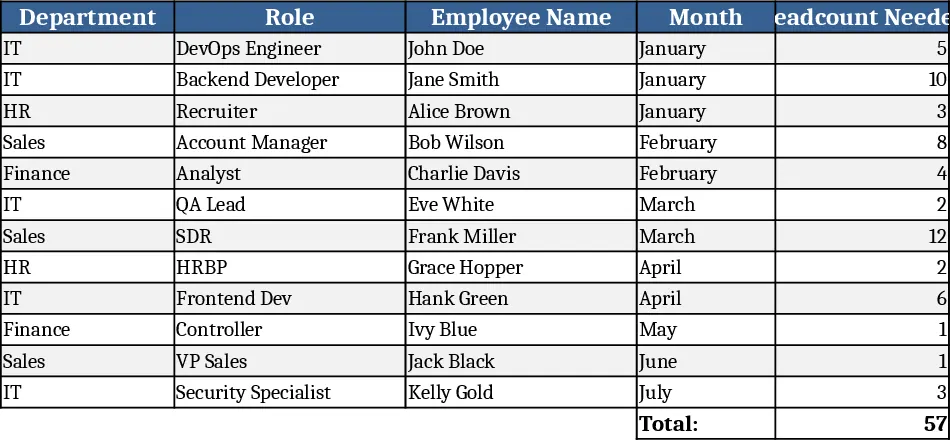
This Excel template gives HR teams a clear, month‑by‑month view of their staffing landscape. It is split into three main sheets: Workforce Overview, Monthly Data Entry, and Summary Dashboard. In the Overview sheet you set the total budgeted headcount, cost per employee, and key role categories. The Data Entry sheet contains a calendar‑style table where you log actual hires, separations, internal transfers, and planned vacancies for each month. Dropdown menus let you select job families, employment type (full‑time, part‑time, contractor), and reason codes, ensuring consistent data. The Dashboard pulls these inputs into pivot‑style charts and KPI cards that show net headcount change, turnover rate, vacancy fill‑rate, and cost variance at a glance.
The template solves the common headache of juggling separate spreadsheets or manual reports to understand staffing trends. By consolidating raw data and visual summaries in one place, you can quickly spot over‑staffed or under‑staffed periods, evaluate the impact of turnover on budgets, and align recruitment plans with business cycles. This reduces the time spent reconciling numbers and eliminates guesswork when presenting workforce plans to senior leadership.
It is ideal for HR managers, workforce planners, and talent acquisition leads who need to forecast staffing levels for operational units, track the effectiveness of hiring campaigns, or prepare quarterly headcount reports. Whether you are a small business scaling up or a large enterprise managing multiple departments, the sheet adapts to any size by simply adding rows for additional roles or locations.
The template helps you track: monthly hires, exits, internal moves, planned vacancies, budgeted vs. actual headcount, turnover percentages, and associated labor costs. These metrics give you a data‑driven foundation for decisions such as opening new positions, adjusting recruitment budgets, or negotiating with line managers.
How to use
- Open the Workforce Overview sheet and fill in your total headcount budget, cost per employee, and list of job families.
- Go to the Monthly Data Entry sheet and, for each month, select the appropriate job family from the dropdown, then enter numbers for hires, separations, and transfers.
- The Summary Dashboard updates automatically – review the charts and KPI cards to see net headcount change, turnover rate, and cost variance.
- Export or copy the dashboard view to include in your monthly HR report or presentation.
By using this sheet you can expect to save hours each month on data collection and reporting, while gaining a clearer picture of staffing dynamics that supports more strategic workforce decisions.
Similar Templates Recommendation
Secondary School Results and Ranking Template
Track up to 200 secondary students' marks, auto‑calculate grades, averages, divisions and rankings in a clear, formatted sheet.

Couple Budget and Cash Flow Tracker Template
Track monthly income, expenses, and cash flow for a working couple, visualize budgets and savings goals in one spreadsheet.

Date Range and Internal Log Template
Create an Excel file with two columns for dates and internal notes, with colored rows for different date ranges.
