

Affiliate Compliance Monitoring Dashboard Template
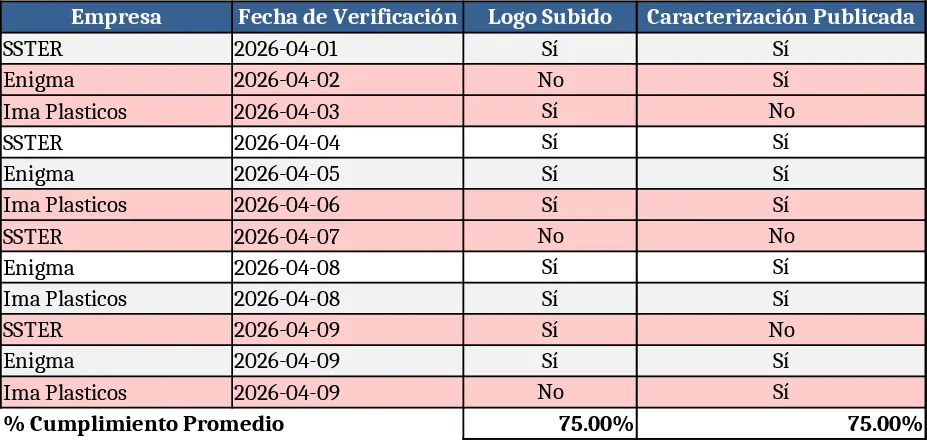
This Excel template is built to help you monitor the compliance status of each affiliated entity—such as SSTER, Enigma, Ima Plasticos, and others—while also organizing the information needed to showcase them on the PCT Matanzas website. The workbook contains three main sheets: a Compliance Tracker, a Promotion Catalog, and a Summary Dashboard. In the Compliance Tracker you’ll find columns for entity name, compliance criteria, last audit date, responsible person, and a drop‑down status (Compliant, Pending, Non‑Compliant). The Promotion Catalog captures the logo file name, a brief characterization, and the URL of the institution’s own site. The Summary Dashboard pulls key metrics from the two data sheets, displaying the percentage of compliant affiliates, a list of entities ready for promotion, and a quick‑view table that can be copied directly into the website’s content management system.
The template solves the common headache of juggling separate spreadsheets for regulatory tracking and marketing assets. By consolidating both functions, you eliminate duplicate data entry, reduce the risk of outdated information, and ensure that only compliant partners are highlighted online. This leads to smoother internal audits, clearer communication with affiliates, and a more professional web presence that reflects up‑to‑date compliance status.
It is ideal for compliance officers, partnership managers, and web administrators at organizations that maintain a network of affiliated companies. Whether you are preparing for a quarterly audit, updating the partner showcase page, or simply need a quick snapshot of which affiliates meet the required standards, this workbook provides a single source of truth.
With this template you can track each affiliate’s compliance milestones, manage the assets needed for their online promotion, and instantly generate a ready‑to‑publish list of qualified partners. The built‑in data validation ensures that only valid status options are entered, while conditional formatting highlights overdue compliance items in red, making it easy to spot issues at a glance.
How to use
- Open the workbook and start with the Compliance Tracker sheet; fill in each company’s name, select the appropriate compliance criteria, enter the last audit date, assign a responsible person, and choose the status from the drop‑down list.
- Switch to the Promotion Catalog sheet; upload the logo file to the designated folder, enter the file name, write a short description of the entity, and paste the institutional website URL.
- Go to the Summary Dashboard to review the compliance percentage, see which affiliates are flagged as ready for promotion, and copy the ready‑to‑publish table for the website.
- Update the sheets regularly after each audit or whenever a new affiliate joins, and the dashboard will refresh automatically.
Expected benefits include a noticeable reduction in manual cross‑checking effort, faster preparation of compliance reports, and a streamlined process for keeping the partner showcase current without needing separate tools.
Similar Templates Recommendation
Secondary School Results and Ranking Template
Track up to 200 secondary students' marks, auto‑calculate grades, averages, divisions and rankings in a clear, formatted sheet.

Couple Budget and Cash Flow Tracker Template
Track monthly income, expenses, and cash flow for a working couple, visualize budgets and savings goals in one spreadsheet.

Date Range and Internal Log Template
Create an Excel file with two columns for dates and internal notes, with colored rows for different date ranges.
