

Comprehensive School Management Dataset Template
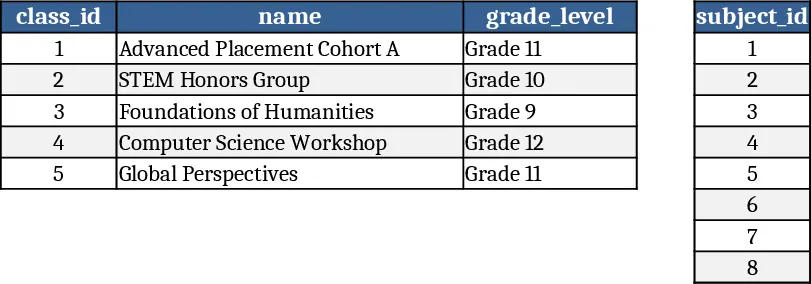
The template is organized into seven linked worksheets that together model a complete school‑year data flow. Classes lists each class name and its grade level, while Subjects holds subject names and codes. Assignments ties a class to a subject and defines the assignment title, due date and maximum marks – you’ll find 5‑10 sample assignments that progress from quizzes to mid‑terms and final projects. The Students sheet captures five distinct personas (high‑achiever, comeback, volatile, etc.) with fields for first name, last name, birth‑date, enrollment date and status. Grades records every student‑assignment pair with marks obtained and the grading timestamp, giving each student 8‑15 grade entries. Attendance logs daily presence for each class over the last 7‑14 days, using a dropdown for status (Present, Absent, Late, Excused). Finally, Financials tracks tuition or fee payments, amount, type and payment status (Completed, Pending).
All sheets use data‑validation dropdowns for IDs, status, and type fields, ensuring consistency across the workbook. A hidden Dashboard sheet pulls key metrics via pivot tables and simple formulas: average grade per class, grade‑distribution histograms, attendance trend lines for the past week, and a tuition‑payment summary showing pending versus completed amounts. These visual summaries are ready to copy into presentations or to feed into analytics tools.
The template solves the common headache of creating realistic, relational school data for demos, testing, or machine‑learning model training. Instead of manually entering hundreds of rows, you get a ready‑made, coherent dataset that reflects real‑world variability – high‑performers, improving students, and volatile learners – plus the attendance and financial patterns that dashboards expect. This speeds up proof‑of‑concept work, lets developers test API integrations (e.g., ledger hashing), and gives educators a sandbox to explore analytics without exposing actual student records.
It is ideal for school administrators, data analysts, developers building school‑management software, and educators who need sample data for training or reporting exercises. Whether you are building a new LMS, testing predictive‑grade models, or preparing a stakeholder demo, the template provides the full spectrum of information needed to showcase functionality and insights.
How to use
- Open the workbook and start on the Classes and Subjects sheets – add or edit entries to match your institution’s structure; IDs are auto‑generated.
- Move to the Students sheet and either keep the five pre‑filled personas or replace them with your own names; the template will automatically assign unique student IDs.
- Populate the Assignments sheet (or accept the sample set), then fill the Grades, Attendance, and Financials sheets – you can copy the sample rows or generate new ones; all dropdowns will guide you.
- Go to the Dashboard sheet and refresh the pivot tables (Data → Refresh All). Instantly see class‑average grades, attendance trends, and payment status charts ready for export.
Expected benefits: you’ll cut hours of manual data entry, get a consistent data model for testing, and produce polished visual reports with just a few clicks.
Similar Templates Recommendation
Secondary School Results and Ranking Template
Track up to 200 secondary students' marks, auto‑calculate grades, averages, divisions and rankings in a clear, formatted sheet.

Couple Budget and Cash Flow Tracker Template
Track monthly income, expenses, and cash flow for a working couple, visualize budgets and savings goals in one spreadsheet.

Date Range and Internal Log Template
Create an Excel file with two columns for dates and internal notes, with colored rows for different date ranges.
