

Attendance Lost Hours & Absenteeism Percentage Template
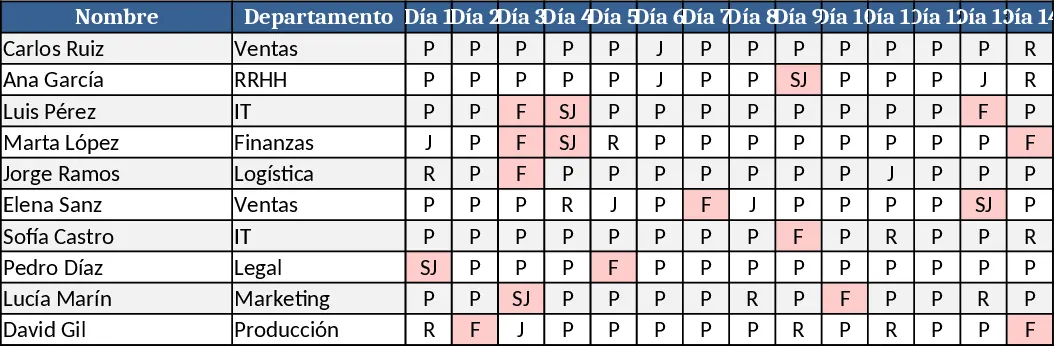
This template is built for an OpenDocument Spreadsheet (.ods) that records daily employee attendance using single‑letter codes (F, R, J, SJ, P). The workbook contains one main sheet where rows represent individual staff members and columns B2 to AF2 (and beyond) hold the daily codes for a full month. At the far right of each row, two calculated columns are added: Total Lost Hours and % Absenteeism. The template provides the exact formulas you need – =SUMPRODUCT(--(B2:AF2="F"),8)+SUMPRODUCT(--(B2:AF2="SJ"),8)+SUMPRODUCT(--(B2:AF2="R"),1) for lost hours and =((COUNTIF(B2:AF2,"F")+COUNTIF(B2:AF2,"SJ")+COUNTIF(B2:AF2,"J"))/COUNTA(B2:AF2))*100 for the absenteeism percentage. A separate summary table aggregates these metrics for the whole team, showing total hours missed, average absenteeism, and a quick visual of attendance trends.
The template solves the common headache of manually translating attendance codes into meaningful metrics. By automating the conversion of letters to hour values and percentages, it eliminates calculation errors, speeds up payroll adjustments, and provides HR managers with instant insight into workforce reliability. It is especially useful for monthly attendance reviews, compliance reporting, and identifying patterns of chronic lateness or absenteeism. The clear, formula‑driven approach ensures that any changes in the coding scheme can be updated in one place, keeping the entire workbook consistent.
Designed for HR professionals, team leads, and office administrators who need to monitor staff presence, this tool fits any organization that tracks attendance on a daily basis. Whether you manage a small office or a large department, the template scales – just extend the day columns to cover longer periods or add new employee rows. It helps you keep a precise record of lost work hours, understand the impact of different absence types, and generate ready‑to‑share reports for senior management.
How to use
- Open your attendance .ods file and copy the template sheet into the workbook.
- Fill in each employee’s daily codes (F, R, J, SJ, P) in the range B2:AF2 (adjust the range if your month has more/less days).
- The template automatically calculates "Total Lost Hours" and "% Absenteeism" for each row; review the summary table at the bottom for team‑level metrics.
Expected benefits: reduces manual calculation time, improves data accuracy, and provides instant, actionable attendance insights.
Similar Templates Recommendation
Secondary School Results and Ranking Template
Track up to 200 secondary students' marks, auto‑calculate grades, averages, divisions and rankings in a clear, formatted sheet.

Couple Budget and Cash Flow Tracker Template
Track monthly income, expenses, and cash flow for a working couple, visualize budgets and savings goals in one spreadsheet.

Date Range and Internal Log Template
Create an Excel file with two columns for dates and internal notes, with colored rows for different date ranges.
