Professional Excel Spreadsheet with Charts Template
This versatile management and organization template serves as a centralized hub for all your operational needs, transforming scattered notes and fragmented data into a structured, actionable system. The workbook is thoughtfully divided into several key sections, including a master task tracker, a resource allocation sheet, and a dynamic scheduling calendar. Within these sheets, you will find intuitive fields for task descriptions, priority levels, due dates, and status updates. Built-in dropdown menus allow for quick categorization, ensuring that your data remains consistent and easy to filter, while the summary dashboard provides an immediate visual overview of your current progress and upcoming deadlines through automated charts and status indicators.
In the fast-paced environment of modern business, staying organized is often the difference between success and burnout. This template solves the common problem of fragmented information by providing a single source of truth for your daily workflows. It is particularly beneficial for small business owners, department managers, and project coordinators who need to maintain oversight of multiple moving parts without the complexity of expensive software. By using this tool, you can ensure that every team member knows their responsibilities, deadlines are met with precision, and resources are utilized effectively, leading to a more harmonious and productive work environment. It eliminates the need for constant status meetings by making progress visible to anyone with access to the file.
The template helps you track everything from routine administrative tasks to long-term strategic goals. Its flexibility makes it suitable for various scenarios, whether you are managing a retail storefront's daily operations, coordinating a marketing campaign, or simply organizing internal office procedures. The ability to see your entire operation at a glance allows for better decision-making and quicker pivots when priorities shift. Instead of spending hours digging through emails or chat logs to find the latest update on a task, you can find exactly what you need in seconds, allowing you to focus on high-value activities that drive growth. The structure is designed to grow with you, allowing for easy expansion as your team or project list increases in size.
How to use:
- Start by navigating to the Settings or Setup sheet to customize your categories, team member names, and priority levels to match your specific business language and operational structure.
- Enter your current tasks and projects into the Master List, assigning deadlines and responsible parties using the pre-configured dropdown menus to ensure data integrity.
- Regularly update the status and completion percentage of each item as work progresses, which will automatically update the summary charts and visual progress bars.
- Use the built-in filter functions to view specific timeframes, high-priority items, or specific departments, helping you conduct efficient weekly review meetings or personal planning sessions.
By implementing this structured approach to your daily management, you can expect a significant reduction in the time spent on manual coordination and a noticeable improvement in overall team accountability and clarity. This tool is designed to reduce the mental load of management, giving you the confidence that no detail is being overlooked.
Similar Templates Recommendation
Professional Data Management Excel Template
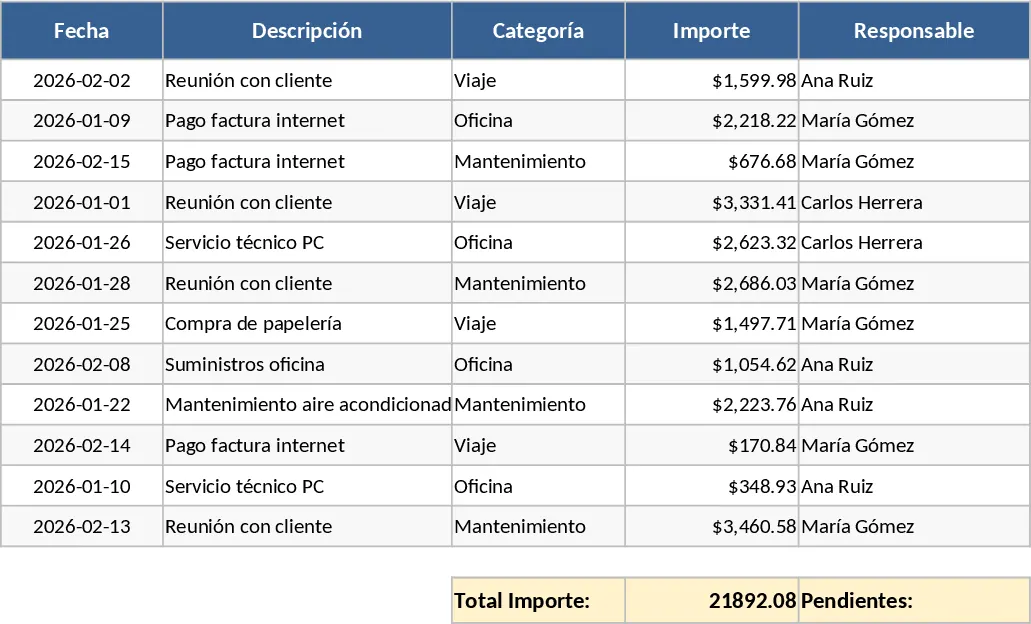
Streamline your daily workflows and track essential business data with this versatile, ready-to-use Excel template designed for general management.
Time Measurement Log Template
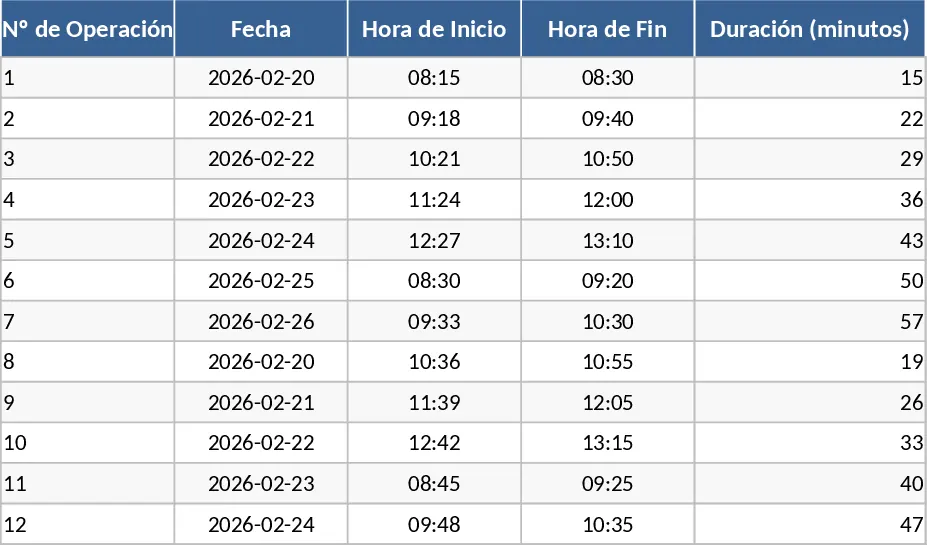
Track and analyze the time taken for specific tasks and processes to improve operational efficiency and identify workflow bottlenecks.
Consolidated Project Gantt Chart Template
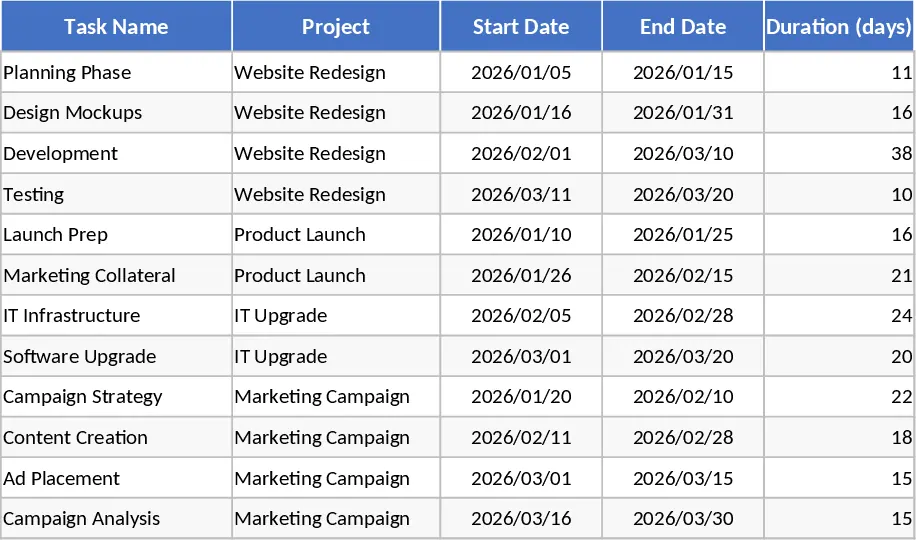
Track multiple project timelines and milestones in one unified view to monitor progress and manage deadlines across your entire portfolio.