

Apartment Rental Listing Guide Template
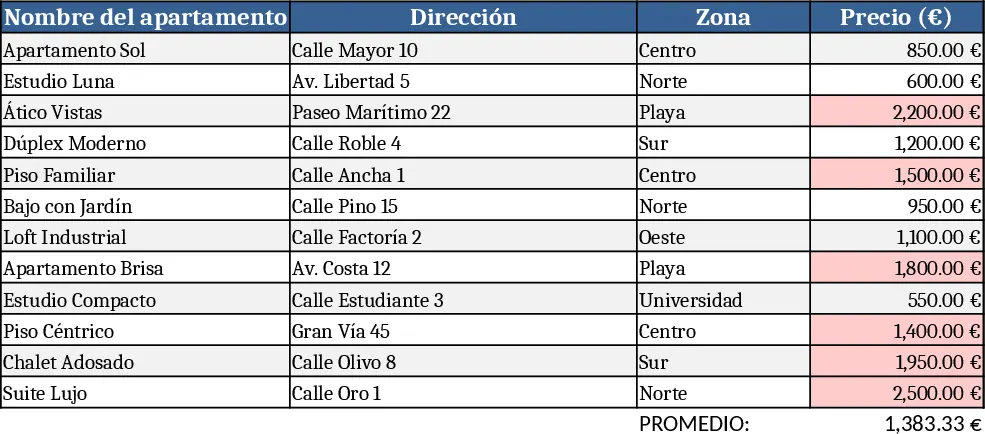
This template lets real‑estate advisors keep a clear, editable inventory of all apartments they manage. The workbook is split into three sheets: Apartment List, Photo Gallery, and Summary Dashboard. In the Apartment List you enter each unit’s name, address, zone, monthly rent, number of bedrooms and bathrooms, whether it’s furnished, and any custom notes. Two date fields capture when the unit becomes available and the next viewing date. The Photo Gallery sheet provides a simple place to drop one or two images per listing, linked back to the main sheet via a dropdown. The Summary Dashboard pulls key metrics – total units, average rent, vacant vs. occupied count, and a quick‑look table of the next three available apartments – so you can instantly show clients a concise overview.
The template solves the common chaos of juggling multiple property details across emails, notes, and separate files. By centralising every attribute in one place, you reduce the risk of missing a crucial feature, avoid duplicate entries, and present a professional, data‑driven guide to prospective tenants. It’s especially useful for agents who handle dozens of listings across different neighborhoods and need to respond quickly to client inquiries with accurate, up‑to‑date information.
Ideal for rental agents, property managers, and independent consultants who match tenants with owners. Whether you’re preparing a client meeting, updating a website, or simply tracking which units are ready for showings, this workbook keeps the information organized and instantly accessible.
How to use
- Open the Apartment List sheet and start filling in each column – name, address, zone, price, bedrooms, bathrooms, furnished (Yes/No), notes, available from, next viewing. Use the dropdowns for zone and furnished to keep entries consistent.
- Switch to the Photo Gallery sheet, click the cell under the “Image” column for a unit, and paste or insert a picture (max two per unit). The image will automatically appear as a thumbnail linked to the listing.
- Go to the Summary Dashboard to see real‑time totals, average rent, and a ready‑to‑share table of the next available apartments. You can copy this table into emails or presentations.
- Update any field whenever a unit’s status changes – the dashboard refreshes instantly, ensuring you always have the latest data at hand.
Expected benefits: faster response times to client queries, fewer manual errors, and a polished, data‑driven presentation that helps close rentals more efficiently.
Similar Templates Recommendation
Secondary School Results and Ranking Template
Track up to 200 secondary students' marks, auto‑calculate grades, averages, divisions and rankings in a clear, formatted sheet.

Couple Budget and Cash Flow Tracker Template
Track monthly income, expenses, and cash flow for a working couple, visualize budgets and savings goals in one spreadsheet.

Date Range and Internal Log Template
Create an Excel file with two columns for dates and internal notes, with colored rows for different date ranges.
