

Quotation, Work, Delivery & Billing Tracker Template
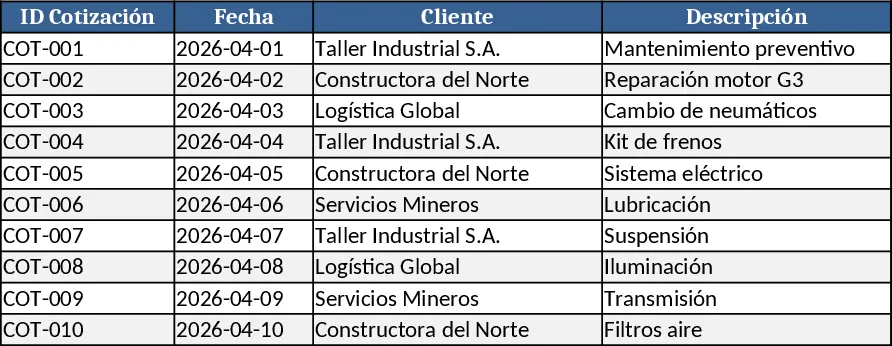
This Excel template is built around three interconnected sheets – Quotations, Work & Delivery, and Expenses & Billing. In the Quotations sheet you enter client name, quote number, item description, unit price, quantity and a status dropdown (Draft, Sent, Approved). The Work & Delivery sheet pulls the approved quote ID and lets you log start/end dates, assigned staff, delivery method and a completion checkbox. The Expenses & Billing sheet records every spare‑part or supply cost, linking each line to a work order via a dropdown, and automatically calculates total cost, markup and final invoice amount. A summary dashboard on the first tab shows total quoted value, realized revenue, outstanding payments and expense breakdown by category, all updated with simple formulas.
The template solves the common headache of juggling separate documents for quotes, job tracking and expense logs. By keeping everything in one workbook you eliminate duplicate data entry, reduce errors, and gain instant visibility into profit margins for each project. It’s especially useful for small‑to‑medium service businesses, field technicians, or any team that needs to move from a quote to a paid invoice while monitoring material costs.
Anyone who creates estimates, manages field work, or handles billing will benefit – from sales engineers and project coordinators to finance clerks and operations managers. The workbook helps you monitor the full lifecycle of a job: from the initial quotation, through execution and delivery, to final payment and expense reconciliation. This end‑to‑end view makes it easier to spot overruns, negotiate better rates with suppliers, and ensure timely invoicing.
How to use
- Open the workbook and fill in the Quotations sheet with client details, items and prices; select the appropriate status.
- When a quote is approved, go to the Work & Delivery sheet, choose the quote ID, add dates, assign staff and mark completion.
- Record every part or supply used in the Expenses & Billing sheet, linking each cost to the relevant work order; the sheet will compute totals and suggested markup.
- Review the dashboard for a quick snapshot of total quoted value, actual revenue, pending invoices and expense categories.
Expected benefits include faster quote‑to‑cash cycles, reduced manual reconciliation effort and clearer insight into project profitability, helping you make smarter pricing and purchasing decisions.
Similar Templates Recommendation
Secondary School Results and Ranking Template
Track up to 200 secondary students' marks, auto‑calculate grades, averages, divisions and rankings in a clear, formatted sheet.

Couple Budget and Cash Flow Tracker Template
Track monthly income, expenses, and cash flow for a working couple, visualize budgets and savings goals in one spreadsheet.

Date Range and Internal Log Template
Create an Excel file with two columns for dates and internal notes, with colored rows for different date ranges.
