

Language School Management System with VBA Template
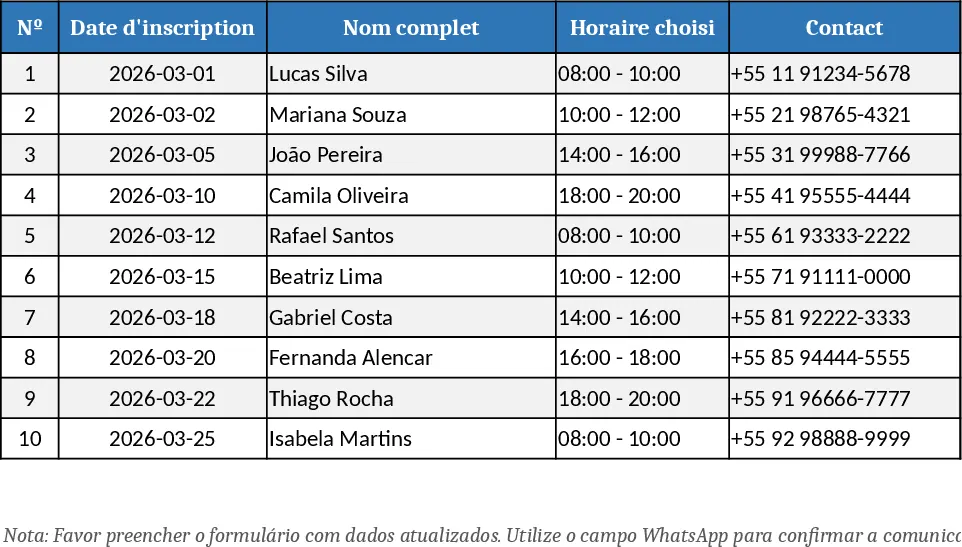
This template turns a regular workbook into a lightweight language‑school management system. It contains separate sheets for each language department (English, French, Portuguese, Spanish) and a master dashboard that pulls data from all four. Each department sheet holds a table of students with fields such as Nº, Registration Date, Full Name, Chosen Schedule, Contact, WhatsApp, Gender, ID Number, Amount Paid, Amount Due, Debt, and Status. Drop‑down lists let you select the level (0‑5) and schedule, while data validation ensures consistent entry. A hidden "Database" sheet stores every record in a normalized table, which the dashboard uses to generate real‑time statistics: total students per department, payment status breakdown, and overdue balances. The dashboard also includes ready‑to‑print invoice and receipt templates that auto‑fill with the selected student's data.
The solution solves the daily headache of juggling multiple Excel files or manual paper forms. By centralising enrollment, billing, and reporting, staff spend far less time on repetitive data entry and can instantly see which classes are full, which students owe money, and how each language program is performing. It is ideal for small‑to‑medium language schools that lack a full‑blown ERP but still need a professional‑looking interface, secure access, and clear financial oversight. The built‑in password protection prevents unauthorized edits, while VBA‑driven navigation buttons give the feel of a dedicated application.
Who benefits? School administrators, front‑desk staff, and accountants who need to register new learners, issue invoices, record payments, and monitor departmental health. The template tracks every student’s lifecycle—from first registration through payment completion—providing a single source of truth for enrollment numbers, revenue forecasts, and debt collection. It also produces printable receipts and invoices, reducing the need for separate accounting software.
How to use:
- Open the workbook and enter the access password on the login sheet.
- Click the "New Enrollment" button to open the entry form; fill in all required fields and press "Save" – the data is automatically written to the hidden database and the appropriate department sheet.
- To generate an invoice or receipt, select a student from the drop‑down on the "Documents" sheet and click "Create" – a formatted document appears ready for printing or emailing.
- Review the "Dashboard" sheet for up‑to‑date charts and tables showing enrollment counts, payment status, and overdue amounts.
Expected benefits include a noticeable reduction in manual paperwork, faster invoice generation, and clearer insight into each language program’s financial health, all without needing any prior VBA knowledge.
Similar Templates Recommendation
Secondary School Results and Ranking Template
Track up to 200 secondary students' marks, auto‑calculate grades, averages, divisions and rankings in a clear, formatted sheet.

Couple Budget and Cash Flow Tracker Template
Track monthly income, expenses, and cash flow for a working couple, visualize budgets and savings goals in one spreadsheet.

Date Range and Internal Log Template
Create an Excel file with two columns for dates and internal notes, with colored rows for different date ranges.
