Inventory Management and Stock Tracking with Supplier Tracking Template
Maintaining an accurate count of your products is the backbone of any successful retail or distribution business. This Inventory Management and Control template provides a robust yet user-friendly framework to move away from messy notebooks or disorganized spreadsheets. By centralizing your product data and tracking every movement, you gain a clear view of your assets, ensuring you never miss a sale due to unexpected stockouts or tie up too much capital in overstock. The template is built around three core pillars: a comprehensive Item Master, a detailed Movement Log, and an automated Inventory Summary that does the heavy lifting for you.
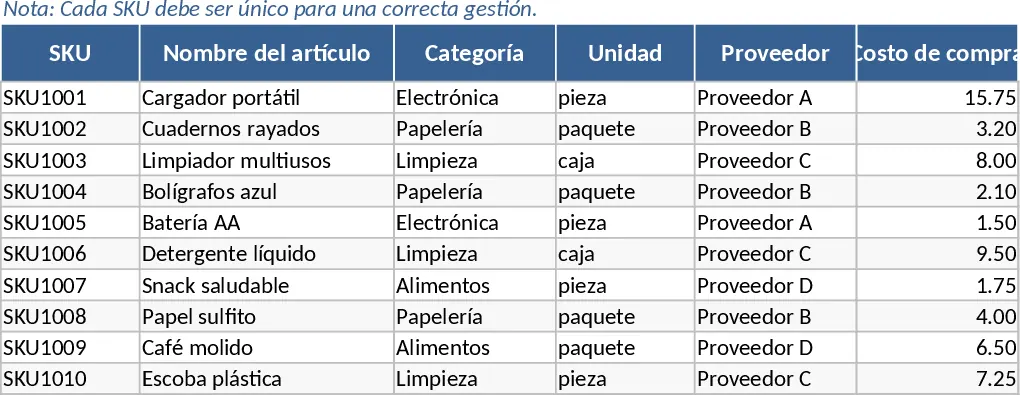
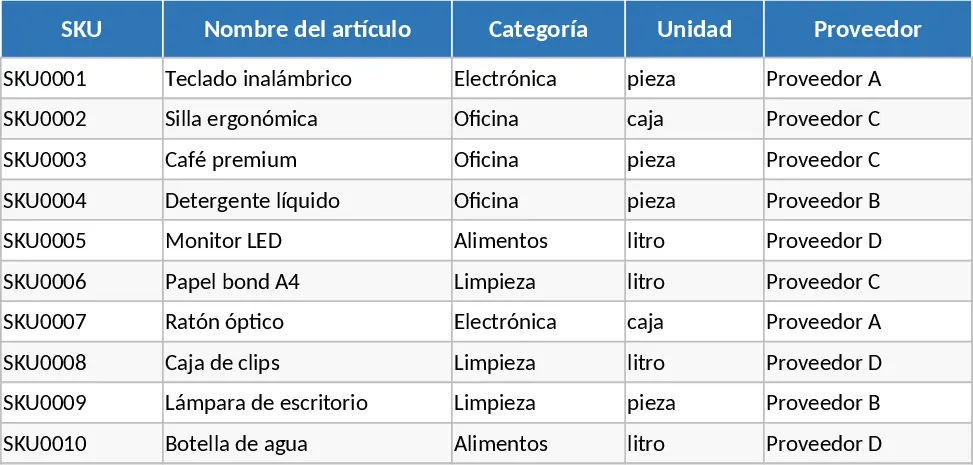
The Item Master serves as your primary database where you define your product catalog. Here, you can assign unique SKUs, categorize items for better organization, and set critical financial parameters like purchase costs and selling prices. Most importantly, it allows you to establish a Reorder Point for every item—a specific threshold that triggers a notification when stock levels drop too low. This proactive approach to procurement helps you maintain the perfect balance of inventory at all times. The Movement Log is designed for daily operational use, allowing you to record every time an item enters or leaves your storage area. Whether it is a new shipment from a supplier, a customer sale, or a manual adjustment for damaged goods, every transaction is captured with a date, reference number, and the person responsible, creating a reliable audit trail for your operations.
This tool is particularly beneficial for small to medium-sized business owners, warehouse supervisors, and e-commerce sellers who need a professional way to manage their physical goods without investing in expensive, complex software. It simplifies the daily workflow by automating the math; instead of manually calculating how many units are left, the Inventory Summary sheet aggregates all your data to show your current stock levels in real-time. It highlights exactly which items need your attention by displaying a clear Reorder alert when quantities hit your predefined limits. This visibility allows you to make data-driven purchasing decisions and keep your supply chain running smoothly.
To get started with your inventory control system, follow these simple steps: First, navigate to the Item Master sheet and input your current product list. Ensure each SKU is unique and set your desired reorder points based on how quickly each item typically sells. Second, whenever you receive new stock or fulfill an order, enter the details into the Movement Log. Use the dropdown menus to select the SKU and the type of movement to ensure data consistency. Finally, regularly check the Inventory Summary sheet to monitor your total stock on hand. Look for the conditional formatting alerts that signal it is time to contact your suppliers for a restock.
By implementing this structured approach, you can expect to significantly reduce the time spent on manual inventory counts and minimize human error in your records. The primary benefit is the peace of mind that comes from having a single source of truth for your stock levels, allowing you to focus more on growing your business and less on searching through boxes in the warehouse.
Similar Templates Recommendation
Inventory Management and Stock Tracking with Automation Template
Efficiently track stock levels, manage item movements, and receive automatic reorder alerts to maintain optimal inventory balance for your business.
Inventory Management and Stock Tracking with Dashboard Template
Efficiently track stock levels, record item movements, and monitor reorder alerts to maintain optimal inventory balance for your business.
Daily Stock Maintenance Template
Track daily inventory levels, monitor stock movements, and manage reorder points to ensure seamless warehouse and supply chain operations.