

Phone Directory with Search Template
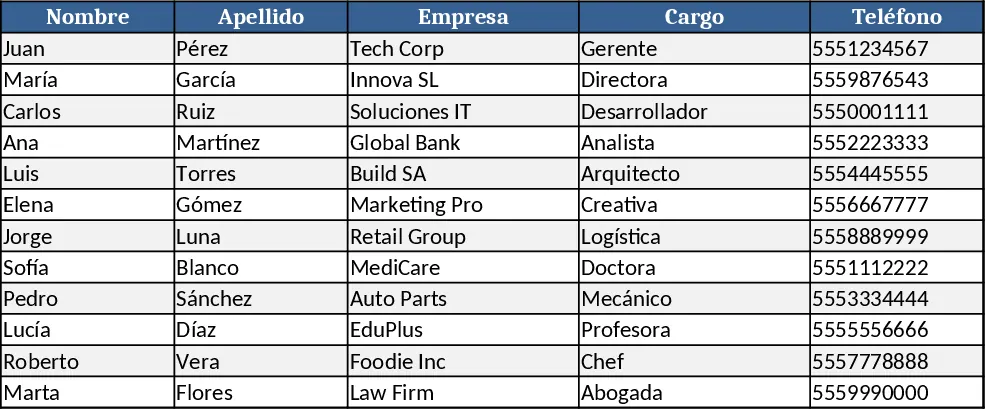
The Phone Directory with Search template is built on two simple sheets. The Directory sheet holds all contact records with columns for Name, Department, Job Title, Phone Number, Email, Office Location, and optional notes. Data validation dropdowns keep department names consistent, and conditional formatting highlights missing phone numbers. The second sheet, Search, provides a clean interface where you can select a department or start typing a name; behind the scenes a FILTER formula pulls matching rows from the Directory sheet, displaying full details instantly.
This template solves the everyday hassle of scrolling through long contact lists or hunting for a colleague’s number in email threads. By centralizing employee information and adding a fast search function, office administrators, HR staff, and team leaders can locate the right person in seconds, reducing interruptions and mis‑dialed calls. It also helps keep contact data up‑to‑date, as any change made in the Directory sheet automatically reflects in the Search results.
Anyone who manages internal communications—HR managers onboarding new staff, office managers maintaining facilities contacts, or project coordinators needing quick access to stakeholder phone numbers—will find this tool valuable. It tracks every employee’s current phone number, extension, and location, making it easy to produce department‑wise contact lists or export a subset for external sharing.
How to use:
- Open the Directory sheet and enter each employee’s details, using the dropdowns for Department to ensure uniform entries.
- Switch to the Search sheet, choose a Department from the dropdown or type part of a name in the search box.
- The template automatically filters and shows matching contacts with full information.
- If you need a printable list, copy the filtered rows to a new sheet or use Excel’s Print Area feature.
Expected benefits include faster lookup times, fewer phone‑related errors, and a single source of truth for contact information, freeing up staff to focus on core tasks rather than hunting for numbers.
Similar Templates Recommendation
Secondary School Results and Ranking Template
Track up to 200 secondary students' marks, auto‑calculate grades, averages, divisions and rankings in a clear, formatted sheet.

Couple Budget and Cash Flow Tracker Template
Track monthly income, expenses, and cash flow for a working couple, visualize budgets and savings goals in one spreadsheet.

Date Range and Internal Log Template
Create an Excel file with two columns for dates and internal notes, with colored rows for different date ranges.
