

Warframe Tenno Activity Tracker Template
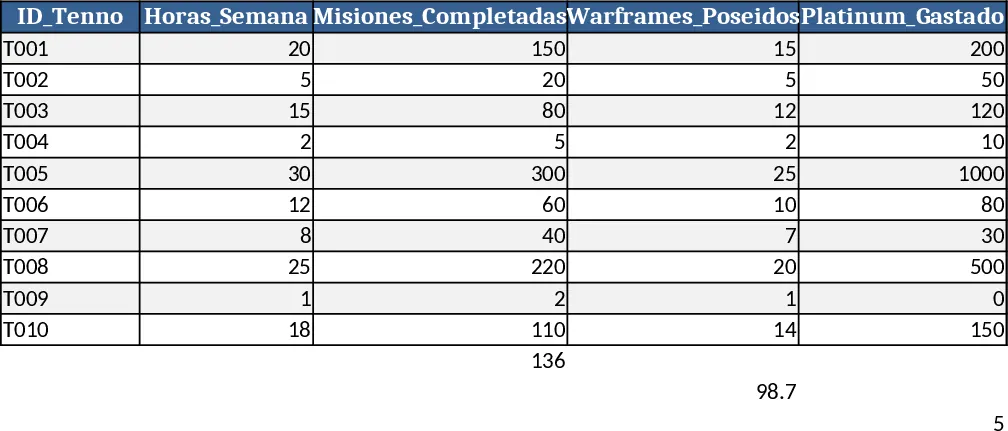
This Excel template is built for Warframe community managers who need a clear, up‑to‑date view of Tenno performance. It contains three worksheets: Data Entry, Summary, and Charts. In the Data Entry sheet you list each player (ID_Tenno) and fill the columns Horas_Semana, Misiones_Completadas, Warframes_Poseidos, Platinum_Gastado, Nivel_Maestria, Modo_Preferido and Estado_Retencion. The last two fields use dropdown lists (Solo/Grupo and Activo/En_Riesgo/Inactivo) to keep data consistent. The Summary sheet automatically calculates totals, averages and counts – for example average weekly hours, total platinum spent, average mastery level, and the percentage of players in each retention state. The Charts sheet turns those numbers into bar and line graphs that highlight the most active players, spend trends, and mode preferences.
The template solves the common problem of scattered spreadsheets and manual calculations. By centralising raw player data and providing instant analytics, you can spot declining engagement before it becomes a churn issue, reward high‑performing Tenno, and plan in‑game events that match the community’s play style. It reduces the time spent copying data between tools and eliminates errors caused by manual aggregation, giving you reliable insight for weekly reports or strategic decisions.
Who benefits most? Clan officers, community managers, and data analysts who oversee player health in Warframe. It is also useful for streamers or content creators who want to showcase their audience’s activity, and for developers who need a quick prototype of player‑behavior dashboards.
How to use
- Open the Data Entry sheet and add a new row for each Tenno, selecting the appropriate mode and retention status from the dropdowns.
- The template will instantly update the Summary sheet – check the key performance indicators at the top of the page.
- Switch to the Charts sheet to view visual trends; you can filter the charts by mode or retention status using the slicers.
- Export the Summary tab as a PDF or copy the charts into a presentation for stakeholder updates.
Expected benefits: you’ll save time compiling manual reports and get a clearer picture of player health with just a few clicks.
Similar Templates Recommendation
Secondary School Results and Ranking Template
Track up to 200 secondary students' marks, auto‑calculate grades, averages, divisions and rankings in a clear, formatted sheet.

Couple Budget and Cash Flow Tracker Template
Track monthly income, expenses, and cash flow for a working couple, visualize budgets and savings goals in one spreadsheet.

Date Range and Internal Log Template
Create an Excel file with two columns for dates and internal notes, with colored rows for different date ranges.
