

Soccer Goal Size & Dimension Tracker Template
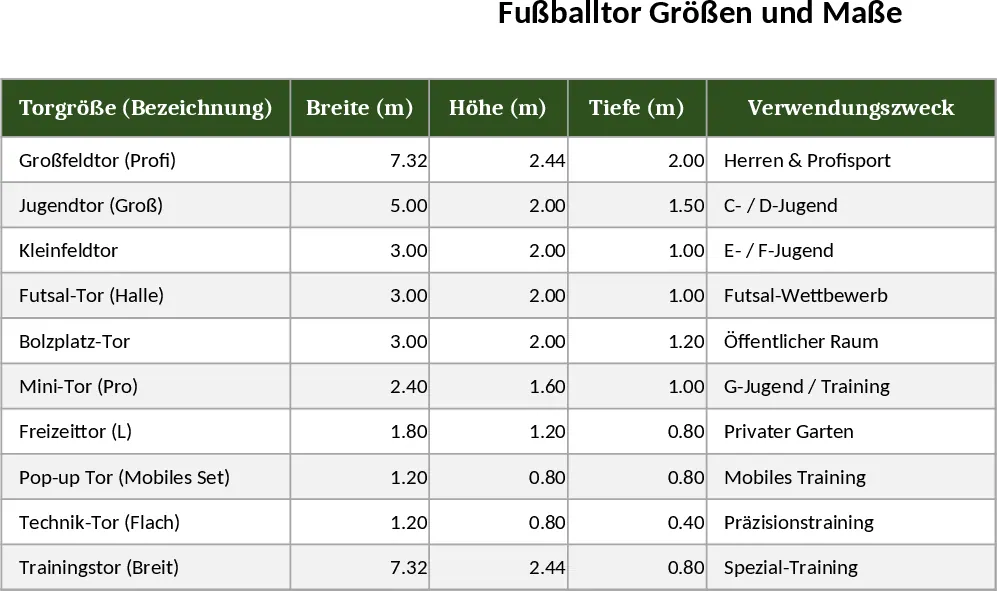
This template provides a ready‑made Excel workbook for logging every detail of a football goal – from overall width and height to frame material and special remarks. The workbook contains two sheets: Goal Specs and Summary. In the Goal Specs sheet you’ll find columns for Goal ID, Width (m), Height (m), Depth (m), Frame Material, Net Size, Standard Size (with a dropdown of common dimensions such as 7.32 × 2.44 m, 5.5 × 2.0 m, etc.), and a free‑text Notes field. The Summary sheet automatically aggregates the data, showing counts of each standard size, average dimensions, and a simple bar chart that visualises the distribution of goal sizes across your inventory.
The workbook solves the common headache of scattered measurements and inconsistent record‑keeping for sports facilities, clubs, or event planners. Instead of juggling handwritten lists or multiple files, you get a single, searchable source that instantly highlights which goals meet league standards, which need replacement, or where custom dimensions have been used. This clarity speeds up budgeting, procurement, and compliance checks, while also providing a professional reference for coaches, facility managers, and equipment suppliers.
Anyone who needs to manage football‑related assets will find this template useful – from stadium operators planning new installations, to school sports departments ordering goals, to tournament organizers ensuring every pitch complies with regulations. By centralising the data, the template helps you keep track of each goal’s specifications, maintenance history, and any special notes (e.g., surface type, anchoring method), making day‑to‑day operations smoother and more transparent.
How to use
- Open the workbook and go to the Goal Specs sheet. Enter a unique Goal ID for each item and fill in the measured Width, Height, and Depth.
- Choose the appropriate Standard Size from the dropdown list, or type a custom size if needed. Select the Frame Material and Net Size from the provided lists.
- Add any relevant comments in the Notes column (e.g., installation date, supplier, condition).
- Switch to the Summary sheet to see an automatically updated overview, including a chart of size distribution and average dimensions.
Expected benefits: reduces manual data entry time, eliminates mismatched records, and gives you instant insight into your goal inventory, helping you plan purchases and maintenance more efficiently.
Similar Templates Recommendation
Secondary School Results and Ranking Template
Track up to 200 secondary students' marks, auto‑calculate grades, averages, divisions and rankings in a clear, formatted sheet.

Couple Budget and Cash Flow Tracker Template
Track monthly income, expenses, and cash flow for a working couple, visualize budgets and savings goals in one spreadsheet.

Date Range and Internal Log Template
Create an Excel file with two columns for dates and internal notes, with colored rows for different date ranges.
