

Excel File Structure Outline Template
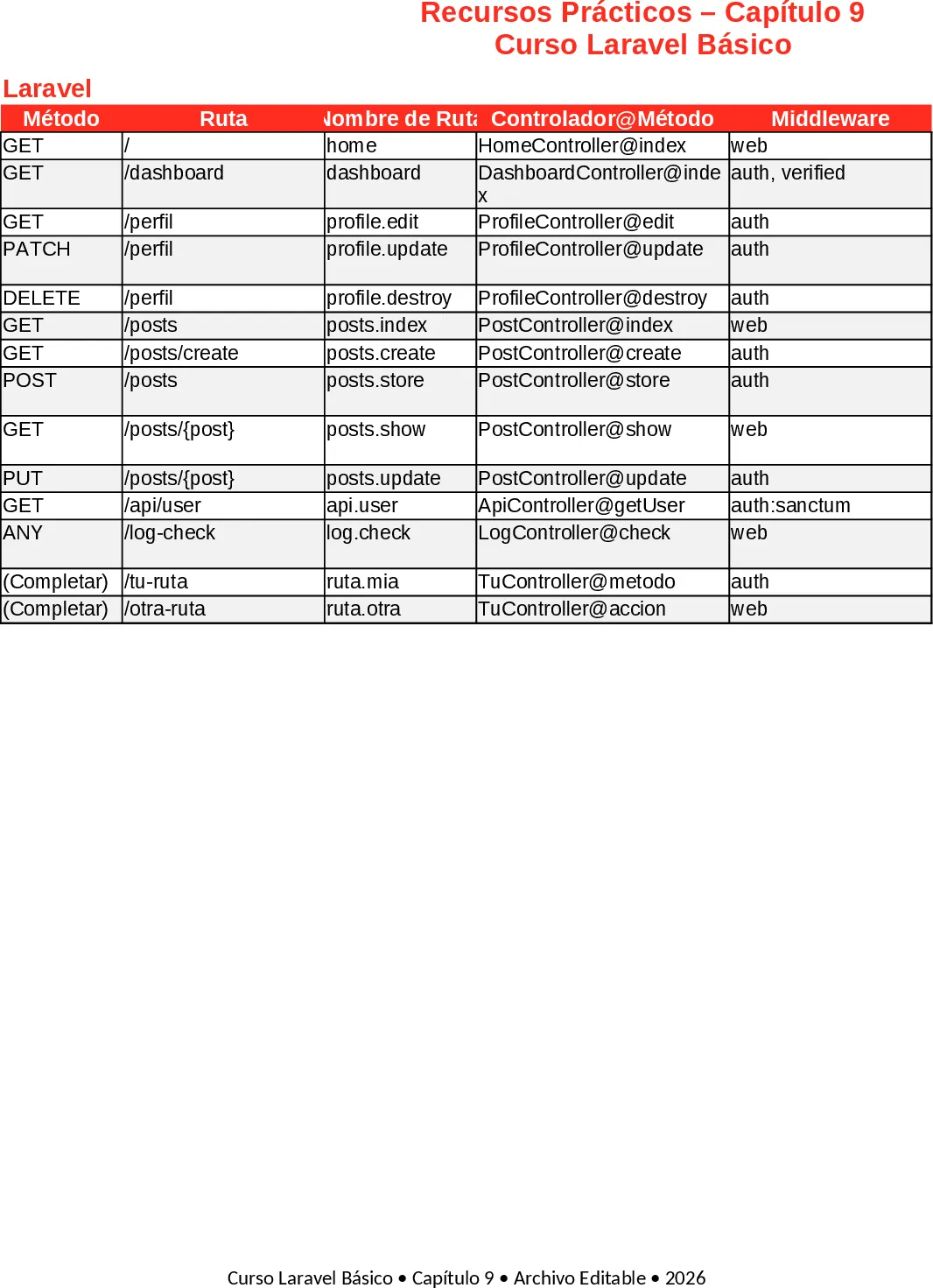
This workbook is a ready‑made teaching aid for the Laravel Básico – Chapter 9 lesson. It contains five fully formatted sheets that follow Laravel’s official colour palette and typography, so students get a professional‑looking reference they can edit and reuse.
Sheet 1 – Rutas Básicas lists twelve common routes in a table with columns for HTTP method, URL, route name, controller@method, middleware and a brief description. Two extra rows are left commented for learners to add their own routes. Sheet 2 – Controladores shows four core controllers (HomeController, ProductController, AuthController and two additional examples) with each method, a short description and a clean PHP code snippet in the last column. Sheet 3 – Comandos Artisan Útiles provides eighteen essential Artisan commands, their purpose, recommended usage and the Laravel version they apply to. Sheet 4 – Datos de Ejemplo (Seeders) offers a ready‑to‑import product table with twelve varied records (id, name, slug, price, stock, category, created_at) that can be used directly in database seeders. Finally, Sheet 5 – Notas del Estudiante is a blank page titled “Mis Notas y Tareas del Capítulo 9” with pre‑formatted cells for personal annotations and homework.
The template solves the common problem of students having to copy‑paste scattered examples from documentation. By gathering routes, controller code, Artisan commands and seed data in one place, it saves time preparing class material and lets learners focus on understanding concepts rather than formatting tables. The consistent styling—blue headers, alternating row colours, borders, and the Laravel logo—makes the file look polished and reinforces brand identity throughout the course.
Anyone teaching or learning basic Laravel will benefit: instructors can hand out the file as a reference guide, and students can use it as a sandbox to experiment with routes, write controller methods, run Artisan commands, and populate a database with realistic seed data. The notes sheet encourages active learning, letting students capture questions, to‑do items, or code snippets they modify during practice.
How to use
- Open the workbook and review the pre‑filled tables on Sheets 1‑4. Replace placeholder values with your own project specifics if needed.
- Add your custom routes in the commented rows of Sheet 1, then run
php artisan route:listto verify they appear. - Copy the controller snippets from Sheet 2 into your
app/Http/Controllersdirectory, adjusting namespaces as required. - Use the Artisan commands listed on Sheet 3 as a checklist while building the application; the "Uso recomendado" column gives quick tips.
- Import the product data from Sheet 4 into a seeder (
php artisan db:seed) to populate a demo database. - Jot down observations, questions, or task lists on Sheet 5 as you work through the chapter.
Expected benefits: a cleaner workflow, less time spent on manual documentation, and a single source of truth for all Chapter 9 resources, helping learners stay organized and progress faster.
Similar Templates Recommendation
Secondary School Results and Ranking Template
Track up to 200 secondary students' marks, auto‑calculate grades, averages, divisions and rankings in a clear, formatted sheet.

Couple Budget and Cash Flow Tracker Template
Track monthly income, expenses, and cash flow for a working couple, visualize budgets and savings goals in one spreadsheet.

Date Range and Internal Log Template
Create an Excel file with two columns for dates and internal notes, with colored rows for different date ranges.
