

Weekly Contributions and Payroll Tracker Template
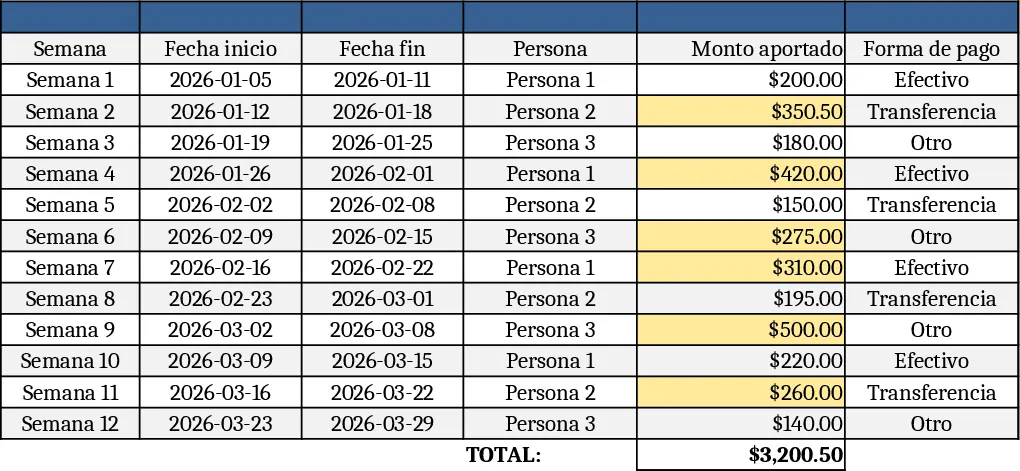
This spreadsheet is built around three simple tabs – Data Entry, Weekly Summary, and Charts. In the Data Entry sheet you record each payroll cycle by selecting the week (or date range) and the employee from a drop‑down list. Key columns capture the gross salary, the specific contribution amount for that employee, any statutory deductions, and the resulting net pay. A total column adds up the weekly outflow for each row. The Weekly Summary sheet pulls those rows together with formulas that calculate the total contribution per employee, the total payroll cost for the week, and cumulative totals for the month or year. The optional Charts tab visualises trends such as contribution growth or payroll spikes, giving you a quick visual snapshot.
The template solves the common headache of juggling multiple Excel files or handwritten notes to keep payroll accurate. By centralising every weekly payment in one place, you eliminate double‑entry errors, ensure each contribution is recorded precisely, and instantly see how payroll expenses affect your cash flow. It also helps you stay compliant with internal budgeting rules because the totals are calculated automatically, leaving you free to focus on strategic decisions rather than manual math.
Designed for small‑business owners, HR assistants, or accountants who manage a tight‑knit team, the file works best when you have a handful of employees and need a clear, repeatable process for weekly payroll. Whether you’re preparing bank transfers, reconciling with your accounting software, or simply wanting a historical log of how much each person has contributed over time, this template gives you the structure and transparency you need.
How to use
- Open the workbook and go to the Data Entry tab. Choose the week (or enter the start date), pick an employee from the drop‑down, and fill in the gross salary, contribution amount, and any deductions.
- Add a new row for each employee each week. The sheet will automatically compute net pay and the weekly total.
- Switch to the Weekly Summary tab to see aggregated figures: total contributions per employee, total payroll for the selected week, and running totals for the period you choose.
- (Optional) Visit the Charts tab to view visual trends; the charts update automatically as you add new rows.
By using this template you’ll spend far less time reconciling weekly payroll and gain a clear snapshot of cash requirements, making payroll processing smoother and more reliable.
Similar Templates Recommendation
Secondary School Results and Ranking Template
Track up to 200 secondary students' marks, auto‑calculate grades, averages, divisions and rankings in a clear, formatted sheet.

Couple Budget and Cash Flow Tracker Template
Track monthly income, expenses, and cash flow for a working couple, visualize budgets and savings goals in one spreadsheet.

Date Range and Internal Log Template
Create an Excel file with two columns for dates and internal notes, with colored rows for different date ranges.
