

Fabrica de Insumos 17 De Febrero Block Inventory and Sales Tracking Template
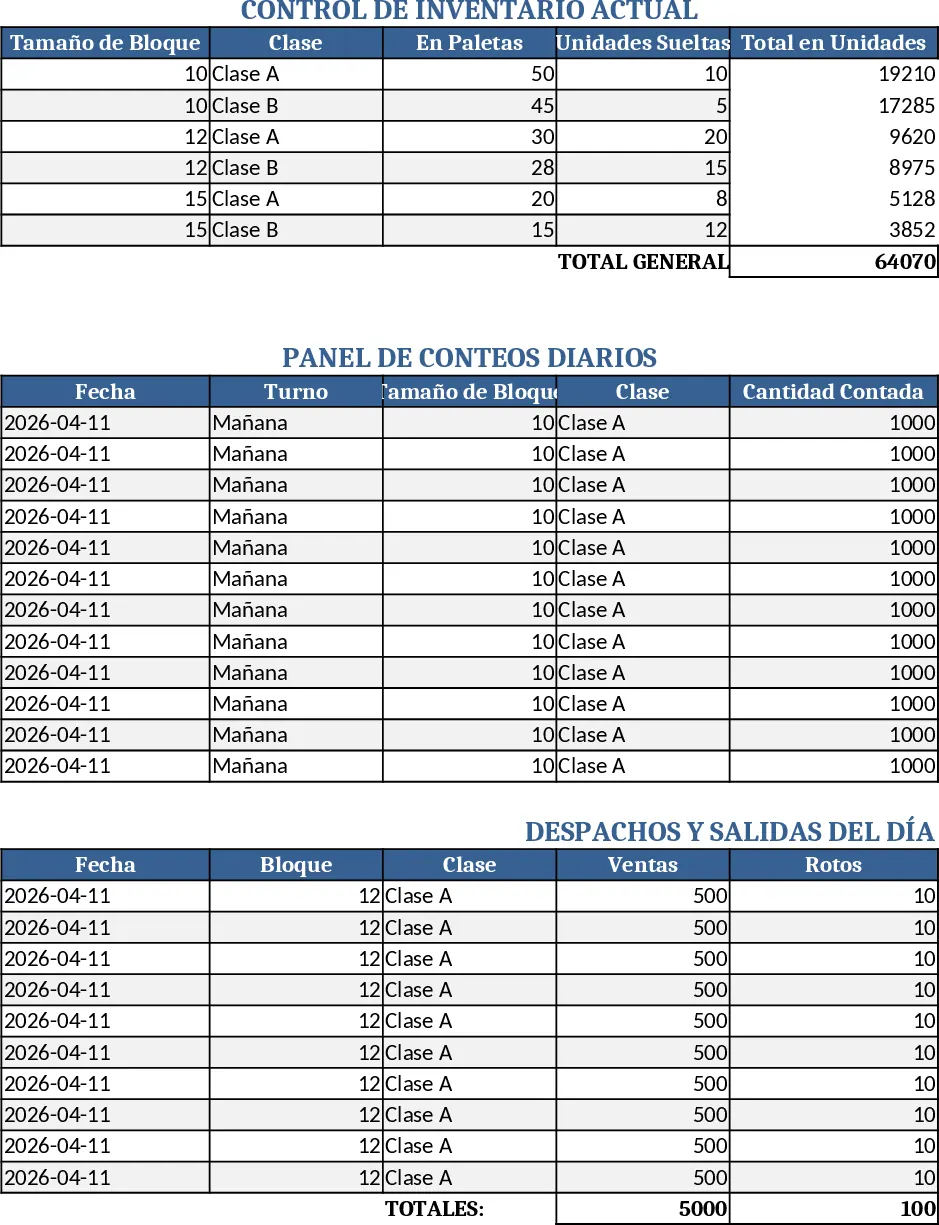
This Excel template is built for a block‑manufacturing plant and combines three essential panels on a single, well‑designed worksheet. The Control de Inventario panel lists every size (10, 12, 15) and class (A, B) of block, letting you enter quantities in pallets or individual units while automatically converting everything to units. The conversion rates are fixed – a pallet of size 10 holds 384 blocks, size 12 holds 320, and size 15 holds 256 – so you only need to record the number of pallets and the sheet does the math. Below the inventory table, a Panel de Ventas captures each day's dispatches, broken pieces, donations and shipments to the partner "Construpatria". Every entry includes the date and instantly subtracts the sold or lost units from the current inventory, showing the updated balance at the end of the line. Finally, the Panel de Conteos records the twice‑daily physical counts (morning and afternoon), allowing you to compare counted stock with system stock and spot discrepancies quickly.
The template solves the common headache of juggling separate spreadsheets for stock, sales and physical counts. By consolidating everything, it eliminates manual recalculations, reduces the risk of data entry errors, and gives you an at‑a‑glance view of how many blocks are available, what was moved, and where any losses occurred. It is especially useful for warehouse supervisors, production planners and sales coordinators who need real‑time visibility of block availability and daily movement.
Who benefits most? Plant managers and inventory clerks who run daily counts, sales teams that need to log dispatches, and anyone responsible for reporting stock levels to finance or logistics. The template helps you track the exact number of blocks per size and class, monitor daily sales and breakage, record donations, and keep a precise audit trail of morning and afternoon counts. This level of detail supports better ordering decisions, smoother production scheduling, and clearer communication with customers.
How to use:
- Open the sheet and go to the "Control de Inventario" section. Enter the number of pallets or individual units for each size‑class combination; the formulas will display total units automatically.
- When a sale, breakage, donation or Construpatria shipment occurs, add a new row in the "Panel de Ventas" with the date, type of movement and quantity. The inventory balance column updates instantly.
- At the start of each day, fill in the morning count in the "Panel de Conteos"; repeat the same in the afternoon column later. The sheet will highlight any variance between counted and system stock.
- Review the summary rows at the bottom of each panel to see current stock, total daily sales and any discrepancies.
Expected benefits include faster end‑of‑day reconciliation, fewer manual calculations and a clearer picture of inventory health, all without needing multiple files or complex macros.
Similar Templates Recommendation
Secondary School Results and Ranking Template
Track up to 200 secondary students' marks, auto‑calculate grades, averages, divisions and rankings in a clear, formatted sheet.

Couple Budget and Cash Flow Tracker Template
Track monthly income, expenses, and cash flow for a working couple, visualize budgets and savings goals in one spreadsheet.

Date Range and Internal Log Template
Create an Excel file with two columns for dates and internal notes, with colored rows for different date ranges.
