

Name and Age List Template
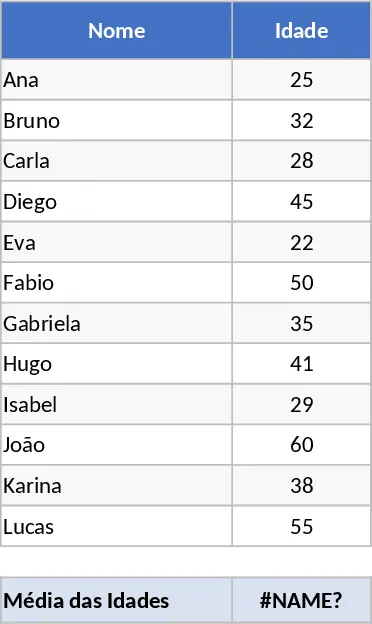
This template is a single‑sheet workbook called Names & Ages. It contains four columns – Name, Age, Date of Birth (optional) and Comments – plus a small summary area at the top that automatically shows the total number of entries, the average age and a quick bar chart of age distribution. The layout is clean, with bold headers, data‑validation drop‑downs for common age ranges, and conditional formatting that highlights ages above or below a chosen threshold. Users can instantly see both the raw list and the aggregated insights without any extra formulas.
The file is perfect for anyone who needs to keep a quick register of people and their ages. Teachers can track class rosters, HR teams can maintain a snapshot of employee ages for benefits planning, event organizers can manage attendee lists, and small business owners can record customer demographics. By centralising this information, the template eliminates the hassle of juggling separate notes or manual calculations, giving you an at‑a‑glance view of age‑related trends and helping you make informed decisions about staffing, programming, or marketing.
Because the template is pre‑built, you spend less time setting up columns and formulas and more time focusing on the data that matters. It solves the common problem of inconsistent data entry by providing ready‑made fields and validation rules, ensuring every row follows the same structure. The built‑in summary automatically updates as you add or edit rows, so you always have the latest totals and averages without copying formulas or creating new charts.
How to use
- Open the workbook and go to the Names & Ages sheet.
- Enter each person's name in the Name column and their age in the Age column; you can also fill in the optional Date of Birth for automatic age calculation.
- Add any relevant notes in the Comments column.
- Watch the summary area refresh instantly, showing the total count, average age and a visual age distribution chart.
Using this template typically saves you the time you would otherwise spend building a list from scratch and manually calculating statistics. It streamlines data entry, reduces errors, and gives you quick, actionable insights into the age profile of any group you are managing.
Similar Templates Recommendation
Secondary School Results and Ranking Template
Track up to 200 secondary students' marks, auto‑calculate grades, averages, divisions and rankings in a clear, formatted sheet.

Couple Budget and Cash Flow Tracker Template
Track monthly income, expenses, and cash flow for a working couple, visualize budgets and savings goals in one spreadsheet.

Date Range and Internal Log Template
Create an Excel file with two columns for dates and internal notes, with colored rows for different date ranges.
