

Comprehensive Concrete & Finish Materials Takeoff Template
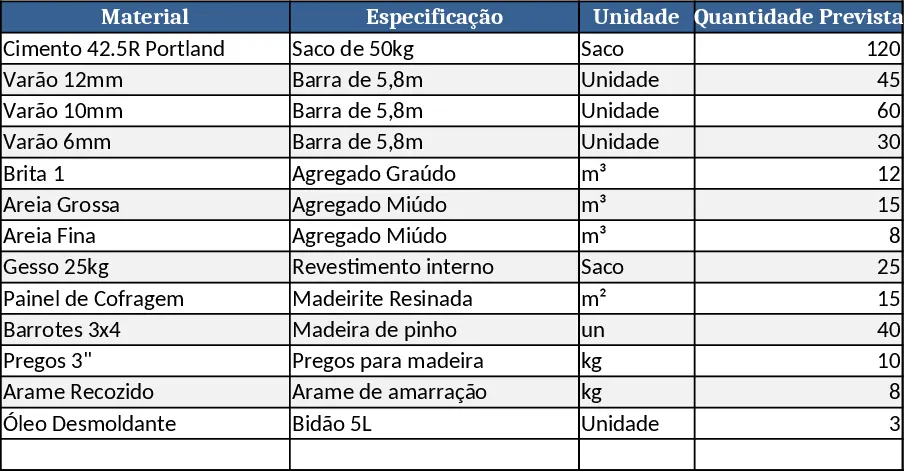
This template is a comprehensive material specification workbook designed for construction projects. It typically contains a Materials List sheet where you record each item (cement, rebar, gypsum, nails, wire, formwork, etc.), its unit size, required length or weight, and the unit price. A Summary sheet automatically aggregates quantities and calculates total costs per category and overall. Optional dropdowns let you select material grades (e.g., Portland 42.5) and finish quality levels, ensuring consistency across the file. The layout mirrors a purchase map, so the final report can be printed or shared with suppliers.
The workbook solves the common headache of manual take‑offs and mismatched orders. By centralising every specification, you avoid over‑buying, under‑buying, and costly on‑site adjustments. It streamlines budgeting, improves accuracy in procurement, and gives project managers a clear view of material spend versus the original estimate. The clear itemisation also helps architects and site supervisors communicate exact needs to the client or store.
Ideal for construction managers, site engineers, procurement officers, and small‑to‑medium contractors who need a reliable way to translate design drawings into a purchase‑ready list. Whether you are preparing a new residential build, a renovation, or a high‑finish interior, the template adapts to any scope by simply adding or removing rows.
The template helps you track every material type, its required quantity, unit price, and total cost. It also flags items that need special handling, such as high‑quality finishes or custom lengths, and provides a consolidated cost overview that can be attached to project proposals or client invoices.
How to use
- Open the Materials List sheet and enter each material, selecting the appropriate grade from the dropdowns.
- Fill in the required dimensions (length, weight, number of pieces) and the unit price you obtained from suppliers.
- The Summary sheet will instantly calculate line totals and aggregate subtotals for each material group.
- Review the final cost table, adjust quantities if needed, and export or print the purchase map for the store.
Expected benefits: you’ll spend less time reconciling orders, reduce material waste, and gain a clearer picture of project costs with minimal manual calculation.
Similar Templates Recommendation
Secondary School Results and Ranking Template
Track up to 200 secondary students' marks, auto‑calculate grades, averages, divisions and rankings in a clear, formatted sheet.

Couple Budget and Cash Flow Tracker Template
Track monthly income, expenses, and cash flow for a working couple, visualize budgets and savings goals in one spreadsheet.

Date Range and Internal Log Template
Create an Excel file with two columns for dates and internal notes, with colored rows for different date ranges.
