

Employee Medical Leave and EPS Filing Tracker Template
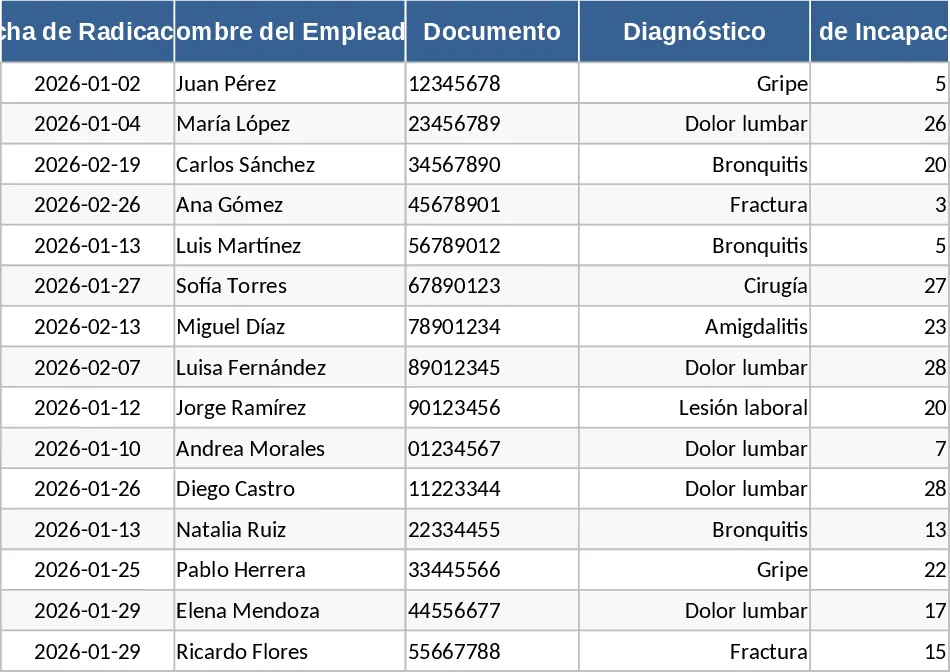
Managing employee medical leave and disability filings is a critical yet often overwhelming responsibility for HR departments. This comprehensive Excel template is designed to streamline the entire lifecycle of a disability claim, from the moment an employee submits a medical certificate to the final reimbursement from the health provider (EPS). By centralizing this data, you move away from fragmented emails and paper notes into a professional, audit-ready system that ensures compliance and financial accuracy.
The template is structured with intuitive columns covering essential data points: employee identification, type of disability (general illness, occupational hazard, or maternity/paternity), start and end dates, and the total number of days. It also includes dedicated sections for the filing details, such as the filing date, the specific EPS involved, and the unique tracking number assigned by the health entity. Dropdown menus allow you to quickly categorize the status of each claim, making it easy to filter for pending items that require immediate attention or rejected claims that need correction.
This tool is indispensable for HR interns, payroll specialists, and office managers who need to ensure the company is properly reimbursed for paid leave. Without a dedicated tracking system, companies often lose track of older claims, leading to significant financial losses over time. This template solves that problem by providing a clear visual overview of what has been filed, what is currently being processed, and what has been successfully settled. It also helps in identifying patterns in employee absenteeism, which can inform better wellness policies within the organization.
Beyond simple data entry, the template serves as a reliable source of truth during payroll audits or financial reviews. You can easily generate summaries showing the total amount of money recovered from health providers versus the amount still outstanding. This level of detail is crucial for cash flow management and for providing accurate reports to senior management regarding labor costs and social security recoveries.
How to use this template:
- Start by filling in the employee's basic information and the specific details found on their medical certificate, including the start date and the diagnosis category.
- Once the claim is submitted to the health provider, enter the filing date and the tracking number into the filing section to establish a formal record.
- Periodically check the status of the claim on the provider's portal and update the template's status column to reflect whether it is approved, pending, or paid.
- Use the built-in filters to review outstanding payments at the end of each month and follow up with the respective health provider for any delayed reimbursements.
Expected benefits: Enhanced organization of medical records and a significant reduction in the time spent searching for filing statuses or missing reimbursement data.
Similar Templates Recommendation
Secondary School Results and Ranking Template
Track up to 200 secondary students' marks, auto‑calculate grades, averages, divisions and rankings in a clear, formatted sheet.

Couple Budget and Cash Flow Tracker Template
Track monthly income, expenses, and cash flow for a working couple, visualize budgets and savings goals in one spreadsheet.

Date Range and Internal Log Template
Create an Excel file with two columns for dates and internal notes, with colored rows for different date ranges.
