

Basement Water Damage Insurance Claim Template
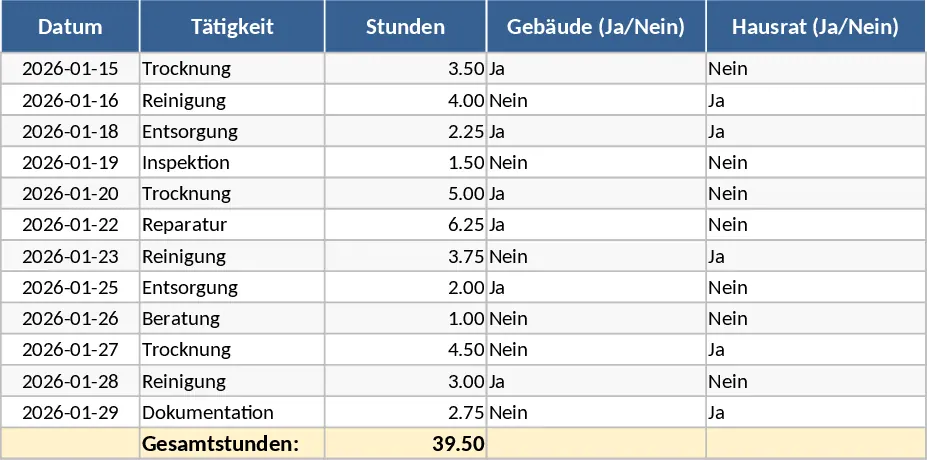
Managing a water damage claim in your basement requires meticulous record-keeping to ensure you receive the full compensation you are entitled to under your policy. This Excel template is designed to act as your central command center during the recovery process, transforming a chaotic situation into a structured, manageable project. The template is organized into several key sections: a Detailed Loss Inventory, a Repair & Service Tracker, and a Claim Summary Dashboard. Within these sections, you will find specific fields for item descriptions, purchase dates, original costs, and estimated replacement values, along with dropdown menus to track the status of each line item—from Reported to Settled.
This tool is essential for anyone facing the aftermath of a pipe burst, heavy rain, or sewage backup. The primary problem it solves is the loss of information; in the rush to clean up, it is easy to discard damaged items before they are properly documented. By using this template, you create a permanent digital record that includes space for photo references and receipt numbers. This level of detail is exactly what insurance adjusters look for, and providing a clean, organized spreadsheet can significantly reduce the back-and-forth communication often required to settle a claim. It helps you track not just the physical items lost, but also the soft costs like professional drying services, mold remediation, and temporary storage fees.
For homeowners, this template provides peace of mind during a high-stress period. For property managers or landlords, it serves as a professional report that can be shared with owners or legal teams. The template helps you manage the entire lifecycle of the claim, ensuring that structural repairs—such as flooring, insulation, and drywall—are tracked alongside personal property losses. By quantifying the total loss early on, you can better understand your financial position relative to your policy limits and deductibles. Having all your data in one place allows you to see the gap between your actual expenses and the insurance payouts in real-time.
How to use this template:
- Begin by walking through the damaged area and entering every affected item into the Inventory sheet. Include as much detail as possible, such as brand names and approximate age, to help the adjuster calculate depreciation accurately.
- Use the Expenses tab to log every invoice and receipt related to the cleanup and repair. This includes everything from the initial water extraction to the final coat of paint.
- Update the Claim Status column as you receive feedback or payments from the insurance company to keep a real-time view of your recovery progress.
Expected benefits: This template significantly reduces the time spent on administrative tasks and helps ensure no expense is overlooked, potentially increasing your total settlement amount while reducing the stress of the claims process.
Similar Templates Recommendation
Secondary School Results and Ranking Template
Track up to 200 secondary students' marks, auto‑calculate grades, averages, divisions and rankings in a clear, formatted sheet.

Couple Budget and Cash Flow Tracker Template
Track monthly income, expenses, and cash flow for a working couple, visualize budgets and savings goals in one spreadsheet.

Date Range and Internal Log Template
Create an Excel file with two columns for dates and internal notes, with colored rows for different date ranges.
