

Civil Registry Oath Appointment Tracking Template
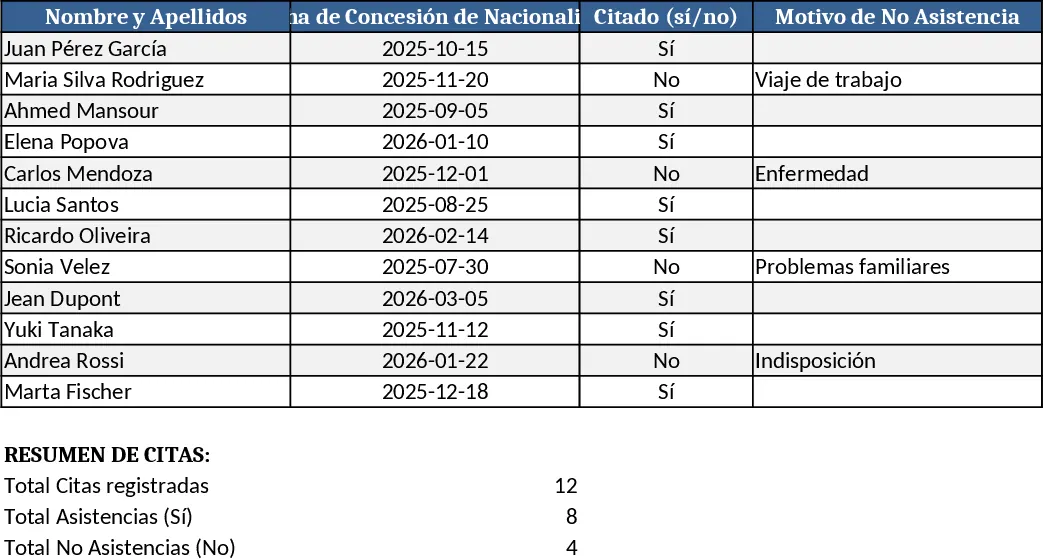
This template is built for civil‑registry offices that manage daily oath‑of‑constitution appointments for new Spanish citizens. It contains a main sheet where each row represents an applicant and includes fields for full name, nationality‑grant date, appointment status, reason for missed appointments, scheduled oath date, children’s Spanish citizenship, spouse nationality, and marriage location. Drop‑down lists standardise values such as "Cited", "Not Cited", "No Show" and "Married in Spain/Abroad". A summary section automatically counts pending appointments, shows upcoming oath dates, and highlights cases lacking required documentation.
The workbook solves the common headache of juggling email requests, scattered notes, and manual cross‑checks. By centralising every piece of information, staff can instantly see who has been invited, who needs a reminder, and which families meet the additional criteria for expedited processing. This reduces duplicate entries, prevents missed deadlines, and ensures that the Madrid nationality office receives complete, accurate data for each applicant.
It is ideal for clerks, case managers, and supervisors in the Registro Civil who handle foreign applicants seeking Spanish nationality and the accompanying DNI. Whether you are processing a single request or dozens each day, the template scales to keep everything organised and searchable by name, date, or status.
The sheet helps you track appointment invitations, monitor attendance, record family ties that may affect processing time, and generate quick reports for senior officials. By linking the applicant’s name directly to the nationality‑grant date, you can filter for those whose grant is recent and need to be scheduled promptly, avoiding bottlenecks.
How to use:
- Enter each applicant’s details in the "Applicants" sheet, selecting appropriate options from the drop‑downs.
- Update the "Appointment Status" column when you send an invitation or receive a confirmation; the summary will reflect the change instantly.
- Use the filter row to view pending appointments, missed sessions, or applicants with Spanish spouses or children.
- Export the summary table to share with the Madrid office or print a daily agenda for the registration desk.
Expected benefits: streamlined data entry, faster identification of pending cases, and reduced administrative effort when preparing daily appointment lists.
Similar Templates Recommendation
Secondary School Results and Ranking Template
Track up to 200 secondary students' marks, auto‑calculate grades, averages, divisions and rankings in a clear, formatted sheet.

Couple Budget and Cash Flow Tracker Template
Track monthly income, expenses, and cash flow for a working couple, visualize budgets and savings goals in one spreadsheet.

Date Range and Internal Log Template
Create an Excel file with two columns for dates and internal notes, with colored rows for different date ranges.
