

Procurement & Project Management Dashboard Template
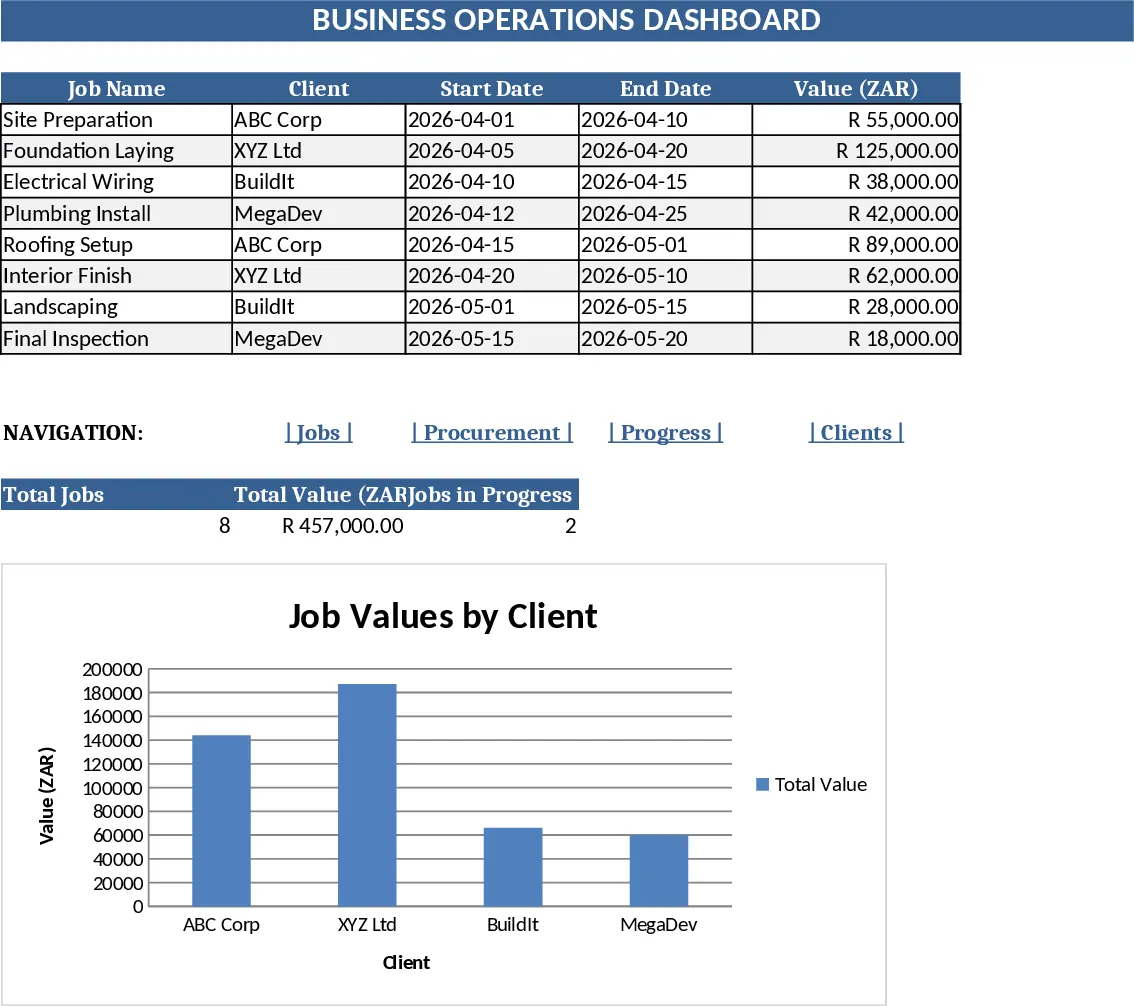
This Business Dashboard combines a Procurement Tracker and a Project Management timeline into a single, easy‑to‑use Excel workbook. The file is organized into four main sheets: Procurement Tracker, where you log each purchase of boards, hardware, timber, paint or sealers; Project Timeline, where you map every job from the initial quote through deposit, material purchase, delivery, assembly, installation and final snag checks; Financial Summary, which automatically aggregates costs, deposits and outstanding balances; and a visual Dashboard that pulls key metrics into charts and gauges.
The template solves the common headache of juggling separate spreadsheets for buying supplies and monitoring project progress. By centralizing data, you instantly see which materials are on order, upcoming delivery dates, cash flow status, and how each job is advancing against its schedule. This visibility helps you avoid stockouts, keep clients informed, and make faster decisions on resource allocation.
It is ideal for small‑to‑medium construction firms, carpentry shops, or any business that fabricates and installs products using boards, hardware, timber and finishing supplies. Whether you are a project manager, procurement officer, or owner‑operator, the dashboard gives you a single source of truth for both supply chain and project execution.
The workbook tracks every critical element: supplier name, material type, quantity, unit price, total cost, expected delivery, job name, quote amount, deposit received, purchase date, assembly start, installation date, snag‑check completion, and status flags (e.g., Pending, In‑Progress, Completed). Dropdown menus standardize entries, while conditional formatting highlights overdue deliveries or jobs behind schedule. The Dashboard sheet visualizes total spend by material, cash‑in‑vs‑cash‑out, and a Gantt‑style progress bar for each active project.
How to use
- Open the Procurement Tracker sheet and enter each purchase – select the material from the dropdown, fill supplier, quantity, unit price and expected delivery date.
- Switch to the Project Timeline sheet and create a new row for each job; input the quote amount, deposit received, and then update each stage date as the work progresses, choosing the appropriate status from the dropdown.
- The Financial Summary updates automatically; review total costs, pending payments and cash flow at a glance.
- Go to the Dashboard to see real‑time charts of material spend, upcoming deliveries, and project completion percentages.
Expected benefits: reduces manual data entry, cuts the time spent consolidating reports, and gives you instant insight into procurement health and project status, helping you keep jobs on schedule and budgets under control.
Similar Templates Recommendation
Secondary School Results and Ranking Template
Track up to 200 secondary students' marks, auto‑calculate grades, averages, divisions and rankings in a clear, formatted sheet.

Couple Budget and Cash Flow Tracker Template
Track monthly income, expenses, and cash flow for a working couple, visualize budgets and savings goals in one spreadsheet.

Date Range and Internal Log Template
Create an Excel file with two columns for dates and internal notes, with colored rows for different date ranges.
