

Daily Work Hours & Payment Tracker Template
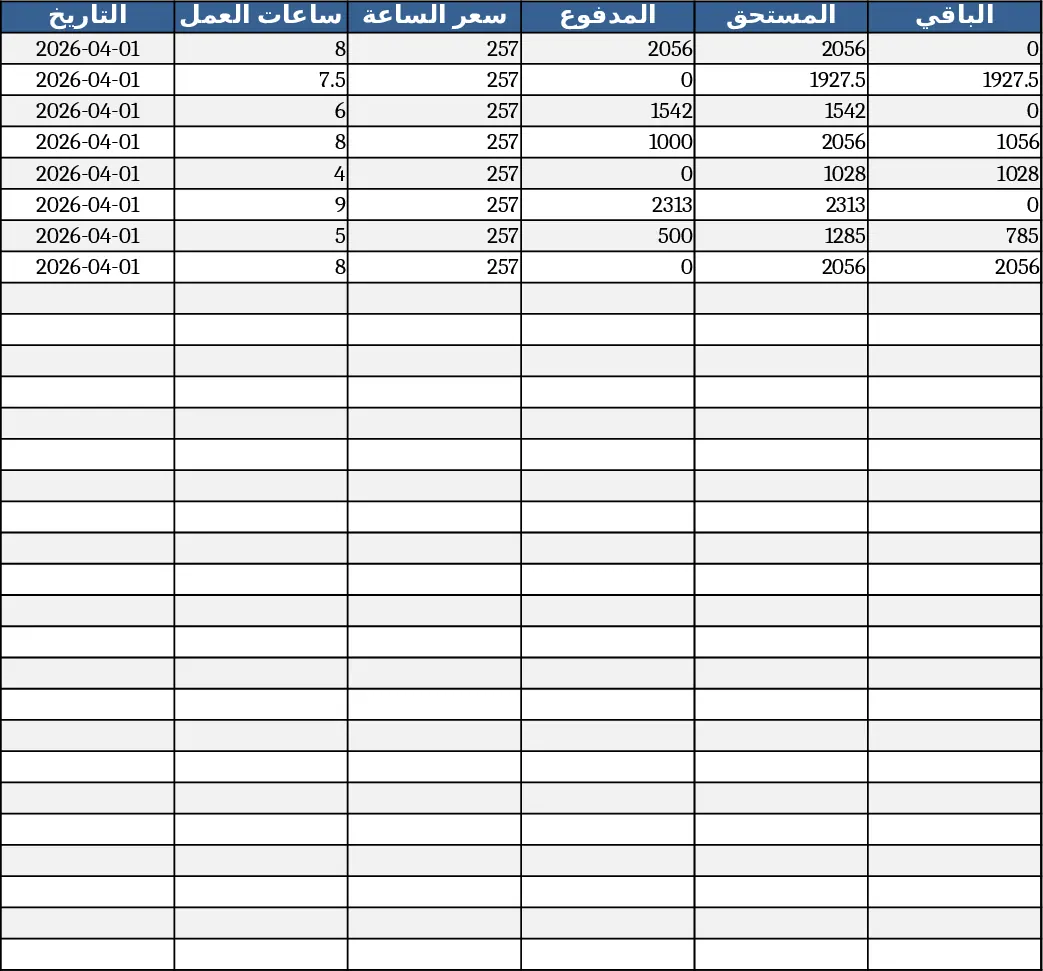
This Excel template is designed for simple yet powerful management of employee work hours and wages. The workbook contains a single sheet with six columns: Date (A) – auto‑filled each day you open the file; Hours Worked (B) – where you type the number of hours; Hourly Rate (C) – a fixed 257 DZD that appears automatically once hours are entered; Paid Amount (D) – where you record what has already been paid; Amount Due (E) – calculated as Hours × Rate; and Balance (F) – the difference between Amount Due and Paid. Around 30 pre‑formatted rows cover an entire month, and all formulas are hidden so users only see clean input cells.
The template solves the common headache of manually computing payroll each day. By automating the rate multiplication and balance calculations, it eliminates arithmetic errors and speeds up the daily logging process. Managers and HR staff can instantly see how much each employee earned, what has been paid, and what remains outstanding, enabling quick reconciliation and transparent record‑keeping.
Ideal for small businesses, freelancers, or HR departments that need a straightforward way to monitor monthly labor costs without complex software. Whether you’re tracking a single employee or a small team, the sheet scales effortlessly – just copy the rows for additional staff or extend the month as needed.
How to use
- Open the workbook; the Date column fills with today’s date automatically.
- Enter the number of hours worked for the day in column B.
- The Hourly Rate column (C) appears as 257 DZD automatically.
- Record any payment made in column D; columns E and F update instantly to show the total due and remaining balance.
Expected benefits include a noticeable reduction in time spent on payroll calculations and fewer manual entry mistakes, letting you focus on core HR tasks rather than number‑crunching.
Similar Templates Recommendation
Secondary School Results and Ranking Template
Track up to 200 secondary students' marks, auto‑calculate grades, averages, divisions and rankings in a clear, formatted sheet.

Couple Budget and Cash Flow Tracker Template
Track monthly income, expenses, and cash flow for a working couple, visualize budgets and savings goals in one spreadsheet.

Date Range and Internal Log Template
Create an Excel file with two columns for dates and internal notes, with colored rows for different date ranges.
