

Personnel Log with Date, Location, and Remarks Filter Template
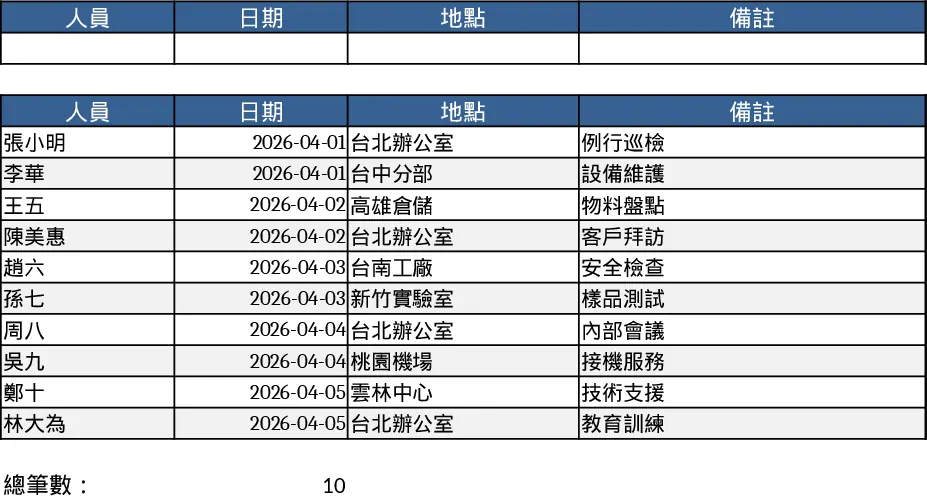
This template provides a clean, tab‑based workbook for logging every staff entry you need to track. The main sheet contains columns for Employee Name, Entry Date, Location, and a free‑form Remarks field. Drop‑down lists can be added for common locations or status codes, and a built‑in filter row lets you instantly narrow results by any column. A summary sheet automatically aggregates counts by date or location, giving you a quick snapshot of daily attendance or site usage.
Designed for HR administrators, office managers, and team leads who need a simple way to capture who was on site, when, and where. It solves the hassle of scattered notes or multiple spreadsheets by centralizing all entry data in one place, reducing manual cross‑checking and ensuring accurate records for payroll, compliance, or audit purposes.
The workbook helps you track each person’s check‑in details, monitor site occupancy, and keep a searchable history of remarks such as project assignments or special instructions. With built‑in filters and a search box, you can retrieve any record in seconds, making it easy to answer ad‑hoc queries or generate reports for management.
How to use
- Open the workbook and go to the "Entries" sheet. Fill in the employee name, select the date from the calendar picker, choose the location from the drop‑down, and add any notes in the Remarks column.
- After entering data, use the filter row at the top of each column to narrow the view by name, date range, or location.
- Switch to the "Summary" sheet to see automatically calculated totals, such as entries per day or per site.
- Export or print the filtered view whenever you need a hard copy or need to share with stakeholders.
Expected benefits: saves time on manual logging, reduces errors, and provides instant insight into personnel movement without complex setup.
Similar Templates Recommendation
Secondary School Results and Ranking Template
Track up to 200 secondary students' marks, auto‑calculate grades, averages, divisions and rankings in a clear, formatted sheet.

Couple Budget and Cash Flow Tracker Template
Track monthly income, expenses, and cash flow for a working couple, visualize budgets and savings goals in one spreadsheet.

Date Range and Internal Log Template
Create an Excel file with two columns for dates and internal notes, with colored rows for different date ranges.
