

Nail Salon Financial Control and Client Management Template
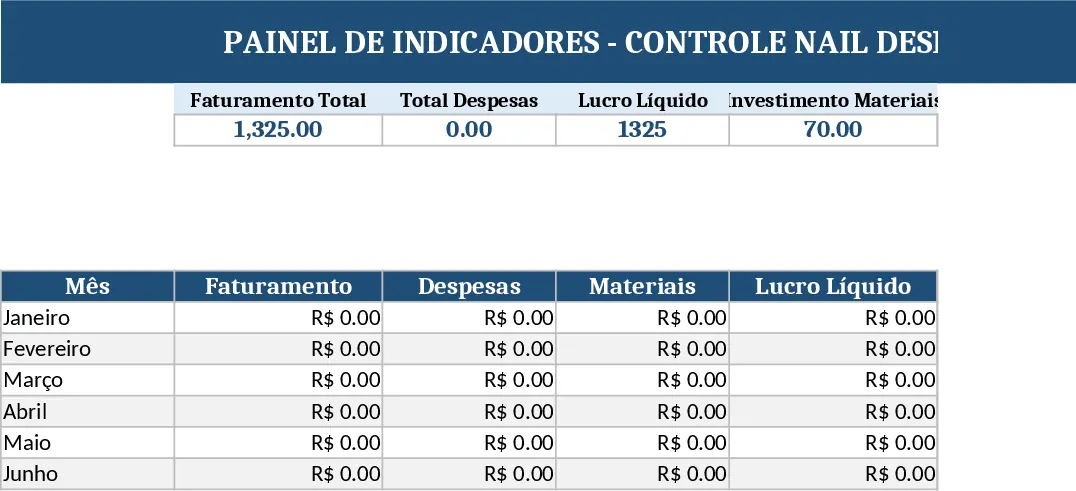
The spreadsheet is organized into five interconnected tabs that give you a complete picture of your nail salon’s finances without any manual juggling. Resumo Geral shows the total monthly turnover, total expenses, net profit, material investment, number of clients served, and average ticket value, plus dynamic charts that visualize revenue versus costs. Controle de Clientes logs each appointment with client name, service type, date, price, payment method and status, letting you see who paid, who is pending, and what services are most popular. Controle de Despesas captures every outflow—materials, rent, utilities, and other costs—so you can quickly sum up what you spend each month. Controle de Materiais tracks inventory purchases, quantities, unit prices, total spend, and suppliers, helping you avoid stockouts and over‑buying. Finally, Investimentos records any money put into training, equipment, or marketing, giving you a clear view of long‑term growth spending.
This template solves the common headache of scattered receipts and manual calculations for independent nail designers operating as MEI. By linking all tabs with built‑in formulas (SUM, AVERAGE, IF, etc.), the summary page refreshes instantly whenever you add a new client entry, expense, or material purchase. The automatic highlighting of pending payments ensures you never miss a collection, while month‑and‑client filters let you drill down to specific periods or customers. The clean layout makes data entry fast, and the visual dashboards turn raw numbers into actionable insights at a glance.
It’s ideal for solo nail artists, small salon owners, or anyone running a micro‑enterprise who needs to keep a tight grip on cash flow, profitability, and inventory without hiring an accountant. Whether you’re preparing monthly tax reports, planning inventory purchases, or evaluating the ROI of a new marketing campaign, this spreadsheet gives you the numbers you need to make informed decisions.
How to use:
- Open the file and select the month you want to work with using the drop‑down filter on each tab.
- Enter each client’s details in the Controle de Clientes sheet—service, price, payment method, and status.
- Record every expense and material purchase in their respective sheets, filling in dates, categories, and amounts.
- Watch the Resumo Geral tab update automatically; the charts will reflect your latest data, and any pending payments will be highlighted in red.
Expected benefits: you’ll spend far less time reconciling numbers, reduce errors from manual calculations, and gain quick visual insight into profitability and cash flow, letting you focus more on your craft and less on paperwork.
Similar Templates Recommendation
Secondary School Results and Ranking Template
Track up to 200 secondary students' marks, auto‑calculate grades, averages, divisions and rankings in a clear, formatted sheet.

Couple Budget and Cash Flow Tracker Template
Track monthly income, expenses, and cash flow for a working couple, visualize budgets and savings goals in one spreadsheet.

Date Range and Internal Log Template
Create an Excel file with two columns for dates and internal notes, with colored rows for different date ranges.
