Gantt Chart Project Plan Template
Managing a project requires a delicate balance of timing, resource allocation, and progress monitoring. This Excel Gantt Chart Project Plan Template is designed to streamline that process by providing a structured yet flexible environment for project coordination. Whether you are launching a new product, managing a marketing campaign, or overseeing a construction project, this tool helps you move from a simple list of to-dos to a professional, time-phased roadmap. It eliminates the need for complex software while providing the visual clarity necessary for successful delivery.
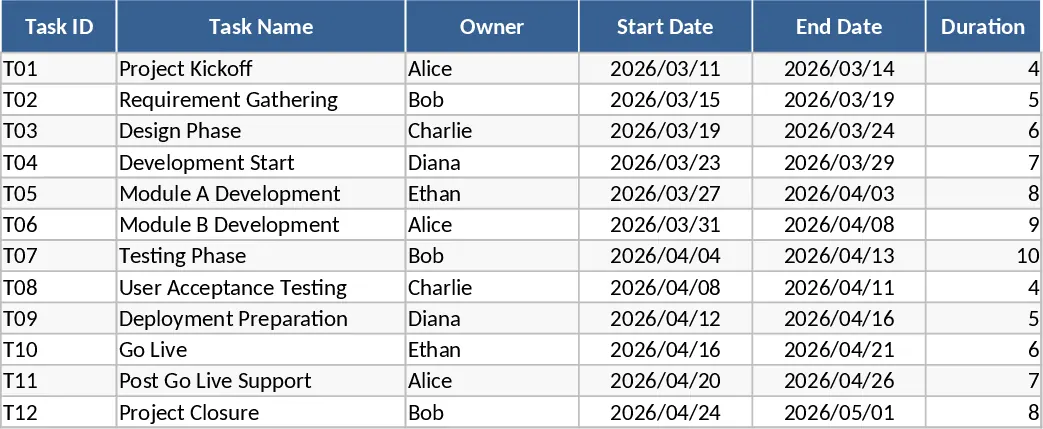
The core of the template is the Tasks sheet. Here, you can input your project activities across a multi-week schedule. Each entry includes essential fields such as Task ID, Owner, and Status. The template features automated logic where the duration is calculated instantly based on your start and end dates, with built-in validation to prevent scheduling errors. You can also define dependencies, which is crucial for understanding how a delay in one task might ripple through the rest of the project. Marking specific rows as milestones allows you to highlight key deliverables or phase transitions that require special attention from the team.
The Timeline sheet is where your data comes to life. It features a dynamic calendar that can be adjusted to show daily or weekly views. Using sophisticated conditional formatting, the template draws Gantt bars that reflect both the duration of the task and its current completion percentage. Milestones are clearly marked with distinct symbols, making it easy to see if you are on track to hit your major goals. This visual layout is perfect for team meetings or stakeholder presentations, as it provides an immediate sense of the project's scale and current status without needing to dig through rows of data.
To ensure you never lose sight of the big picture, the Summary sheet acts as your project dashboard. It automatically compiles statistics from your task list, providing a breakdown of tasks by status, such as Not Started, In Progress, or Completed. It also calculates a weighted completion percentage for the entire project, giving you a more accurate measure of progress than a simple average. Perhaps most importantly, it generates a watchlist that identifies late tasks or those nearing their deadlines, allowing you to intervene before minor issues become major roadblocks.
How to use:
- Start in the Tasks sheet by listing your project activities, assigning owners, and setting your planned start and end dates for the 8-week period.
- Use the dropdown menus to update the status and percentage of completion as your team makes progress on each individual task.
- Switch to the Timeline sheet to visualize your schedule; you can adjust the start date of the view to focus on the current phase or the entire project span.
- Check the Summary sheet regularly to monitor the overall health of the project and identify any critical tasks that are falling behind schedule.
Expected benefits: This template significantly reduces the effort required to create professional project visualizations and helps maintain a single source of truth for your team's progress.
Similar Templates Recommendation
Automated Gantt Chart Project Plan and Timeline Template
Plan and track project timelines with an automated Gantt chart, task dependencies, and a summary dashboard for real-time progress monitoring.
Gantt Chart Project Planning with Dashboard Template
Plan and track project timelines with an automated Gantt chart, task dependencies, and a summary dashboard for real-time progress monitoring.
Project and Team Management Dashboard with Gantt Chart Template
Manage projects and team tasks effectively with an automated Gantt chart and a visual dashboard for real-time progress tracking.