

New Jersey Small Business Pay Stub Template
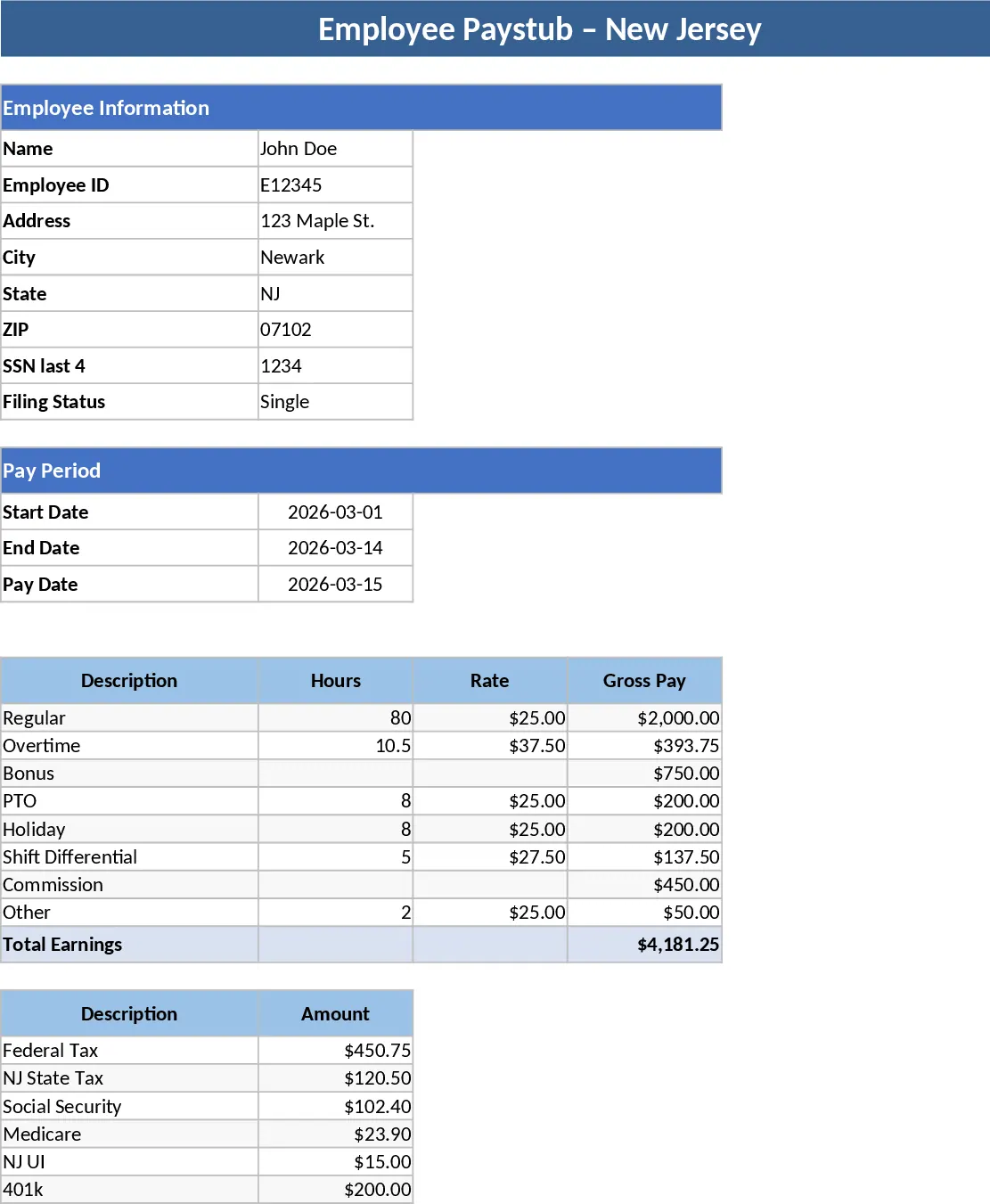
Managing payroll for a small business in New Jersey requires precision and attention to detail, especially when it comes to providing employees with clear, compliant paystubs. This template is designed specifically for NJ-based employers to streamline the documentation of earnings and deductions. The workbook features a centralized employee database, a dedicated input section for current pay period hours and rates, and a professional paystub generator that automatically pulls data into a print-ready format. It includes fields for essential information such as gross pay, federal and state tax withholdings, Social Security, Medicare, and specific New Jersey state taxes like UI/HC/WF and disability insurance. By using a structured format, you ensure that all legal requirements for wage statements are met while providing a clear record for both the employer and the staff.
For small business owners and HR administrators, this tool eliminates the need for expensive payroll software while ensuring that employees receive a transparent breakdown of their compensation. It solves the common headache of manual calculations by automating the math between gross and net pay, helping you maintain accurate financial records for tax season. Whether you are managing a handful of hourly workers or a small salaried team, this template provides a structured way to track year-to-date totals and ensure every team member understands their take-home pay. It is particularly useful for businesses that need to maintain physical or digital records of payment history without the complexity of enterprise-level systems. The template also helps in tracking voluntary deductions such as health insurance premiums, 401k contributions, and other specialized withholdings that are common in modern small business environments.
The template is organized into logical sections to ensure a smooth workflow. The setup phase involves entering company details and employee profiles, which serves as the foundation for all future stubs. The recurring task involves simply updating the hours worked or the specific pay period dates. The summary output is a clean, professional document that includes the company logo, employee information, a detailed list of earnings (regular, overtime, holiday), and a comprehensive list of deductions. This level of detail helps prevent disputes and provides employees with the documentation they need for personal financial tasks like loan applications or housing verifications. Having a consistent, professional paystub format builds trust with your team and demonstrates a high level of organizational competence.
How to use:
- Start by filling out the Company and Employee Setup sheets with permanent information such as business address, employee names, and tax filing statuses.
- For each pay cycle, enter the specific hours worked, hourly rates, or flat salary amounts into the Payroll Input sheet, ensuring all bonuses or reimbursements are included.
- Navigate to the Paystub Generator sheet and select the desired employee from the dropdown menu to automatically populate their specific data for the period.
- Review the generated stub for accuracy, then use the print function or save the sheet as a PDF to distribute to your staff.
Expected benefits: This template significantly reduces the time spent on manual payroll calculations and provides a standardized, professional format for employee communication, helping you stay organized with minimal administrative effort.
Similar Templates Recommendation
Secondary School Results and Ranking Template
Track up to 200 secondary students' marks, auto‑calculate grades, averages, divisions and rankings in a clear, formatted sheet.

Couple Budget and Cash Flow Tracker Template
Track monthly income, expenses, and cash flow for a working couple, visualize budgets and savings goals in one spreadsheet.

Date Range and Internal Log Template
Create an Excel file with two columns for dates and internal notes, with colored rows for different date ranges.
