

EPAVE GDPR Treatment Activity Report Template
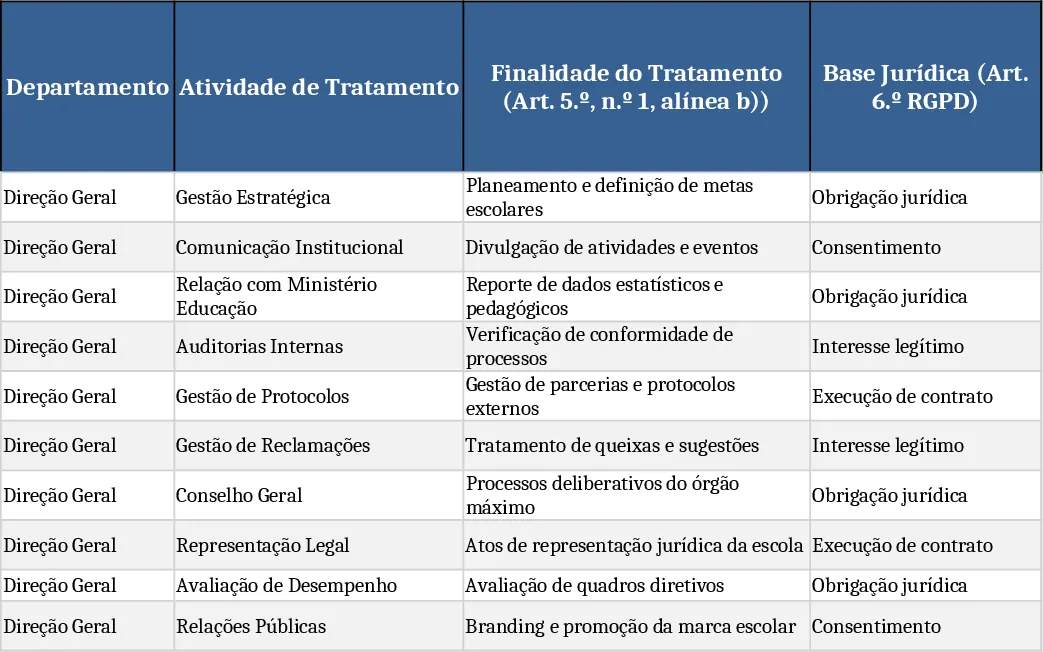
This Excel template delivers a complete Registo de Atividades de Tratamento (RAT) that meets every requirement of Article 30 of the EU GDPR for EPAVE – Escola Profissional do Alto Ave. The workbook is divided into seven pre‑named sheets – Direção Geral, Contabilidade_Financeiro, Direção Pedagógica, Serviços Administrativos, Aprovisionamento, Informática_TI – each representing a key department of the school. Within every sheet you will find a structured table with 17 mandatory columns such as Departamento, Atividade de Tratamento, Finalidade, Base Jurídica, Categoria de Titulares, Dados Sensíveis, Transferências Internacionais, Medidas Técnicas e Organizativas, and Risco Associado. All headers are bold, columns are auto‑sized, filters are enabled, and the first row is frozen for easy navigation.
The template comes pre‑populated with realistic examples tailored to a vocational school environment: student enrolment, attendance tracking, assessment records, teacher and staff management, payroll processing, internship coordination, communication with parents, LMS usage, recruitment, financial operations, and IT system logs. Each example includes the appropriate legal basis, data categories, retention periods, and risk assessments, ensuring that you can simply replace the placeholder text with your own specifics.
Designed for data‑protection officers, compliance managers, and school administrators, this workbook solves the time‑consuming task of drafting a GDPR‑compliant activity register from scratch. It guarantees that all mandatory fields are covered, that sensitive data handling is clearly documented, and that international transfers and DPIA requirements are flagged. By using the template, EPAVE can quickly demonstrate compliance to supervisory authorities, streamline internal audits, and integrate the RAT into its broader compliance and PPRCIC processes.
How to use
- Open the workbook and select the sheet that corresponds to the department you are documenting.
- Replace the sample rows with your actual processing activities, filling in each column – the dropdowns for "Sim/Não" and risk levels help maintain consistency.
- Add or delete rows as needed; the table will automatically keep filters and formatting intact.
- Review the summary view (if added) to see a consolidated list of all processing activities across departments.
Expected benefits include a noticeable reduction in manual drafting effort, consistent documentation across all school units, and a ready‑to‑submit record that aligns with GDPR articles 5, 6, 9, 30, 32 and 35.
Similar Templates Recommendation
Secondary School Results and Ranking Template
Track up to 200 secondary students' marks, auto‑calculate grades, averages, divisions and rankings in a clear, formatted sheet.

Couple Budget and Cash Flow Tracker Template
Track monthly income, expenses, and cash flow for a working couple, visualize budgets and savings goals in one spreadsheet.

Date Range and Internal Log Template
Create an Excel file with two columns for dates and internal notes, with colored rows for different date ranges.
