

Class Gradebook with Settings, Grades, and Summary Template
This Excel Gradebook template is organized into three clear tabs – Configuração, Notas, and Resumo – to let teachers manage every step of grading in one place. In the Configuração sheet you define the assessment categories (Task, Quiz, Exam, Project), assign each a weight that totals 100 %, and set the grading scale (e.g., 0‑100 or 0‑10). Dropdown lists keep category names consistent and prevent weight errors.
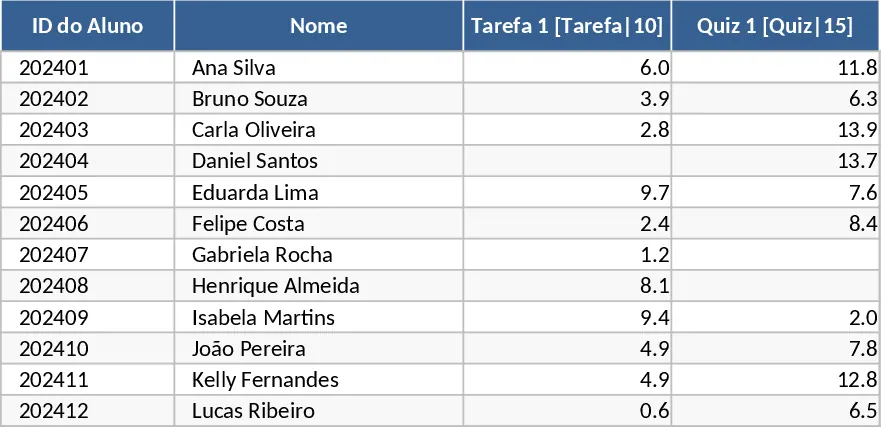
The Notas sheet is a matrix where each row represents a student and each column a specific assessment. Columns start with Student ID and Name, followed by the six assessments you created, each showing the maximum possible points. Cells accept only numbers between 0 and the defined maximum; leaving a cell blank automatically flags the item as missing. The sheet is pre‑filled with 12 sample students, so you can see the layout immediately.
The Resumo sheet pulls data from Notas and produces a complete performance snapshot for every pupil. It calculates the average score per category, applies the configured weights to produce a final numeric grade, converts that grade into a letter concept, and ranks the class from highest to lowest. It also lists how many assessments each student missed and shows which specific items are absent, giving you a quick audit of incomplete work.
This template is ideal for classroom teachers, tutoring coordinators, or school administrators who need a fast, error‑free way to record grades, apply complex weighting rules, and communicate results to students and parents. It eliminates manual calculations, reduces the risk of mis‑entered weights, and provides an at‑a‑glance view of both individual and class‑wide performance.
How to use:
- Open the Configuração tab and enter your assessment names, their weight percentages, and the grading scale; the dropdowns will lock in the categories.
- Switch to the Notas tab, fill in each student’s ID and name, then enter the scores for every assessment – leave a cell empty for a missed assignment.
- Go to the Resumo tab to see automatically generated averages, weighted final grades, letter concepts, class ranking, and a list of missing items for each student.
- Adjust weights or add new assessments in Configuração; the formulas update instantly across the other sheets.
By using this ready‑made workbook you’ll spend far less time on repetitive calculations and more time on teaching, while ensuring that every grade is calculated consistently and transparently.
Similar Templates Recommendation
Secondary School Results and Ranking Template
Track up to 200 secondary students' marks, auto‑calculate grades, averages, divisions and rankings in a clear, formatted sheet.

Couple Budget and Cash Flow Tracker Template
Track monthly income, expenses, and cash flow for a working couple, visualize budgets and savings goals in one spreadsheet.

Date Range and Internal Log Template
Create an Excel file with two columns for dates and internal notes, with colored rows for different date ranges.
