

Date Overdue Indicator Template
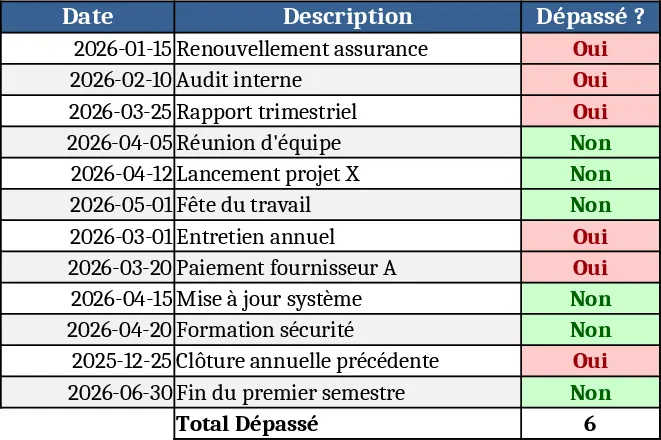
This template is a lightweight Excel workbook designed to help you monitor any list of dates and instantly see which ones are past due. The file contains a single sheet with three columns: Item/Task, Due Date, and Status. In the Due Date column you enter the target date for each item. The Status column is pre‑filled with a formula that compares the entered date to today’s date using the TODAY() function. The formula returns a clear label such as "Overdue" or "On Track", or a Boolean TRUE/FALSE, depending on how you prefer to view the result. You can also add conditional formatting to colour‑code overdue rows for quick visual scanning.
The workbook solves the common problem of manually checking deadlines across projects, invoices, maintenance schedules, or any time‑sensitive list. By automating the comparison, you eliminate human error, reduce the time spent scrolling through rows, and gain an at‑a‑glance view of what needs immediate attention. This is especially useful for project managers, accountants, HR coordinators handling contract renewals, or anyone who keeps track of time‑bound tasks.
Anyone who works with dates in Excel will find this template handy: from small business owners tracking payment due dates, to teachers monitoring assignment deadlines, to operations teams overseeing service contracts. The template helps you keep a tidy record, instantly highlights overdue items, and provides a simple way to prioritize follow‑up actions.
How to use
- Open the workbook and enter each item’s name in the Item/Task column.
- Fill the corresponding Due Date cell with the target date (use any Excel date format).
- The Status column updates automatically – you’ll see "Overdue" for dates earlier than today and "On Track" for future dates. Adjust the formula if you prefer TRUE/FALSE results.
- (Optional) Apply conditional formatting to the Status column to colour‑code overdue rows for faster visual identification.
Expected benefits: you’ll save minutes to hours each week by letting Excel do the date comparison, reducing the risk of missed deadlines and keeping your workflow organized.
Similar Templates Recommendation
Secondary School Results and Ranking Template
Track up to 200 secondary students' marks, auto‑calculate grades, averages, divisions and rankings in a clear, formatted sheet.

Couple Budget and Cash Flow Tracker Template
Track monthly income, expenses, and cash flow for a working couple, visualize budgets and savings goals in one spreadsheet.

Date Range and Internal Log Template
Create an Excel file with two columns for dates and internal notes, with colored rows for different date ranges.
