

Fiscal Year 2025‑2026 Task Hours Tracker Template
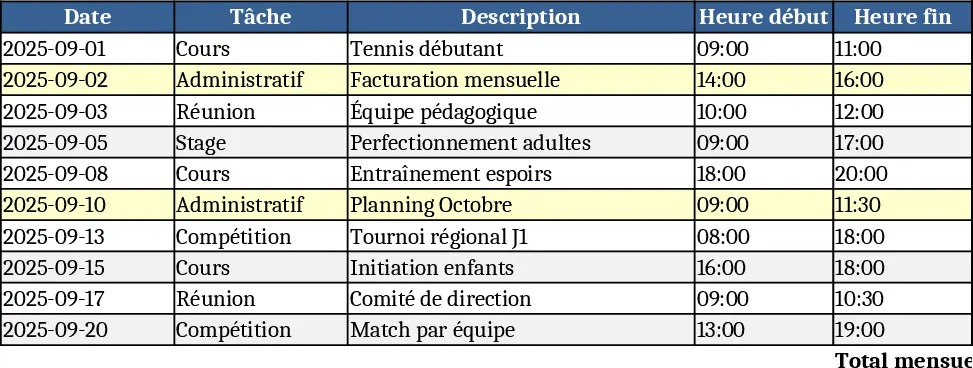
This Excel workbook is built around three simple sheets that let you capture every hour you work and instantly see how those hours add up by task, month and year. The Input sheet is a table where you record the date, pick a task from a dropdown (cous, compétition, administratif, stage, réunion) and enter the number of hours spent. Data validation ensures only the predefined task names are used, keeping the data clean. Below the table a small pivot‑style area automatically rolls up the data, showing a quick view of the current month’s total hours per task.
The Monthly Summary sheet pulls the raw entries and creates a matrix with months as columns and tasks as rows. Each cell shows the total hours for that task in that month, and a row at the bottom gives the grand total for the month. Conditional formatting highlights any month that exceeds a preset threshold, helping you spot overloads at a glance.
On the Yearly Summary sheet you get a single‑page dashboard that aggregates the twelve months into an annual view. It displays the total hours per task for the whole year, the overall yearly total, and a small chart that visualises the distribution of your time across the five categories. This high‑level picture is perfect for performance reviews, budgeting or simply understanding where your effort goes.
How to use
- Open the workbook and go to the Input sheet. Select the date, choose the appropriate task from the dropdown, and type the hours you worked.
- Continue adding rows for each work session; the sheet will automatically expand the table.
- Switch to the Monthly Summary sheet to see the updated totals for the current month and compare them with previous months.
- Open the Yearly Summary sheet to review the cumulative totals for the entire September 2025 – August 2026 period and export the chart if needed.
Expected benefits include a noticeable reduction in manual calculations, fewer errors in time reporting, and a clear visual summary that supports better planning and workload balancing. This template is ideal for employees, interns, project coordinators or anyone who needs to track how time is allocated across recurring activities throughout a fiscal year.
Similar Templates Recommendation
Secondary School Results and Ranking Template
Track up to 200 secondary students' marks, auto‑calculate grades, averages, divisions and rankings in a clear, formatted sheet.

Couple Budget and Cash Flow Tracker Template
Track monthly income, expenses, and cash flow for a working couple, visualize budgets and savings goals in one spreadsheet.

Date Range and Internal Log Template
Create an Excel file with two columns for dates and internal notes, with colored rows for different date ranges.
