

Vertical Weekly Schedule March‑November Activities Template
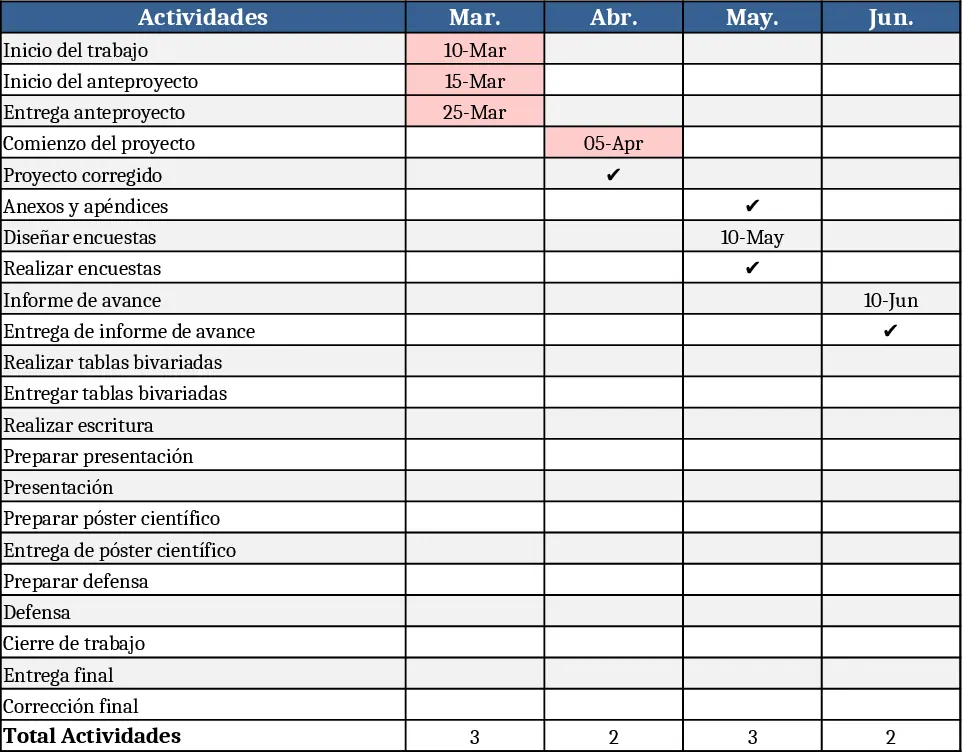
This template provides a clean, vertical Gantt‑style schedule that spans March to November. The first row lists the months (Mar – Nov) and the first column lists every key activity, from "Inicio del trabajo" to "Corrección final". Each cell is a simple placeholder where you can mark the month(s) when the task starts, ends, or is in progress. The layout is fully editable, so you can add colour‑coded symbols, conditional formatting, or notes to highlight critical dates. A summary sheet automatically counts completed tasks per month, giving you a quick health check of the overall timeline.
Use it to keep your research or development project on track without juggling multiple documents. By visualising every deliverable in one vertical view, you instantly see bottlenecks, overlapping phases, and upcoming deadlines. This reduces the back‑and‑forth of email updates and helps the whole team stay aligned on what needs to happen each month. It’s especially handy for academic teams, research groups, or small product teams that need a simple yet comprehensive schedule.
The template is ideal for project managers, research coordinators, and anyone responsible for delivering a multi‑month deliverable. Whether you’re planning a thesis, a scientific study, or a product rollout, the vertical layout makes it easy to communicate progress to supervisors, sponsors, or collaborators.
How to use
- Open the "Schedule" sheet and fill in the start month for each activity by entering a marker (e.g., an "X" or colour) in the corresponding month column.
- If a task spans several months, fill each relevant cell; the summary sheet will automatically tally the number of active tasks per month.
- Use the drop‑down lists (if enabled) to select status options such as "Planned", "In‑Progress", or "Completed" for each activity.
- Review the automatically generated monthly overview to spot overloads or gaps, then adjust task placements as needed.
Expected benefits: you’ll spend less time updating separate spreadsheets, gain a clear visual of project health, and reduce the risk of missed deadlines.
Similar Templates Recommendation
Secondary School Results and Ranking Template
Track up to 200 secondary students' marks, auto‑calculate grades, averages, divisions and rankings in a clear, formatted sheet.

Couple Budget and Cash Flow Tracker Template
Track monthly income, expenses, and cash flow for a working couple, visualize budgets and savings goals in one spreadsheet.

Date Range and Internal Log Template
Create an Excel file with two columns for dates and internal notes, with colored rows for different date ranges.
