

Member Subscription Tracker with Access Code Template
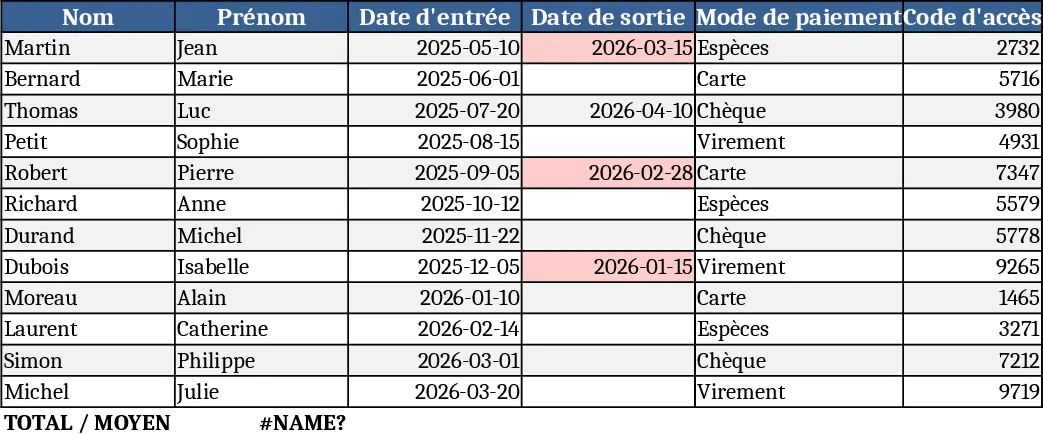
This Excel template is built for clubs, gyms, associations or any organization that manages members and their subscriptions. It contains a main "Members" sheet where you record each member’s first name, last name, date of entry, optional date of exit, chosen payment method and a generated 4‑digit access code. The sheet uses simple formulas to compute the subscription end date based on the entry date and the payment frequency you define. A summary dashboard pulls key metrics – total active members, upcoming expirations, and a quick list of codes that need renewal – so you can see the health of your membership base at a glance.
The template solves the common headache of manually calculating when each member’s subscription ends and having to create unique access codes for entry systems. By automating these calculations, you eliminate errors, reduce the time spent on spreadsheet gymnastics, and ensure that no member’s access lapses unnoticed. It’s especially useful for front‑desk staff, membership coordinators, or small‑business owners who need a reliable, low‑cost way to keep their member data organized and up‑to‑date.
Anyone who handles member enrolment – from fitness club managers to library administrators – will find this template handy. It works well when you need to track a growing list of members, monitor payment schedules, and generate simple numeric codes for door locks, online portals, or event passes. The template also helps you produce reports for board meetings or audit trails, showing who joined when, how they paid, and when their access will expire.
How to use
- Open the workbook and go to the "Members" sheet. Fill in each row with the member’s first name, last name, entry date, optional exit date, and select the payment mode from the drop‑down (monthly, quarterly, yearly, etc.).
- The "Access Code" column automatically creates a unique 4‑digit code using a random‑number formula; you can copy‑paste values if you need static codes.
- The "Expiry Date" column calculates the end of the subscription based on the entry date and the payment frequency you chose. Adjust the frequency table on the hidden "Settings" sheet if your billing cycles differ.
- Switch to the "Dashboard" sheet to see a snapshot of active members, upcoming expirations within the next 30 days, and a printable list of access codes ready for distribution.
Expected benefits include a noticeable reduction in manual data entry time, fewer calculation mistakes, and a clearer view of renewal windows, helping you keep members engaged and access systems running smoothly.
Similar Templates Recommendation
Secondary School Results and Ranking Template
Track up to 200 secondary students' marks, auto‑calculate grades, averages, divisions and rankings in a clear, formatted sheet.

Couple Budget and Cash Flow Tracker Template
Track monthly income, expenses, and cash flow for a working couple, visualize budgets and savings goals in one spreadsheet.

Date Range and Internal Log Template
Create an Excel file with two columns for dates and internal notes, with colored rows for different date ranges.
