Struggling with clashing courses and overloaded instructors? You’re not alone.
In the world of academic administration, planning course schedules can be an Excel nightmare. There are instructors to balance, room availability to check, time slots to avoid, and a hundred other small pieces that need to fit together. Traditionally, this process is clunky, manual, and—frankly—error-prone.
Let’s take a step into the pain first.
Traditional Course Scheduling: A Spreadsheet Puzzle You Didn’t Sign Up For
Let’s say you have a course list with 30 scheduled classes, each with its own instructor, day, time, and classroom. You’re tasked with answering questions like:
- Are any instructors double-booked?
- Which time slots are overutilized?
- Who’s getting the short end of the teaching load?
Here’s how you'd typically solve that:
Sort and filter manually. You might start by creating pivot tables or conditional formatting rules to flag instructor overlaps.
Use COUNTIFS or SUMIFS. These formulas help track how many times each instructor appears on which day.
Create charts manually. You’d try to visualize the load distribution using Bar Charts, but formatting is rarely smooth.
Cross-check for errors. This step takes up the bulk of your time—looking for duplicate use of a room, or a class with no instructor.
And heaven help you if someone edits the spreadsheet halfway through.
With RowSpeak, It’s One Simple Question Away
Enter RowSpeak. It’s not a plugin, not built into Excel, and doesn’t require coding. You just upload your scheduling spreadsheet, and type a question.
Try this:
Show a Bar Chart of how many classes are scheduled for each instructor.
The result? A clean, clear Bar Chart that shows how many courses each faculty member is responsible for—no formulas, no formatting, no extra tabs. You just get insight.
More Smart Questions You Can Ask RowSpeak
- List any scheduling conflicts for instructors.
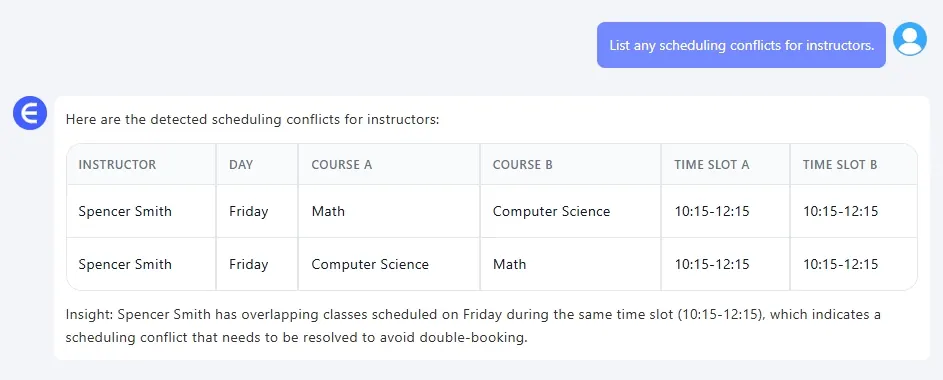
It checks if any instructors are double-booked by time slot.
- Which day of the week has the highest number of classes scheduled?
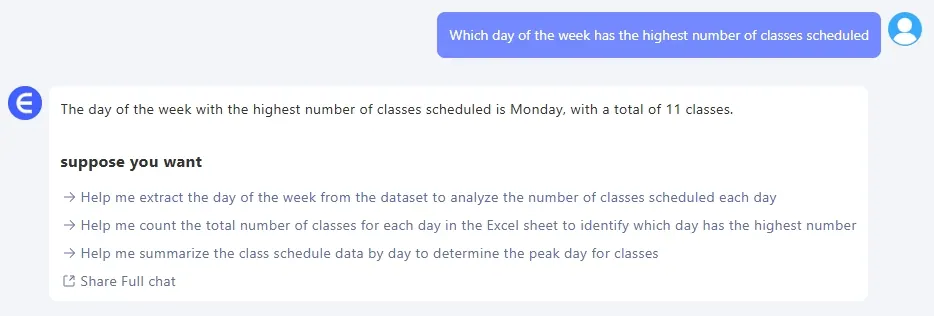
Get a quick breakdown across weekdays—perfect for spotting overload.
All that takes less than 10 seconds. No VBA. No pivot tables. No late-night panic.
Manual vs. RowSpeak: The Showdown
| Step | Traditional Excel | RowSpeak |
|---|---|---|
| Setup | Create formulas, conditional formatting, error checks | Upload and ask |
| Conflict Detection | Requires multiple filters and manual checking | Instant output |
| Visual Charts | Manual axis tweaking and label formatting | Auto-generated |
| Time Required | 30–45 minutes per pass | Less than 1 minute |
That’s the difference: insight at the speed of thought.
Final Thoughts: Make Scheduling Smarter, Not Harder
Course scheduling doesn’t have to be a brain drain. You already have the data—what you need is the clarity. With RowSpeak, the guesswork is gone. It’s like having a data analyst at your fingertips, but without the learning curve or the cost.
So next time you're buried in class rosters and time slots, don’t open a new sheet. Just open your mind—and RowSpeak.
Want to try this with your own performance sheet?Try RowSpeak now >>