How to Add a Second Y-Axis in Excel (The AI-Powered Way)

We’ve all been there – staring at an Excel chart where revenue numbers dwarf customer satisfaction scores, making both trends impossible to read. The fix? A second Y-axis. And here’s the game-changer: AI tools like RowSpeak now automate what used to be a manual headache.

Why Your Data Needs Dual Y-Axes

Single-axis charts work for simple data, but real-world metrics often clash:

  • Revenue ($10,000s) vs. satisfaction scores (1-10)
  • Temperature (°F) vs. ice cream sales (units)
  • Stock prices ($) vs. trading volume (millions)

RowSpeak’s AI instantly recognizes when your data needs separate scales, suggesting dual-axis setups that would take 10+ clicks to create manually.

The Traditional Way (Before AI)

  1. Prep Your Data

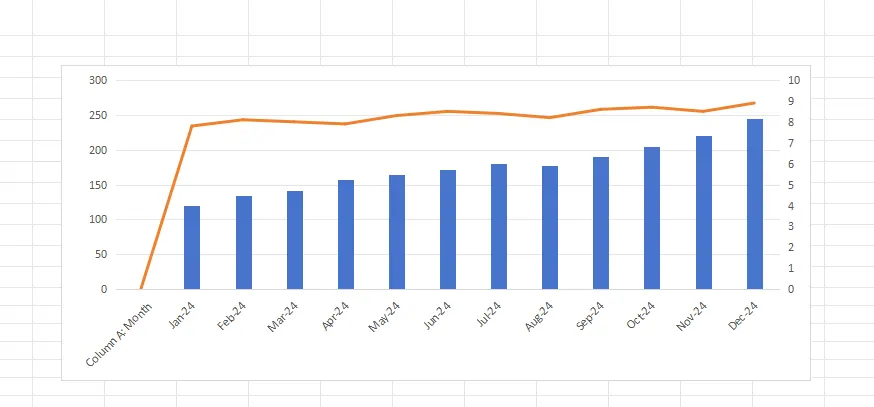
    • Column A: Months
    • Column B: Metric 1 (e.g., revenue)
    • Column C: Metric 2 (e.g., satisfaction)
  2. Create a Basic Chart

    • Highlight data → Insert → Combo Chart
  3. Manual Axis Setup

    • Right-click a data series → Format → Secondary Axis
    • Painstakingly adjust scales and labels
combo

This method works but eats time – especially when tweaking multiple charts.

How RowSpeak’s AI Changes the Game

  1. Upload Your Spreadsheet

    • RowSpeak scans your data structure automatically
  2. Ask in Plain English
    Type: "Show revenue and satisfaction on separate Y-axes"

  3. Get an Optimized Chart
    The AI:

    • Chooses ideal chart types
    • Balances axis scales
    • Adds clear labels
    • Even suggests insights

Pro Tips for Clarity

Even with AI help, avoid these pitfalls:

  • Overcrowding → Max 2-3 data series per chart
  • Misleading scales → Let RowSpeak auto-align ranges
  • Hidden trends → Use the AI’s "Spot Correlations" tool

Real-World Examples

Marketing Team

  • Primary Y-axis: Ad spend ($)
  • Secondary Y-axis: Click-through rate (%)
    AI Insight: "CTR peaks at $5k monthly spend"

E-commerce Manager

  • Primary Y-axis: Daily orders
  • Secondary Y-axis: Avg. delivery time (hours)
    AI Warning: "Delivery delays spike during 50+ order days"

Try It Yourself

RowSpeak’s free plan lets you:
✅ Generate 5 dual-axis charts monthly
✅ Get AI-powered optimization tips
✅ Export to PowerPoint with one click

Time Saver: What took 15 minutes manually now takes <60 seconds.


Why struggle with manual chart tweaks? Let RowSpeak’s AI build your dual-axis charts – your data (and your boss) will thank you.

About the Author
As a growth lead at RowSpeak, I help teams ditch spreadsheet frustration. Our AI handles the busywork so you can focus on insights, not formatting.
Ditch Complex Formulas – Get Insights Instantly

No VBA or function memorization needed. Tell RowSpeak what you need in plain English, and let AI handle data processing, analysis, and chart creation

Try RowSpeak Free Now

Recommended Posts

How to Add X-Axis Labels in Google Sheets (The Easy Way)
Excel Operation

How to Add X-Axis Labels in Google Sheets (The Easy Way)

Struggling to make sense of your Google Sheets charts? Adding proper X-axis labels transforms messy data into compelling stories. Here's exactly how to do it.

Gianna
How to Add 6 Months to a Date in Excel (The AI-Powered Way)
Excel Operation

How to Add 6 Months to a Date in Excel (The AI-Powered Way)

Discover the fastest, most accurate way to handle date calculations in Excel—no complex formulas required. Let AI do the heavy lifting with RowSpeak.

Gianna
How to Add a Secondary Axis in Google Sheets (The Easy Way)
Excel Operation

How to Add a Secondary Axis in Google Sheets (The Easy Way)

Struggling to compare different data scales in your charts? This step-by-step guide shows you how to add a secondary axis in Google Sheets - and how RowSpeak can do it automatically with AI.

Gianna
How to Add a Row in Excel Using AI (The Smart Way)
Excel Operation

How to Add a Row in Excel Using AI (The Smart Way)

Adding rows in Excel doesn't have to be a manual chore. Discover how AI transforms this basic task into an intelligent, automated process that adapts to your data patterns.

Gianna
How to Add Months to a Date in Excel (The Smart AI Way)
Excel Operation

How to Add Months to a Date in Excel (The Smart AI Way)

Tired of complex Excel formulas for date calculations? Discover how AI transforms this tedious task into a one-click solution - complete with step-by-step guidance.

Gianna
How to Add Months to a Date in Excel (The Smart Way)
Excel Operation

How to Add Months to a Date in Excel (The Smart Way)

Tired of manual date calculations? Discover how Excel's EDATE function can automate your date adjustments - and how RowSpeak takes it to the next level with AI-powered date handling.

Gianna
How to Add Numbers to the Horizontal Axis in Google Sheets (The Easy Way)
Excel Operation

How to Add Numbers to the Horizontal Axis in Google Sheets (The Easy Way)

Tired of confusing charts? This step-by-step guide shows you how to properly display numbers on your Google Sheets horizontal axis, with bonus tips for creating professional visuals instantly using AI-powered RowSpeak.

Gianna
How to Alphabetize in Excel by Last Name (The AI-Powered Way)
Excel Operation

How to Alphabetize in Excel by Last Name (The AI-Powered Way)

Tired of wrestling with Excel to sort names by last name? Discover how AI-powered solutions like RowSpeak can transform this tedious task into a one-click operation.

Gianna